9 Best Sewing Machines That Embroider Names (November 2026)
The best sewing machines that embroider names include the Brother Sewing Machine for basic sewing and name practice, the Brother SE700 Sewing and Embroidery Machine for built-in name fonts, and the SINGER® for heavy fabric sewing.
On this page (7 sections)
- Which sewing machines that embroider names fit different projects?
- What should you check before choosing a name machine?
- Are sewing machine letters the same as embroidery lettering?
- What size embroidery field do names need?
- Can you embroider names with any sewing machine?
- What kind of machine is best for your sewing and embroidery mix?
- Which sewing machine should you choose for names?
The best sewing machines that embroider names have built-in embroidery lettering and a stated embroidery field, such as the Brother SE700 or POOLIN EOC05. Some computerized sewing machines also include letter stitches or alphanumeric patterns, but those features may not work like a dedicated embroidery function.
If you want names stitched onto towels, clothes or gifts, begin by checking how the machine creates text and how large the embroidery area is. Our guide on how to choose a sewing machine covers the broader choice between stitch options, controls and project needs.
Our picks at a glance
-
1

-
2
 Best for built-in name fonts
Brother SE700 Sewing and Embroidery Machine
9.7/10 our score
See it on Amazon -
3

- 4
 Check it
Janome JW8100 Fully-Featured Computerized Sewing Machine
Best for computerized sewing projects - 5
 Check it
POOLIN EOC05 2-in-1 Embroidery Machine with Sewing
Best for longer names - 6
 Check it
Janome Cat Fancy Easy-to-Use Sewing Machine
Best for beginner sewing practice - 7
 Check it
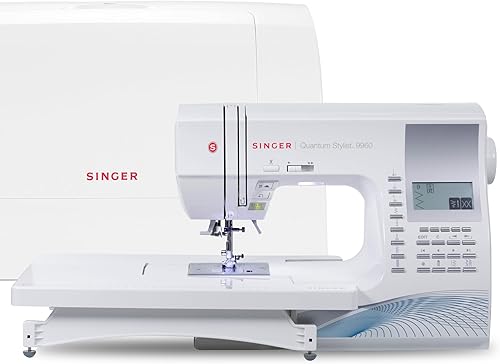
SINGER® Quantum Stylist 9960 Computerized Sewing
Best for sewing text and monograms - 8
 Check it
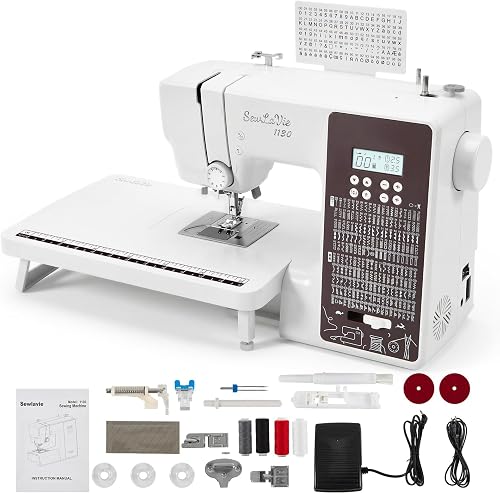
SewLaVie 1130 Computerized Sewing and Quilting Machine
Best for varied lettering stitches - 9
 Check it
Juki HZL-F600 Computerized Sewing and Quilting Machine
Best for decorative sewing options
Which sewing machines that embroider names fit different projects?
The Brother SE700 is the clearest fit for built-in embroidery lettering, while the POOLIN EOC05 offers a longer embroidery size. Other picks provide sewing letters or alphanumeric patterns, so check how each machine forms text before you buy.
The Brother Sewing Machine suits someone who needs an everyday sewing machine and wants to practice guided lettering techniques separately. Its 27 stitches include decorative, blind hem, zigzag and stretch options, but no built-in lettering or embroidery field is specified.
The automatic needle threader and drop-in bobbin simplify routine setup. A free arm also helps when sewing cuffs, sleeves and pant legs.
This is not the right pick if you expect to type a name into a screen and have an embroidery unit stitch it automatically. For a manual approach, read how to embroider names with a sewing machine.
Brother SE700 Sewing and Embroidery Machine: Best for built-in name fonts
- 10 embroidery lettering fonts
- 4 x 4 in embroidery field
- 135 built-in designs
- 103 sewing stitches
The SE700 combines sewing and embroidery and includes 10 lettering fonts for names. Its 4 x 4 in field suits smaller personalization, while wireless transfer and USB offer ways to send embroidery files.
Pros
- 10 built-in embroidery lettering fonts
- 4 x 4 in field with included hoop
- Wireless LAN and USB transfer
Cons
- Embroidery field is 4 x 4 in
- US 120 V use only
The Brother SE700 is the strongest match for machine embroidery names among these picks because it includes 10 embroidery lettering fonts and a 4 x 4 in field. Its 3.7 in touchscreen lets you edit and preview designs on-screen.
It also works as a sewing machine, with 103 built-in sewing stitches and 8 included sewing feet. You can transfer embroidery files through its built-in USB port or wireless LAN, and the Artspira app offers a way to draw or download patterns on a mobile device.
The 4 x 4 in field works best when the name and layout fit within that area. Measure the item and leave room around the lettering so the hoop and design placement make sense.
SINGER®: Best for heavy fabric sewing
- 97 stitch applications
- Automatic needle threader
- Adjustable presser foot pressure
- Free arm
This SINGER® heavy-duty sewing machine focuses on sewing, with stitch applications and fabric control for varied projects. Its features do not specify embroidery lettering, so it is not a direct choice for machine-stitched names.
Pros
- 97 stitch applications
- Adjustable presser foot pressure
- Free arm for hems and cuffs
Cons
- No built-in lettering specified
- No embroidery field specified
The SINGER® 4423 is designed for sewing projects that may involve heavy materials, with 97 stitch applications and adjustable presser foot pressure. It does not specify a lettering font or embroidery field, so it is not a direct choice for automatic name embroidery.
Its automatic needle threader, top drop-in bobbin and free arm support general sewing tasks. For setup instructions, see how to thread a Singer 4423.
Consider it if you need a machine for seams and garment work, then use another method to add names.
For ordinary sewing tasks, the Singer 4452 heavy duty sewing machine review offers another point of comparison. The 4423 and 4452 are different models, so compare their features against your actual projects.
Janome JW8100 Fully-Featured Computerized Sewing Machine: Best for computerized sewing projects
- 100 built-in stitches
- 7 one-step buttonholes
- LCD screen
- Extension table
The JW8100 offers computerized sewing controls and a broad stitch selection for garments, quilting details and decor. The listed features do not specify name lettering or machine embroidery.
Pros
- 100 built-in stitches
- LCD stitch selection
- Extension table and quilting feet included
Cons
- No built-in lettering specified
- No embroidery field specified
The Janome JW8100 is a computerized sewing machine with 100 stitches and 7 one-step buttonholes. Its LCD screen and buttons help select stitches and adjust settings, while the start/stop button and speed slider offer more control over sewing pace.
The machine includes an extension table, even feed foot and quarter-inch foot for larger sewing and quilting work. The stated features don't specify lettering fonts or an embroidery field, so treat it as a sewing option rather than a dedicated name embroidery machine.
If you are comparing computerized controls, our guide explains what a computerized sewing machine is. That can help you tell stitch selection and sewing automation apart from embroidery functions.
POOLIN EOC05 2-in-1 Embroidery Machine with Sewing: Best for longer names
- 8 lettering fonts
- 4 x 4 in and 4 x 9.25 in embroidery sizes
- 130 built-in designs
- 7 in touchscreen
The EOC05 combines embroidery and sewing, with 8 built-in lettering fonts and a longer embroidery size for names. It also offers Wi-Fi transfer and a 7 in touchscreen.
Pros
- Two embroidery sizes, including 4 x 9.25 in
- 8 built-in lettering fonts
- Sewing and embroidery functions
Cons
- 1-year warranty
- Larger embroidery size may need more project space
The POOLIN EOC05 is a useful choice when your name design may need more length than a small field allows. It offers 8 lettering fonts and two embroidery sizes: 4 x 4 in and 4 x 9.25 in.
The 7 in touchscreen displays designs and settings, and the machine includes 130 embroidery designs plus 207 sewing stitches. Wi-Fi transfer and Institch software provide a path for managing designs beyond the built-in options.
Switching between embroidery and sewing involves changing the working table. Choose it if you want both functions in one machine and value the longer embroidery area for names on items such as bags or towels.
Janome Cat Fancy Easy-to-Use Sewing Machine: Best for beginner sewing practice
- 15 built-in stitches
- 4-step buttonhole
- Free arm
- Darning plate
The Cat Fancy is a beginner-oriented sewing machine for garment repairs, patchwork and light quilting. Its features do not specify built-in lettering, so choose it for sewing practice rather than automatic name embroidery.
Pros
- Simple stitch selection
- Free arm design
- Darning plate included
Cons
- No built-in lettering specified
- No embroidery field specified
The Janome Cat Fancy is aimed at beginner sewing projects, with 15 built-in stitches, a 4-step buttonhole and a free arm. Its features don't specify name lettering or an embroidery field, so it is best viewed as a sewing practice machine.
The machine includes a darning plate for quilting and free-motion sewing. Free-motion work can allow you to guide fabric to form letters, but it takes manual control and practice rather than using built-in name fonts.
If you're new to sewing, compare it with our best sewing machines for beginners guide. Choose based on sewing needs first if lettering is not a frequent project.
SINGER® Quantum Stylist 9960 Computerized Sewing: Best for sewing text and monograms
- Built-in lettering font
- 600 built-in stitches
- 13 one-step buttonhole styles
- 13 presser feet
The Quantum Stylist 9960 has a built-in lettering font for monograms and custom text in sewing projects. It is a computerized sewing machine, so check whether its lettering approach fits your project before expecting embroidery-machine functions.
Pros
- Built-in lettering font
- Speed control and start/stop button
- 13 presser feet
Cons
- No embroidery field specified
- Lettering is not described as embroidery fonts
The SINGER® Quantum Stylist 9960 has a built-in lettering font for monograms and custom text, along with 600 built-in stitches. It is a computerized sewing and quilting machine, so its text feature should not be confused with a dedicated embroidery field.
Its 13 one-step buttonhole styles and 13 presser feet support a wide range of sewing tasks. The speed control and start/stop button can help when you want to sew slowly and steadily around a text design.
This may suit projects where sewn lettering is enough. If you need embroidery-style filled letters positioned in a hoop, choose a combo machine that specifies embroidery fonts and a field.
SewLaVie 1130 Computerized Sewing and Quilting Machine: Best for varied lettering stitches
- 100 alphanumeric fonts
- 300 built-in stitches
- LCD screen
- Start/stop button
The 1130 includes 100 alphanumeric fonts among its 300 stitch patterns, offering text options for sewing projects. Its features do not specify a dedicated embroidery field, so confirm that its lettering method suits your intended finish.
Pros
- 100 alphanumeric fonts
- LCD controls
- Speed control slider
Cons
- No embroidery field specified
- Lettering is described as stitch patterns
The SewLaVie 1130 offers 100 alphanumeric fonts among its 300 stitch patterns, along with an LCD screen and speed control. That makes it a candidate for sewing text, but no dedicated embroidery field is specified.
Its start/stop button allows sewing without a foot pedal, and the machine includes an extension table and free arm. Confirm how the lettering patterns are stitched and whether that finish matches your project before relying on it for name personalization.
Juki HZL-F600 Computerized Sewing and Quilting Machine: Best for decorative sewing options
- 255 built-in stitches
- Letter stitches
- LCD stitch selection
- Automatic needle threader
The Juki HZL-F600 includes letter stitches within its selection of 255 built-in stitches. It is described as a sewing and quilting machine, and no dedicated embroidery field is specified.
Pros
- Letter stitches included
- LCD stitch selection
- Automatic needle threader
Cons
- No embroidery field specified
- Letter stitches are not described as embroidery fonts
The Juki HZL-F600 includes letter stitches among 255 built-in stitches, along with LCD stitch selection and an automatic needle threader. Its features describe sewing and quilting, without a dedicated embroidery field.
That distinction matters if you want names in an embroidery hoop rather than letters sewn as a stitch pattern. For general quilting and sewing comparisons, see sewing machine vs quilting machine.
What should you check before choosing a name machine?
Check the lettering method, embroidery area and design workflow before choosing a machine. Those details determine whether it can make the type and size of name you want.
A machine with built-in embroidery fonts can stitch selected text within its hoop area. A sewing machine with letter stitches or alphanumeric patterns may sew characters as regular stitches, which can look different from embroidery lettering.
Also check how you position and edit the name. A touchscreen preview, built-in fonts, USB or wireless transfer can each affect how much setup you need.
Are sewing machine letters the same as embroidery lettering?
No, sewing machine letters and embroidery lettering can be different functions. Sewing machines may form letters as stitches along a path, while an embroidery machine uses a hoop and an embroidery field to stitch a design.
The SE700 and EOC05 specify embroidery lettering fonts and embroidery sizes. The 9960 and SewLaVie 1130 specify lettering or alphanumeric options, but no embroidery field is given.
What size embroidery field do names need?
The right field depends on the name length, letter size and item. A 4 x 4 in area can work for smaller personalization, while a longer name may need a longer field or reduced text size.
The POOLIN EOC05 offers a 4 x 9.25 in option, while the Brother SE700 has a 4 x 4 in field. Compare the full design dimensions with the flat area available on your fabric.
Can you embroider names with any sewing machine?
No, not every sewing machine has an embroidery function. Some machines include letter stitches, and free-motion embroidery is another manual method, but neither necessarily provides built-in embroidery fonts and a hoop field.
Our guide answers can you embroider with a sewing machine and explains the difference between manual techniques and embroidery features. For a machine-built name, look for stated fonts and an embroidery area.
What kind of machine is best for your sewing and embroidery mix?
Choose a combo machine if you want a machine to sew names with built-in embroidery fonts. The Brother SE700 fits small personalization, while the POOLIN EOC05 adds a longer 4 x 9.25 in embroidery option.
Choose a sewing machine with letter stitches if sewn text is enough, and a standard machine if names are occasional and you'll use a manual method. A longarm quilting machine is made for managing large quilting projects, so it is not the practical choice for routine name personalization.
For garment finishing after embroidery, a zipper foot can help with closures. Our invisible zipper foot guide covers that separate sewing task.
Which sewing machine should you choose for names?
Choose the Brother SE700 if you want built-in embroidery fonts for small names, or the POOLIN EOC05 if you need a longer embroidery area. Pick the SINGER® Quantum Stylist 9960 or SewLaVie 1130 when sewing text features meet your needs, and choose a standard sewing machine when embroidery is not part of the job.
A dedicated combo machine is the clearest path to repeatable machine embroidery names. Check the font choices, field size and file workflow against the items you plan to personalize.
Our top 3 picks at a glance
-
1
-
2
Best for built-in name fonts
Brother SE700 Sewing and Embroidery Machine
9.7/10 our score
See it on Amazon -
3
Frequently asked questions
Can a regular sewing machine embroider names?
Some regular sewing machines have lettering or letter stitches, but that does not always mean they offer machine embroidery. Check whether the machine has built-in fonts, how it forms letters, and whether it uses an embroidery hoop or field.
For free-motion name work, you'll guide the fabric yourself.
What should I look for in a sewing machine that embroiders names?
Look for built-in lettering fonts, a stated embroidery field and a clear way to position and preview text. A combo machine can sew and embroider, while a sewing machine with letter stitches may only sew letters as part of a regular stitch sequence.
Match the machine's functions to your project before choosing.
Is a 4 x 4 in embroidery field large enough for names?
A 4 x 4 in embroidery field can suit small names on items such as pockets, cuffs or towels, depending on the text length and layout. Longer names may need smaller lettering or a larger field.
Measure the usable area on the item and compare it with the design dimensions.
Do sewing machines with fonts need a computer?
Not always. The Brother SE700 has built-in lettering fonts and can also receive files through wireless LAN or USB, while the POOLIN EOC05 includes lettering fonts directly on the machine.
Check the specific workflow you want, especially if you plan to create or edit text beyond the built-in options.


