7 Best Embroidery Machines for Beginners (November 2026)
The best beginner embroidery machines for home use include the Brother SE700 Sewing and Embroidery Machine for sewing and embroidery in one, the Smartstitch S-1001 Upgraded Embroidery Machine for a growing embroidery business, and the Brother SE600 Sewing and Embroidery Machine for a straightforward combo machine.
On this page (4 sections)
The best embroidery machine for beginners depends on whether you also want to sew. The Brother SE700 combines sewing and embroidery with built-in designs and lettering, while the Poolin EOC05 focuses on home embroidery and the EOC06 offers a larger work area.
A first machine should fit the projects you expect to make, the space you have and the time you want to spend learning. A small monogramming project has different needs from large garment designs or repeated production work.
If you’re choosing a decoration method, compare embroidery and sublimation.
For more options sized around a home workspace, compare our guide to the best home embroidery machine. If your table or storage space is limited, see the best small embroidery machines for beginners.
Our picks at a glance
-
1
 Best for sewing and embroidery in one
Brother SE700 Sewing and Embroidery Machine
9.7/10 our score
See it on Amazon -
2
 Best for a growing embroidery business
Smartstitch S-1001 Upgraded Embroidery Machine
9.6/10 our score
See it on Amazon -
3
 Best for a straightforward combo machine
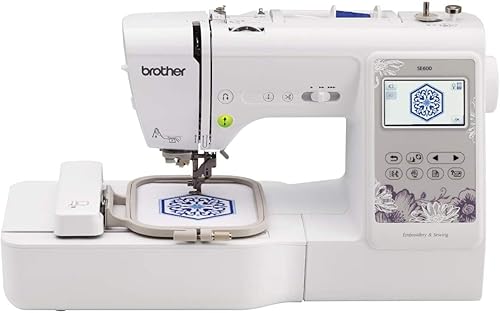
Brother SE600 Sewing and Embroidery Machine
9.4/10 our score
See it on Amazon
- 4
 Check it
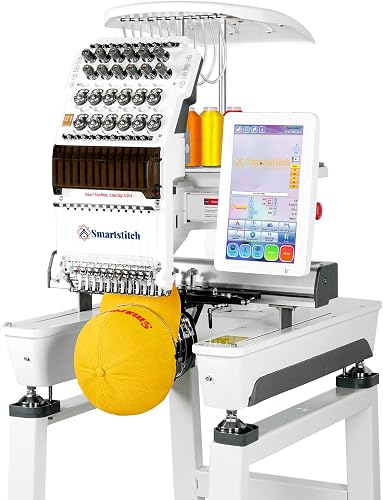
Smartstitch S-1201 Plus Embroidery Machine
Best for larger commercial embroidery - 5
 Check it
SINGER® Smart HD 9120™ Sewing Machine
Best for sewing first, embroidery later - 6
 Check it
Poolin EOC06 Large Hoop Embroidery Machine
Best for larger home projects - 7
 Check it
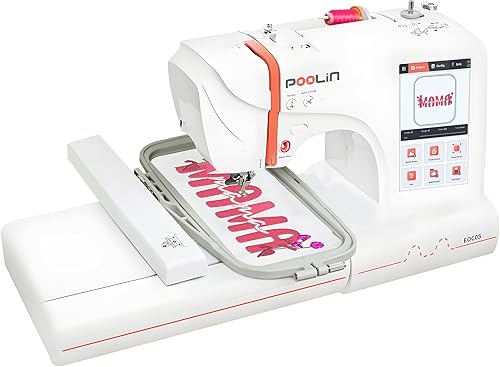
Poolin EOC05 Embroidery Machine for Beginners
Best for home monograms and gifts
How we chose beginner embroidery machines
The strongest beginner options offer a clear path into embroidery, with features that match the buyer’s likely projects. We compared the machines by embroidery area, built-in design tools, sewing functions, file transfer and setup support.
A large field can make bigger designs possible, but it also comes with a larger machine and a steeper learning curve. Compare embroidery machines on sale against the projects and workspace you have in mind.
For simple names and gifts, an embroidery-only home model or a sewing-and-embroidery combo may be a better fit.
Compare Brother single-needle embroidery machines for more options.
Scores weigh the listed features against what a beginner is likely to need. We also considered whether a machine is aimed at home projects or commercial work.
| Product | Best for | Embroidery field | Built-in designs | Sewing and embroidery | Our score |
|---|---|---|---|---|---|
| Brother SE700 Sewing and Embroidery Machine | sewing and embroidery in one | 4 x 4 in | 135 | Both | 9.7 |
| Smartstitch S-1001 Upgraded Embroidery Machine | a growing embroidery business | 9.6 | |||
| Brother SE600 Sewing and Embroidery Machine | a straightforward combo machine | 4 x 4 in | 80 | Both | 9.4 |
| Smartstitch S-1201 Plus Embroidery Machine | larger commercial embroidery | 9.3 | |||
| SINGER® Smart HD 9120™ Sewing Machine | sewing first, embroidery later | 9.1 | |||
| Poolin EOC06 Large Hoop Embroidery Machine | larger home projects | 8.9 | |||
| Poolin EOC05 Embroidery Machine for Beginners | home monograms and gifts | 8.4 |
Which beginner embroidery machine fits your project?
The Brother SE700 is the most flexible starting point for someone who wants to sew and embroider, while the Poolin EOC05 is aimed at personal embroidery at home. For a different production setup, compare single-needle embroidery machines.
The Smartstitch machines suit buyers who have a concrete need for a larger work area or multiple needles.
Brother SE700: best embroidery machine for beginners who sew
Brother SE700 Sewing and Embroidery Machine: Best for sewing and embroidery in one
- 4 x 4 in embroidery field
- 135 built-in designs
- 10 embroidery lettering fonts
- 3.7 in color touchscreen
A combo machine for beginners who want to sew as well as embroider. Its built-in designs, lettering fonts and touchscreen provide ways to start without first creating custom files.
Pros
- Sews and embroiders
- Built-in designs and lettering fonts
- Wireless design transfer and USB
Cons
- 4 x 4 in embroidery field limits design size
- US 120 V use
The SE700 is a sewing-and-embroidery combo with a 4 x 4 in embroidery field. Read our Brother SE700 machine review for a closer look.
It includes 135 built-in designs and 10 embroidery lettering fonts, so you can start with its onboard options for small personal projects and monograms.
Its 3.7 in color touchscreen lets you preview and edit designs on screen. You can transfer embroidery files over wireless LAN with Brother’s Design Database Transfer software or use the built-in USB port.
Brother’s Artspira app also supports drawing patterns on a mobile device and sending them wirelessly.
This model suits beginners who want one machine for garment sewing and embroidery. The field size is the main constraint: check your usual design dimensions before choosing it for larger jacket backs or broad sweatshirt graphics.
For shirt-focused options, compare embroidery machines for shirts.
The SE700 is intended for sale and use in the US at 120 volts. For a closer look at the brand’s range, see our guide to the best Brother embroidery machine.
Smartstitch S-1001: best for a beginner planning commercial work
Smartstitch S-1001 Upgraded Embroidery Machine: Best for a growing embroidery business
- 10 needles
- 9.5 x 14.2 in embroidery area
- 7 in touchscreen
- USB and Wi-Fi pattern transfer
A commercial-style machine with a larger work area and 10 needles. It suits a beginner who already plans varied, higher-volume projects and has room for a larger machine.
Pros
- Large embroidery area
- 10 needles
- Manuals and training videos
Cons
- 93 lb machine needs space and setup planning
- More machine than many home learners need
The S-1001 has 10 needles and a maximum embroidery area of 9.5 x 14.2 in. For repeated orders, compare embroidery machines for a small business.
It is a commercial embroidery machine, so it makes more sense for a beginner who already expects to work on larger or varied projects than for someone who only wants occasional monograms.
The machine supports DST and DSB files transferred by USB or Wi-Fi. Smartstitch lists features such as automatic thread trimming, color changing, thread break detection and a 7 in touchscreen.
Manuals and video training are available, and the machine comes with a starter pack.
At 93 lb, it needs a planned workspace and careful setup. Consider whether the larger area and multi-needle workflow solve a real need before choosing it as a first home machine.
Brother SE600: best for a basic sewing and embroidery combo
Brother SE600 Sewing and Embroidery Machine: Best for a straightforward combo machine
- 4 x 4 in embroidery field
- 80 built-in designs
- 6 embroidery lettering fonts
- 3.2 in color touchscreen
This combo machine handles everyday sewing and small embroidery designs. Its touchscreen lets you preview designs, and the built-in fonts support basic personalization.
Pros
- Sews and embroiders
- Built-in designs and lettering fonts
- Automatic needle threader
Cons
- 4 x 4 in embroidery field
- Fewer built-in designs than the SE700
The SE600 combines sewing and embroidery, with a 4 x 4 in embroidery field and 80 built-in designs. It also has six embroidery lettering fonts, 103 built-in sewing stitches and a 3.2 in color touchscreen for previewing designs.
This model fits beginners who want to learn embroidery while keeping a sewing machine available for garment repairs and simple projects. Its included hoop limits the design area, so plan around smaller motifs and names.
An automatic needle threader and drop-in top bobbin are among its convenience features. Compare the SE600 with the newer SE700 based on the built-in embroidery designs, touchscreen and design-transfer options you expect to use.
For another Brother combo, see the Brother SE2000 machine review.
Smartstitch S-1201 Plus: best for larger production plans
Smartstitch S-1201 Plus Embroidery Machine: Best for larger commercial embroidery
- 12 needles
- 12 x 16 in embroidery area
- 10 in touchscreen
- USB and Wi-Fi pattern transfer
Its large embroidery area and 12 needles make it a fit for buyers planning larger, varied production work. New users should weigh the learning and setup needs of a commercial machine.
Pros
- Large embroidery area
- 12 needles
- Manuals and training videos
Cons
- Large work area may be unnecessary for home monograms
- Requires more planning than a basic combo machine
The S-1201 Plus has 12 needles and a 12 x 16 in embroidery area. That capacity suits a beginner with a plan for large designs or repeated work, but it is more machine than most people need for learning small names and gifts.
Smartstitch lists automatic thread trimming and color changing, thread break detection, laser positioning and a 10 in touchscreen among its features. The machine supports USB and Wi-Fi pattern transfer, and manuals and training videos are available.
Before choosing it, think through workspace, setup and the kinds of designs you’ll make most often. If those larger projects are only occasional, a home machine with a smaller field may be a simpler first step.
SINGER Smart HD 9120: best for sewing first
SINGER® Smart HD 9120™ Sewing Machine: Best for sewing first, embroidery later
- 200+ stitches
- App-based setup and controls
- Optional 900E embroidery attachment
- 170 x 100 mm hoop with attachment
This is a sewing machine that can add embroidery with the optional 900E attachment. It makes sense if sewing is the main goal and embroidery can wait.
Pros
- App-based guidance and controls
- Speed control and start/stop button
- Embroidery attachment option
Cons
- Embroidery attachment is sold separately
- Not ready for embroidery without the add-on
The SINGER Smart HD 9120 is a sewing machine with optional embroidery, not a ready-to-use embroidery machine. Embroidery requires the 900E attachment, sold separately, which uses a 170 x 100 mm hoop.
Its CREATIVATE app supports guided setup, stitch controls, tutorials and project inspiration. The machine offers more than 200 stitches, along with a built-in needle threader, speed control and start/stop button.
Choose it if sewing is your main activity and you may add embroidery later. If you want to begin embroidering right away, compare it with a model that includes embroidery capability in the machine setup.
Poolin EOC06: best for larger home designs
Poolin EOC06 Large Hoop Embroidery Machine: Best for larger home projects
- 11 x 7.9 in maximum embroidery area
- 7 in color touchscreen
- 200 built-in patterns
- USB and wireless design transfer
The EOC06 offers more room than a 4 x 4 in combo machine for garments, bags and home projects. It includes thread, bobbins and stabilizers to help a beginner get started.
Pros
- Large hoop options
- Built-in patterns and fonts
- Starter supplies included
Cons
- Embroidery only
- 35 lb machine needs a dedicated workspace
The EOC06 gives home users a maximum embroidery area of 7.9 x 11 in, with several hoop options. It has a 7 in touchscreen, 200 built-in patterns and eight fonts, offering more room and onboard choices than a 4 x 4 in machine.
Poolin includes thread, bobbins and stabilizers, and the machine supports design transfer by USB or wireless LAN. It also comes with InStitch digitizing software for opening, viewing and editing embroidery files.
This embroidery-only machine suits a beginner who expects to work on larger garments, bags or home projects and can give it a dedicated spot. If hats are on your project list, compare embroidery machines with hat attachments.
Its 35 lb weight and broader footprint make it less convenient to move than a small combo machine.
Poolin EOC05: best for beginner home monograms
Poolin EOC05 Embroidery Machine for Beginners: Best for home monograms and gifts
- 4 x 9.25 in embroidery area
- 7 in color touchscreen
- Free design software
- Wi-Fi and USB design transfer
An embroidery-only option aimed at home beginners, with a long, narrow work area for names and other designs. It includes hoops and starter supplies for personal projects.
Pros
- Beginner-focused controls
- Long 4 x 9.25 in embroidery area
- Free design software
Cons
- Does not sew
- Not intended for commercial mass production
The EOC05 is an embroidery-only machine with a 4 x 9.25 in embroidery area. Its longer field can suit names, gifts and personal designs, while its 7 in color touchscreen and InStitch OS2 are designed for a simple home learning path.
Poolin includes access to free design software and Wi-Fi or USB design transfer. The package includes two hoops, thread, stabilizer, bobbins and an instruction manual, giving a beginner materials to start personal projects.
For more frame options, see embroidery hoop sets and kits.
This model does not sew and is not intended for commercial mass production. Pick it when home embroidery is the goal and you don’t need a second machine function.
What should beginners look for in an embroidery machine?
Beginners should match the machine’s embroidery field to their planned designs, then decide whether sewing functions matter. For project ideas, explore in the hoop embroidery designs.
A small field is enough for many names and compact motifs, while larger designs need more space or multiple placements.
Is a computerized embroidery machine easier for beginners?
A computerized embroidery machine can make design selection and editing easier through built-in patterns, a touchscreen or digital file transfer. The Brother SE700 has onboard designs and screen editing, while the Poolin EOC05 adds free design software and wireless transfer.
Computerized features don’t remove the need to learn hooping, stabilizer choice and thread setup. Look for clear controls and a setup path that fits how much help you want while learning.
Do you need a sewing and embroidery machine?
You need a combo machine if you want to sew and embroider with one machine. If you only plan to stitch designs onto garments, bags or gifts, an embroidery-only model can keep the focus on that task.
The SE700 and SE600 include sewing and embroidery functions. For a closer comparison of the two machine types, read embroidery vs sewing machine.
Our guide to types of embroidery machines explains common machine categories and how their workflows differ.
How large should the embroidery area be?
Choose an embroidery area that fits the largest design you expect to make in one hooping. The Brother combo machines here use a 4 x 4 in field, while the Poolin EOC05 has a 4 x 9.25 in area and the EOC06 reaches 7.9 x 11 in.
A larger field gives room for broader designs, but it can mean a larger machine. For small workspaces, compare the size and placement needs in our small embroidery machine guide.
Which needle and thread should you use?
Use an embroidery needle suited to the fabric and thread you plan to stitch with. For heavier fabrics, compare 90/14 machine embroidery needles with your manual’s guidance.
Needle choice and thread weight affect how the machine forms stitches, so check the machine instructions and the material guidance for your project.
Our guide to Needles for Machine Embroidery: A Complete Guide covers needle selection, and What Weight Thread for Machine Embroidery? explains common thread weights. Test settings on a fabric and stabilizer scrap before stitching a finished item.
Which stabilizer works for beginner projects?
The right stabilizer depends on the fabric, design density and whether you want the backing to remain in the finished piece. Tear-away is removed after stitching, while cut-away stays in place and supports the design over time.
Read our guide to tear away vs cut away stabilizer before choosing supplies. Starting with a fabric scrap can help you see how the material behaves with your chosen stabilizer and design.
Which beginner embroidery machine should you choose?
Choose the Brother SE700 if you want one machine for sewing and embroidery, or the Poolin EOC05 if your goal is home monograms and gifts. Pick the EOC06 for a larger home embroidery area, and consider a Smartstitch model only when its commercial-style capacity fits your project plan.
If you’re still deciding between a compact design area and more room to grow, compare the best home embroidery machine guide. Start with the projects you want to make, then match the machine type, field size and workspace to that plan.
Our top 3 picks at a glance
-
1
Best for sewing and embroidery in one
Brother SE700 Sewing and Embroidery Machine
9.7/10 our score
See it on Amazon -
2
Best for a growing embroidery business
Smartstitch S-1001 Upgraded Embroidery Machine
9.6/10 our score
See it on Amazon -
3
Best for a straightforward combo machine
Brother SE600 Sewing and Embroidery Machine
9.4/10 our score
See it on Amazon
Frequently asked questions
What is the best embroidery machine for a beginner?
The Brother SE700 is a practical starting point if you want sewing and embroidery in one machine. It has built-in designs and lettering fonts, plus a 4 x 4 in embroidery field.
If you only want to embroider, compare dedicated machines such as the Poolin EOC05 and EOC06.
Should a beginner choose an embroidery-only or combo machine?
Choose a combo machine if you also need to sew, and an embroidery-only model if you want a machine focused on embroidery. The Brother SE700 and SE600 do both, while the Poolin EOC05 and EOC06 are embroidery-only.
Consider what you plan to make before paying for a function you may not use.
Is a commercial embroidery machine suitable for a beginner?
It can suit a beginner with a clear plan for larger or repeated projects, enough workspace and time to learn its controls. The Smartstitch S-1001 and S-1201 Plus have multiple needles and larger embroidery areas than home combo machines.
For occasional names and small gifts, a simpler home model may be easier to fit into your routine.
What should I check before buying an embroidery machine?
Check the embroidery area, whether the machine also sews, how designs transfer, and what supplies are included. Match the field size to your usual projects, such as small monograms or larger sweatshirt designs.
Also check the machine’s dimensions, weight, power requirements and setup instructions.
What stabilizer and needle should I use for machine embroidery?
Choose a stabilizer based on the fabric and whether you want backing to remain after stitching. A suitable machine embroidery needle and thread also help you prepare a project for clean stitching.
Read our guides to machine embroidery needles and tear-away vs cut-away stabilizer before starting.


