8 Best Home Embroidery Machines (November 2026)
The best home embroidery machines include the Brother SE700 Sewing and Embroidery Machine for sewing and embroidery at home, the Smartstitch S-1001 Upgraded Embroidery Machine for a growing home studio, and the Brother SE700 Combo Embroidery & Sewing Machine for a bundled home setup.
On this page (8 sections)
- How we chose home embroidery machines
- The best home embroidery machines for different projects
- What should you consider before choosing an embroidery machine at home?
- Are multi-needle home embroidery machines worth the space?
- How much workspace does an at-home embroidery machine need?
- Do you need Wi-Fi or built-in designs?
- More guides on this topic
- Verdict: Which home embroidery machine should you choose?
The Brother SE700 is the best home embroidery machine for most people who want sewing and embroidery in one unit. It has a 4 x 4 in field, wireless design transfer and a touchscreen for editing and previewing designs.
For a dedicated embroidery setup, the Janome Memory Craft C400E gives you a larger 7.9 x 7.9 in field. Home studios that handle repeat work may prefer a multi-needle model, but those machines need much more space.
If you’re new to machine embroidery, compare our best embroidery machine for beginners guide before choosing. The right fit depends on your workspace, project size and whether you need sewing functions too.
Our picks at a glance
-
1
 Best for sewing and embroidery at home
Brother SE700 Sewing and Embroidery Machine
9.7/10 our score
See it on Amazon -
2
 Best for a growing home studio
Smartstitch S-1001 Upgraded Embroidery Machine
9.6/10 our score
See it on Amazon -
3
 Best for a bundled home setup
Brother SE700 Combo Embroidery & Sewing Machine
9.5/10 our score
See it on Amazon
- 4
 Check it
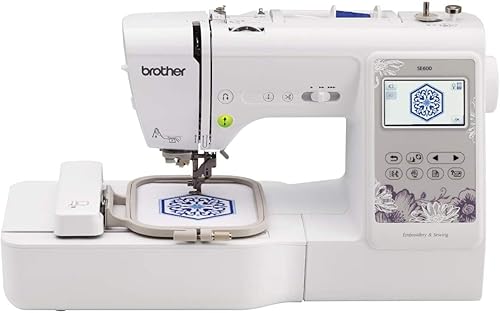
Brother SE600 Sewing and Embroidery Machine
Best for basic home projects - 5
 Check it
SINGER® Smart HD 9120™ Sewing Machine
Best for app-guided sewing with embroidery option - 6
 Check it
Smartstitch S-1501 Commercial Embroidery Machine
Best for high-volume home production - 7
 Check it
Poolin EOM 15 Needle Commercial Embroidery Machine
Best for home business hat orders - 8
 Check it
Janome Memory Craft C400E Computerized Embroidery Machine
Best for larger single designs
How we chose home embroidery machines
The best home embroidery machines balance usable workspace, setup demands and the type of projects you plan to make. We compared embroidery fields, needle count, built-in designs, transfer options and whether each machine also sews.
The scores reflect how well each option fits home use, including the tradeoff between compact combo machines and larger production setups. Our score weighs specs, features and buyer feedback against what you’re shopping for.
A machine with more needles or a larger field can help with specific work, but it also takes more room. For a closer look at the difference in operation, see how embroidery machines work.
| Product | Best for | Embroidery area | Built-in designs | Machine type | Our score |
|---|---|---|---|---|---|
| Brother SE700 Sewing and Embroidery Machine | sewing and embroidery at home | 4 x 4 in | 135 | Sewing and embroidery combo | 9.7 |
| Smartstitch S-1001 Upgraded Embroidery Machine | a growing home studio | 9.5 x 14.2 in | Multi-needle embroidery only | 9.6 | |
| Brother SE700 Combo Embroidery & Sewing Machine | a bundled home setup | 4 x 4 in | Sewing and embroidery combo | 9.5 | |
| Brother SE600 Sewing and Embroidery Machine | basic home projects | 4 x 4 in | 80 | Sewing and embroidery combo | 9.4 |
| SINGER® Smart HD 9120™ Sewing Machine | app-guided sewing with embroidery option | Sewing machine with optional embroidery | 9.1 | ||
| Smartstitch S-1501 Commercial Embroidery Machine | high-volume home production | 14 x 20 in | Commercial multi-needle embroidery | 8.7 | |
| Poolin EOM 15 Needle Commercial Embroidery Machine | home business hat orders | 14.2 x 9.5 in | Commercial multi-needle embroidery | 8.4 | |
| Janome Memory Craft C400E Computerized Embroidery Machine | larger single designs | 7.9 x 7.9 in | 160 | Embroidery-only machine | 8.1 |
The best home embroidery machines for different projects
The SE700 is the most balanced home option here because it combines sewing, embroidery and wireless design transfer. The other picks suit larger designs, bundled supplies or a home studio with higher output needs.
Brother SE700 Sewing and Embroidery Machine: Best for sewing and embroidery at home
- 4 x 4 in embroidery field
- 135 built-in designs
- Wireless LAN and USB transfer
- 3.7 in color touchscreen
The SE700 pairs a 4 x 4 in embroidery field with sewing functions, wireless design transfer and on-screen editing. It suits home users who want one machine for both crafts.
Pros
- Sews and embroiders
- Wireless LAN and USB transfer
- On-screen design preview
Cons
- Embroidery field is limited to 4 x 4 in
- Made for 120-volt use in the US
The Brother SE700 suits a home sewing room where one machine needs to handle two jobs. Its 4 x 4 in embroidery field works for small designs, monograms and compact decorations, while 103 built-in sewing stitches support garment and household sewing.
You get 135 built-in embroidery designs and 10 lettering fonts. The 3.7 in color touchscreen lets you preview and edit embroidery designs on the machine before stitching.
Wireless LAN can transfer designs from a PC through Brother’s free Design Database Transfer software, and the machine also has a USB port. Brother’s Artspira app can be used to draw or choose designs and send them wirelessly.
Choose the SE700 if you want sewing capability and embroidery in a single home machine. Its field is still 4 x 4 in, so larger motifs may require a different machine or careful design planning.
If you’re weighing a combo against a dedicated unit, this embroidery vs sewing machine comparison explains the roles each type fills.
Smartstitch S-1001 Upgraded Embroidery Machine: Best for a growing home studio
- 10 needles
- 9.5 x 14.2 in embroidery area
- 7 in touchscreen
- USB and Wi-Fi pattern transfer
The S-1001 offers a larger work area and 10 needles for multi-color embroidery. Its 93 lb weight and commercial-style setup call for dedicated room and a clear plan for delivery.
Pros
- Large embroidery area
- 10 needles for color changes
- Training materials and support are offered
Cons
- Heavy at 93 lb
- Does not combine sewing with embroidery
The Smartstitch S-1001 is for a home studio that needs more than a small monogram field. Its 9.5 x 14.2 in embroidery area and 10 needles are better matched to larger designs and multi-color projects than occasional small details.
A 7 in touchscreen provides on-machine controls, and designs can transfer by USB or Wi-Fi. The machine supports DST and DSB files, and Smartstitch provides manuals and training videos, with online support options.
At 93 lb, the S-1001 needs a stable, dedicated work area. It is an embroidery machine rather than a sewing-and-embroidery combo, so plan on a separate sewing machine if you need to stitch seams or hems.
Choose it when the larger work area and multiple needles serve regular projects. For occasional craft use in a shared room, a lighter combo machine may be easier to fit into your routine.
Brother SE700 Combo Embroidery & Sewing Machine: Best for a bundled home setup
- 4 x 4 in embroidery field
- 135 built-in designs
- Four included embroidery hoops
- 40 polyester thread spools
This SE700 bundle combines sewing and embroidery with extra hoops, thread and accessories. It fits a home user who wants supplies included with a familiar 4 x 4 in field.
Pros
- Sews and embroiders
- Bundle includes multiple hoops
- Includes 40 thread spools
Cons
- Embroidery field remains 4 x 4 in
- Bundle contents may take storage space
This Brother SE700 bundle suits a buyer who wants sewing and embroidery functions plus extra supplies in one package. It includes four embroidery hoops and 40 polyester thread spools, alongside the machine’s built-in designs and sewing stitches.
The embroidery field is 4 x 4 in, so the extra hoops do not change the machine’s maximum field. They provide different hoop options for setting up projects, while the bundle also includes a sewing kit and other accessories.
For hoop setup tips, read magnetic embroidery hoop guide.
Wireless LAN and the Artspira app support design transfer and customization. The touchscreen is listed as 3.2 x 1.8 in, so compare the screen details with the standard SE700 before choosing between the two versions.
Pick this bundle if the included thread and hoop assortment are useful for projects you already plan to make. Check that you have storage for the extra supplies, especially if your sewing area is small.
Brother SE600 Sewing and Embroidery Machine: Best for basic home projects
- 4 x 4 in embroidery field
- 80 built-in designs
- 103 built-in sewing stitches
- 3.2 in color touchscreen
The SE600 is a combo machine with 80 built-in embroidery designs and a 4 x 4 in field. It suits straightforward home projects that do not need a larger hoop area.
Pros
- Combines sewing and embroidery
- Color touchscreen previews designs
- Includes an automatic needle threader
Cons
- Smaller design library than the SE700
- Embroidery field is limited to 4 x 4 in
The Brother SE600 is a home combo option for buyers who want sewing plus a modest embroidery field. It has 80 built-in designs, six embroidery lettering fonts and a 4 x 4 in field.
Its 103 built-in sewing stitches cover utility and decorative sewing, while the 3.2 in color touchscreen previews designs before stitching. An automatic needle threader and drop-in top bobbin are included.
Compared with the SE700, the SE600 has fewer built-in embroidery designs and a smaller screen. It can still suit a home crafter whose projects fit within the 4 x 4 in field and who does not need wireless transfer.
Choose it for basic sewing and embroidery tasks in a single machine. If you expect to personalize designs often, compare its features with the SE700 before deciding.
SINGER® Smart HD 9120™ Sewing Machine: Best for app-guided sewing with embroidery option
- 200+ stitches
- CREATIVATE app control
- Optional 900E embroidery attachment
- 170 x 100 mm hoop with attachment
The Smart HD 9120 is primarily a sewing machine, with embroidery available through a separately sold 900E attachment. Consider it if app-guided sewing is the priority and embroidery is an add-on.
Pros
- App offers stitch guidance and control
- Speed control and start/stop button
- Embroidery attachment is an option
Cons
- Embroidery attachment is sold separately
- Not a standalone embroidery machine
The SINGER Smart HD 9120 is primarily a sewing machine, with embroidery available through a separately sold 900E attachment. That makes it a fit for home sewists who value app-guided sewing and want embroidery as an option.
The CREATIVATE app works with iOS and Android and provides access to stitch controls, tutorials and project ideas. The machine has more than 200 stitches, a built-in needle threader, speed control and a start/stop button.
With the embroidery attachment, the stated hoop measures 170 x 100 mm, and the app offers access to more than 150 free embroidery designs. Factor the separate attachment into your setup before treating this as an embroidery machine.
Smartstitch S-1501 Commercial Embroidery Machine: Best for high-volume home production
- 15 needles
- 14 x 20 in embroidery area
- 12 in touchscreen
- USB and Wi-Fi transfer
The S-1501 is a substantial commercial machine for a home studio handling larger projects or repeat work. Its 209 lb weight and stand require ample space and a delivery plan.
Pros
- Large embroidery area
- 15 needles for multi-color work
- Cap and flat embroidery attachments are included
Cons
- Heavy and large for a typical home workspace
- Does not sew garments
The Smartstitch S-1501 is a commercial-style machine for a home business or studio that handles frequent, larger jobs. Its 14 x 20 in embroidery area and 15 needles support designs and color changes that exceed the needs of many occasional home projects.
The 12 in touchscreen, automatic color change and laser positioning are aimed at controlling embroidery work. Smartstitch describes it for flat items and caps, and includes a stand, cap equipment and a starter kit.
At 209 lb, it is a major workspace commitment. Measure the room and access route, and consider whether your order volume justifies a dedicated machine rather than a smaller setup.
Choose the S-1501 when production capacity and a large field matter more than portability or sewing functions. It does not replace a regular sewing machine.
Poolin EOM 15 Needle Commercial Embroidery Machine: Best for home business hat orders
- 15 needles
- 14.2 x 9.5 in embroidery area
- 270-degree cap system
- 9 in touchscreen
The Poolin EOM pairs 15 needles with a cap system and accessories for a home studio taking apparel or hat orders. Its stand-mounted form and 165 lb weight need dedicated floor space.
Pros
- Supports cap embroidery and 3D puff designs
- Automatic color change and thread trimming
- Stand and hoops are included
Cons
- Large stand-mounted setup
- Embroidery-only machine
The Poolin EOM is a 15-needle commercial embroidery machine aimed at home studios and small shops moving beyond single-needle work. Its 14.2 x 9.5 in field and 270-degree cap system suit apparel, hats and repeat logo jobs.
Automatic color change, thread trimming and thread-break detection can reduce manual interruptions during multi-color designs. The 9 in touchscreen uses InStitch OS4, and supported DST or DSB files can transfer by Wi-Fi or USB.
This machine weighs 165 lb and comes with a stand, so it needs a dedicated floor area. Its commercial features may be more than you need for occasional names or small craft projects.
Pick the EOM if hats and small production orders are part of your plan. For a quieter home craft corner and mixed sewing projects, a combo machine is a more compact starting point.
Janome Memory Craft C400E Computerized Embroidery Machine: Best for larger single designs
- 7.9 x 7.9 in embroidery area
- 160 built-in designs
- Six monogramming fonts
- Four included hoops
The C400E is an embroidery-only machine with a larger field than 4 x 4 in combo models. It suits home users who want room for bigger designs and do not need the machine to sew.
Pros
- Larger embroidery area
- Includes four hoops
- USB design import
Cons
- Does not provide sewing functions
- Larger footprint than compact combo machines
The Janome Memory Craft C400E is a dedicated embroidery machine for home users who want a larger field without stepping up to a multi-needle commercial unit. Its 7.9 x 7.9 in embroidery area gives more room than the 4 x 4 in fields on the Brother combo models.
It includes 160 built-in designs, six monogramming fonts and four hoops. The color touchscreen can rotate, resize, mirror and combine designs, while USB import lets you add custom designs.
The C400E does not sew, so you’ll need a separate sewing machine for construction and repairs. Its 25 lb weight and 22.01 x 25.98 x 21.81 in dimensions also call for a planned spot in your sewing room.
Choose it when larger single designs matter more than combining two machine types. It offers a middle path between a compact combo and a heavy multi-needle setup.
What should you consider before choosing an embroidery machine at home?
For home use, start with the largest design you want to stitch, then check the machine’s embroidery field and the room needed around it. Compare 5x7 embroidery machines if that field size fits your plans.
A feature-rich machine may be a poor fit if it cannot sit safely in your available workspace.
A 4 x 4 in field works for small lettering and compact motifs. The Janome C400E offers a 7.9 x 7.9 in field, while the Smartstitch and Poolin multi-needle machines have larger work areas for more demanding projects.
Next, decide whether you need a sewing machine too. A combo can save the need for a second machine, while an embroidery-only model may provide a larger field; see our guide to the best embroidery-only machine.
Are multi-needle home embroidery machines worth the space?
A multi-needle home embroidery machine makes sense when you regularly stitch designs with several colors or repeat orders. It can reduce manual color changes, but commercial models are heavy and need a dedicated area.
The S-1001, S-1501 and Poolin EOM weigh 93 lb, 209 lb and 165 lb. Before choosing one, measure doorways, floor space and the room available for hoops, thread and project setup.
If your work is mostly small names and occasional gifts, a single-needle combo may be simpler to accommodate. For projects that need a compact footprint, compare our best small embroidery machine picks.
How much workspace does an at-home embroidery machine need?
An at-home embroidery machine needs room for its own footprint plus space to position fabric and work with hoops. Larger machines may also need a stand and extra clearance for loading projects.
Check both the machine dimensions and the hoop or embroidery field. The S-1001 and S-1501, for example, have larger commercial-style frames and are much heavier than the combo machines in this group.
The work surface should be stable, with enough room to reach controls and change thread. If you’re planning a very small craft area, our best small embroidery machines for beginners guide can help narrow the options.
Do you need Wi-Fi or built-in designs?
Wi-Fi is useful if you want to send embroidery files without moving a USB drive, but it is not essential for every home setup. Built-in designs can also get you started without preparing a custom file.
The SE700 supports wireless transfer and includes 135 designs, while the Janome C400E offers USB import and 160 designs. The Smartstitch and Poolin models accept supported file formats by USB or Wi-Fi.
Think about how you plan to choose and edit designs. If you already use embroidery software, confirm that your files work with the machine before you buy.
More guides on this topic
- Best Wireless Embroidery Machines
- Best Embroidery Machines on Sale
- Best Single-Needle Embroidery Machines
- Can You Do Embroidery with a Cricut?
Verdict: Which home embroidery machine should you choose?
Choose the Brother SE700 if you want one home machine for sewing and embroidery, with wireless transfer and a 4 x 4 in field. Pick the Janome C400E if a larger single design area matters more than sewing capability.
For regular, multi-color production or hat orders, consider the Smartstitch S-1001 or Poolin EOM if you have room for a heavy, dedicated setup. If cost is part of your decision, our guide explains how much embroidery machines cost, and this embroidery vs sublimation comparison can help if you are choosing a decoration method.
Our top 3 picks at a glance
-
1
Best for sewing and embroidery at home
Brother SE700 Sewing and Embroidery Machine
9.7/10 our score
See it on Amazon -
2
Best for a growing home studio
Smartstitch S-1001 Upgraded Embroidery Machine
9.6/10 our score
See it on Amazon -
3
Best for a bundled home setup
Brother SE700 Combo Embroidery & Sewing Machine
9.5/10 our score
See it on Amazon
Frequently asked questions
What is the best home embroidery machine for most people?
The Brother SE700 is a strong choice for home users who want sewing and embroidery in one machine. It has a 4 x 4 in embroidery field, 135 built-in designs, wireless transfer and a touchscreen for previewing designs.
Choose a dedicated embroidery machine if you want a larger field or do not need sewing functions.
Should I choose a combo or embroidery-only machine for home use?
Choose a combo machine if you also sew clothes, mend fabric or make home projects. An embroidery-only model can offer a larger embroidery area, such as the Janome C400E's 7.9 x 7.9 in field.
Compare types of embroidery machines before deciding which setup fits your work.
Is a multi-needle embroidery machine practical at home?
It can work in a home studio if you have room for the machine, stand and supplies. Multi-needle models here weigh 93 to 209 lb and are designed for larger or repeated projects.
Measure doorways and workspace before arranging delivery, and consider how often you need that production capacity.
What embroidery area should I look for?
Match the field to the largest design you plan to stitch without rehooping. A 4 x 4 in field suits small monograms and compact designs, while a 7.9 x 7.9 in field gives more room for larger motifs.
Check the design dimensions as well as the hoop size before you start.


