9 Best Embroidery Machines for Small Business (November 2026)
The best embroidery machines for small business include the Brother SE2000 Sewing and Embroidery Machine Computerized for varied custom orders, the Brother SE700 Sewing and Embroidery Machine for a home business starting small, and the Smartstitch S-1001 Upgraded Embroidery Machine for repeat multi-color orders.
On this page (5 sections)
The Brother SE2000 is a strong embroidery machine for a small business handling varied custom orders, with a 5 x 7 in field and wireless design transfer. For repeat multi-color production, step up to a 10-needle or 12-needle machine; for a sewing-led home business, a combo model may cover more of your workflow.
A good business machine should match the orders you can fulfill repeatedly. Think about design area, color changes, file transfer, operator learning, available space, and how much of each job involves sewing as well as embroidery.
Our picks at a glance
-
1
 Best for varied custom orders
Brother SE2000 Sewing and Embroidery Machine Computerized
9.7/10 our score
See it on Amazon -
2
 Best for a home business starting small
Brother SE700 Sewing and Embroidery Machine
9.7/10 our score
See it on Amazon -
3
 Best for repeat multi-color orders
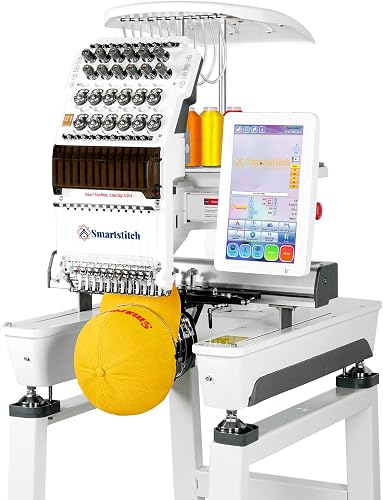
Smartstitch S-1001 Upgraded Embroidery Machine
9.6/10 our score
See it on Amazon
- 4
 Check it
Brother SE700 Combo Embroidery & Sewing Machine
Best for a ready-to-start sewing bundle - 5
 Check it
Smartstitch S-1201 Plus Embroidery Machine
Best for larger repeat designs - 6
 Check it
SINGER® Smart HD 9120™ Sewing Machine
Best for sewing-led custom work - 7
 Check it
Brother PE545 Wireless Embroidery Machine 4x4 Hoop
Best for small embroidery-only jobs - 8
 Check it
Brother PE900 Wireless Embroidery Machine with WLAN
Best for larger single-needle designs - 9
 Check it
BAI The Vision 15-Needle Commercial Embroidery Machine
Best for higher-volume production
Which embroidery machines for small business stand out?
The best options range from home combo machines for personalization to multi-needle commercial models for repeat orders. Our score weighs specs, features, and buyer feedback against what you're shopping for.
| Product | Best for | Embroidery field | Needles | File transfer | Our score |
|---|---|---|---|---|---|
| Brother SE2000 Sewing and Embroidery Machine Computerized | varied custom orders | 5 x 7 in | Single needle | Wireless LAN or USB | 9.7 |
| Brother SE700 Sewing and Embroidery Machine | a home business starting small | 4 x 4 in | Single needle | 9.7 | |
| Smartstitch S-1001 Upgraded Embroidery Machine | repeat multi-color orders | 10 | 9.6 | ||
| Brother SE700 Combo Embroidery & Sewing Machine | a ready-to-start sewing bundle | 4 x 4 in | Single needle | 9.5 | |
| Smartstitch S-1201 Plus Embroidery Machine | larger repeat designs | 12 | 9.3 | ||
| SINGER® Smart HD 9120™ Sewing Machine | sewing-led custom work | 9.1 | |||
| Brother PE545 Wireless Embroidery Machine 4x4 Hoop | small embroidery-only jobs | 4 x 4 in | Single needle | 8.7 | |
| Brother PE900 Wireless Embroidery Machine with WLAN | larger single-needle designs | 5 x 7 in | Single needle | 8.5 | |
| BAI The Vision 15-Needle Commercial Embroidery Machine | higher-volume production | 15 | 8.2 |
Best embroidery machines for small business by order type
The right machine depends on whether you need flexibility, a larger field, or faster multi-color setup. These picks are ordered by their scores, with each one matched to a specific small-business use.
Brother SE2000 Sewing and Embroidery Machine Computerized: Best for varied custom orders
- 5 x 7 in embroidery field
- Wireless LAN and USB file transfer
- Color sort and jump stitch trimming
- Sewing and embroidery in one machine
A 5 x 7 in field and design editing tools suit personalized orders with changing artwork. Color sorting and jump stitch trimming can reduce some stops during a design.
Pros
- Larger field than 4 x 4 in models
- Wireless design transfer
- Sews as well as embroiders
Cons
- Single needle requires thread changes between colors
- US 120-volt use only
The Brother SE2000 is a flexible choice for a home business that takes names, small logos, and custom designs. Its 5 x 7 in embroidery field gives more room than a 4 x 4 in machine, which can reduce the need to split some designs across multiple hoopings.
Wireless LAN and USB transfer give you two ways to move embroidery files to the machine. Color sort changes the stitching order for multi-color designs, and jump stitch trimming handles excess thread jumps within a color.
This is a combo machine, so it also handles sewing jobs. That can help if your business makes finished items from blanks or needs to sew pieces before adding embroidery.
A single needle still means changing thread colors as the design runs. Choose the SE2000 for a mixed order book and moderate pace, then consider a best multi needle embroidery machine if repeat multi-color work becomes a regular bottleneck.
Brother SE700 Sewing and Embroidery Machine: Best for a home business starting small
- 4 x 4 in embroidery field
- 135 built-in designs
- 10 embroidery fonts
- Wireless LAN and USB file transfer
The SE700 combines sewing and embroidery in a compact home-business workflow. Its 4 x 4 in field fits smaller names, logos, and personalization jobs.
Pros
- Sewing and embroidery in one machine
- Wireless design transfer
- Built-in designs and lettering fonts
Cons
- Smaller field limits design size
- Single needle needs manual color changes
The Brother SE700 suits a home embroidery business that is starting with small, personalized work. Its 4 x 4 in embroidery field can handle compact names and motifs, and the machine also sews.
The machine includes 135 built-in designs and 10 embroidery lettering fonts. Wireless LAN and USB transfer let you bring in other embroidery files, while the 3.7 in touchscreen supports on-screen editing and preview.
The smaller field sets a clear boundary: check that your most common logo or name placement fits within the hoop. If you expect larger chest designs, compare it with a best 5x7 embroidery machine before building your service menu around a 4 x 4 in machine.
Smartstitch S-1001 Upgraded Embroidery Machine: Best for repeat multi-color orders
- 10 needles
- 9.5 x 14.2 in embroidery area
- USB and Wi-Fi pattern transfer
- Auto color changing and thread trimming
Ten needles can keep multiple thread colors ready for repeat designs, while the larger field suits apparel and other broader pieces. Smartstitch includes training materials and technical support.
Pros
- Multiple needles reduce manual color swaps
- Large embroidery area
- Thread break detection and automatic trimming
Cons
- Requires more space than a home combo machine
- Learning commercial equipment takes planning
The Smartstitch S-1001 is designed for repeat orders that use several thread colors. Its 10 needles let you set up multiple colors, while automatic color changing and thread trimming can reduce some manual handling between designs.
The 9.5 x 14.2 in embroidery area accommodates larger work than the home machines in this roundup. Smartstitch lists use on items such as denim, canvas, leather, vinyl, caps, shoes, and bags, with DST or DSB files transferred by USB or Wi-Fi.
This machine is a more involved fit for a home business than a single-needle combo model. Smartstitch provides operation manuals, training videos, and technical support, so allow time for setup and learning before promising a new turnaround time to customers.
For steady multi-color orders, the S-1001 offers a more production-focused workflow. Read our guide to the best commercial embroidery machine to compare the needs of a larger workroom.
Brother SE700 Combo Embroidery & Sewing Machine: Best for a ready-to-start sewing bundle
- 4 x 4 in embroidery field
- Four embroidery hoops in bundle
- 40 polyester thread spools
- 135 built-in designs
This SE700 bundle includes extra hoops and thread, which can help a home business organize small custom jobs. The 4 x 4 in field remains the main limit on design size.
Pros
- Includes multiple hoop sizes
- Thread set comes in the bundle
- Sewing and embroidery functions
Cons
- Single needle means manual color changes
- Bundle contents may be more than a new shop needs
This Brother SE700 bundle is aimed at a small shop that wants sewing and embroidery in one machine with extra supplies included. For frame options beyond the bundle, compare embroidery hoop sets and kits.
The bundle has four embroidery hoops and 40 polyester thread spools, along with the SE700's 4 x 4 in field and built-in designs.
Those extras may help you prepare for small personalized jobs without assembling every accessory separately. The core machine is still a single-needle SE700, so it shares the same small embroidery field and manual color changes.
Choose the bundle if the included hoop sizes and thread fit the jobs you plan to sell. If you already have thread or need larger designs, compare the standard SE700 and a 5 x 7 in option before paying for extras you may not use.
Smartstitch S-1201 Plus Embroidery Machine: Best for larger repeat designs
- 12 needles
- 12 x 16 in embroidery area
- USB and Wi-Fi transfer
- Auto color changing and thread trimming
The S-1201 Plus pairs 12 needles with a 12 x 16 in area for jobs that need larger designs or repeated color setups. Its footprint and commercial workflow suit a dedicated production space.
Pros
- Large working area
- 12 needles for multi-color work
- Training and technical support available
Cons
- Needs a dedicated work area
- Commercial-machine setup is more involved
The Smartstitch S-1201 Plus fits a small business producing larger, repeated designs across multiple colors. Its 12 needles and 12 x 16 in embroidery area give it more capacity for a dedicated production setup than a home combo machine.
Automatic color changing, thread trimming, and thread break detection are listed among its features. The machine accepts DST and DSB files, and Smartstitch describes training and technical support for new owners.
Measure the workroom and planned items before choosing a machine of this scale. It is a better match for a business with regular orders and a clear production workflow than for occasional personalization at a kitchen table.
SINGER® Smart HD 9120™ Sewing Machine: Best for sewing-led custom work
- 200+ stitches through the app
- Optional 900E embroidery attachment
- App-based controls and guidance
- 170 x 100 mm hoop with attachment
This is primarily a sewing machine, with embroidery available through a separately sold attachment. It may suit a small business where sewing work leads and embroidery is an added service.
Pros
- App provides guided setup and controls
- Speed control and start/stop button
- Embroidery attachment expands its use
Cons
- Embroidery attachment is sold separately
- Not a dedicated multi-needle embroidery machine
The SINGER Smart HD 9120 is a sewing-first machine for a business that wants embroidery as an added service. Embroidery requires the separately sold 900E attachment, which provides a 170 x 100 mm hoop.
Its app offers access to more than 200 stitches and provides setup guidance and machine controls. Speed control and a start/stop button can be useful for sewing work, but this is not a dedicated embroidery machine in its base configuration.
Choose it if sewing garments or goods is your main service and embroidery is occasional. If embroidery is the core of your business, compare dedicated machines with a ready-to-use embroidery field instead.
Brother PE545 Wireless Embroidery Machine 4x4 Hoop: Best for small embroidery-only jobs
- Embroidery-only machine
- 4 x 4 in embroidery field
- 135 built-in designs
- Wireless LAN and USB
The PE545 focuses on embroidery rather than sewing and fits small names, motifs, and monograms. Its 4 x 4 in field suits limited design sizes and modest order volume.
Pros
- Embroidery-only setup
- Wireless and USB file transfer
- Built-in lettering fonts
Cons
- Cannot function as a traditional sewing machine
- Small field limits larger designs
The Brother PE545 is an embroidery-only option for businesses focused on small designs. Its 4 x 4 in field, 135 built-in designs, and 10 fonts suit compact monograms and simple personalization jobs.
Wireless LAN and USB provide file-transfer options, and the touchscreen lets you position and preview designs. Since the PE545 does not sew, it makes most sense when you already have a separate sewing machine or mainly decorate finished blanks.
Use it for smaller jobs with predictable placement. For larger logos or designs, move up to a 5 x 7 in field before taking orders that may not fit the hoop.
Brother PE900 Wireless Embroidery Machine with WLAN: Best for larger single-needle designs
- Embroidery-only machine
- 5 x 7 in embroidery field
- 193 built-in designs
- Wireless LAN and USB
The PE900 gives an embroidery-only business more room than a 4 x 4 in machine. It remains a single-needle option, so frequent multi-color production involves manual thread changes.
Pros
- 5 x 7 in field
- Wireless design transfer
- Built-in editing and lettering
Cons
- Embroidery only, with no traditional sewing
- Single needle requires color changes
The Brother PE900 gives an embroidery-only business a larger field than the PE545. Its 5 x 7 in embroidery area and 13 lettering fonts suit names, logos, and designs that need more room than a 4 x 4 in hoop allows.
Wireless LAN and USB transfer are available, and color sort and jump stitch trimming can streamline some parts of a multi-color design. It remains a single-needle machine, so repeated color changes still involve manual work.
Choose it when embroidery is your main service and a larger field matters more than sewing capability. For frequent repeat orders, weigh the time spent changing colors against a multi-needle option.
BAI The Vision 15-Needle Commercial Embroidery Machine: Best for higher-volume production
- 15 needles
- 20 x 16 in embroidery area
- Wi-Fi design transfer
- Cost tools in Institch software
The Vision is a large commercial machine for businesses with steady production needs, larger designs, and room for a 727 lb unit. BAI describes cost tools and Wi-Fi transfer as part of its Institch system.
Pros
- 15 needles for multi-color production
- Large embroidery area
- Cost tools included in software
Cons
- Very heavy and large footprint
- A substantial step up for a new home business
The BAI The Vision is a production machine for a business with substantial orders, larger designs, and dedicated floor space. Its 15 needles and 20 x 16 in embroidery area support a broader range of production jobs than compact home machines.
The machine weighs 727 lb, so plan delivery, placement, and workspace before committing. BAI describes Wi-Fi design transfer and cost tools in its Institch system, along with training and technical support.
This is a serious step up for a new home business. Choose it only when your order volume, space, and operating plan support a large commercial machine.
What should you check before choosing a machine for a home business?
For a home business, match the machine to the largest order you expect to repeat and the time you can spend on each item. A small field and single needle can work for a modest custom shop, while multi-needle machines suit repeated color-heavy orders.
Start with the design area. A 4 x 4 in field can suit small names and motifs; a 5 x 7 in field gives more room for common apparel placements, and commercial fields can handle larger work.
Then consider needle count and workflow. A single-needle machine needs manual color changes, so estimate the time for your typical design rather than judging by the machine's maximum stitch speed alone.
If you plan to embroider hats, bags, or thick materials, check the required frames and attachment compatibility for the exact items you intend to sell. A large field by itself does not guarantee that a machine can hoop every product shape.
How can you plan repeat orders and production time?
Repeat orders are easier to manage when you standardize designs, placement, thread colors, and materials. Save a sample and record the stabilizer, needle, thread, and settings that work for each blank.
Needle choice affects stitch quality and fabric handling. Use the Needles for Machine Embroidery: A Complete Guide to match needle type and size to the fabric, and review What Weight Thread for Machine Embroidery? when setting up your thread stock.
For garments and knit blanks, stabilizer helps support the fabric during stitching. Compare options in our best no show mesh stabilizer for embroidery guide, and choose a backing that suits the material and design density.
Typography also affects the finished product. Our guide to best fonts for machine embroidery can help you choose lettering that remains readable at the size your machine can stitch.
What is the final pick for an embroidery machine business?
For a flexible home business, choose the Brother SE2000 if its 5 x 7 in field and combo sewing functions fit your orders. For repeat multi-color production, consider the Smartstitch S-1001 or S-1201 Plus, and reserve the BAI Vision for a business with higher volume and room for a large commercial machine.
Before ordering, compare your expected weekly jobs with hoop size, needle count, and the time needed to finish each item. A best magnetic embroidery hoops guide can help you assess hoop options for repeat setups and fabric handling.
Our top 3 picks at a glance
-
1
Best for varied custom orders
Brother SE2000 Sewing and Embroidery Machine Computerized
9.7/10 our score
See it on Amazon -
2
Best for a home business starting small
Brother SE700 Sewing and Embroidery Machine
9.7/10 our score
See it on Amazon -
3
Best for repeat multi-color orders
Smartstitch S-1001 Upgraded Embroidery Machine
9.6/10 our score
See it on Amazon
Frequently asked questions
What is the best embroidery machine for a small business?
The best fit depends on order size and repeat volume. A single-needle Brother with a 5 x 7 in field can suit varied custom jobs, while a multi-needle machine can reduce manual color changes on repeated designs.
Estimate your weekly orders and design sizes before choosing.
Is a home embroidery machine enough for a business?
A home machine can work for a small business with modest volume, small designs, and flexible turnaround times. A 4 x 4 in field is suited to compact personalization, while larger orders or frequent color changes may call for a multi-needle model.
Plan for time spent hooping, trimming, and finishing each item.
Should I choose a single-needle or multi-needle embroidery machine?
Choose a single-needle machine for varied, lower-volume work where changing thread colors by hand is manageable. A multi-needle model keeps several colors ready and can suit repeated designs.
Compare needle count, field size, workspace, training, and the jobs you expect to sell.
What embroidery area does a small business need?
Match the embroidery area to the largest design you plan to stitch. A 4 x 4 in field can handle many names and small motifs, while 5 x 7 in or larger areas give more room for chest logos and broader designs.
Check your hoop and garment placement needs before buying.
What supplies should a home embroidery business budget for?
Plan for thread, stabilizer, needles, blanks, and replacement supplies, along with software or digitizing costs if your workflow needs them. Keep samples of your chosen materials so repeat orders use consistent settings.
Our guides to machine embroidery needles and thread weight for machine embroidery cover two core setup choices.


