How to Oil a Brother Embroidery Machine
Check your Brother model’s manual before applying oil. Some machines need user lubrication, while others have sealed or service-only parts; use only the oil and locations the manual specifies.
On this page (7 sections)
- How do you oil a Brother embroidery machine?
- What should you check before adding machine oil?
- How can you clean the machine without oiling it?
- Which supplies help keep thread orderly during maintenance?
- What should you do after oiling?
- When should you contact Brother support?
- How to oil a Brother embroidery machine safely
Check your Brother model’s manual before applying oil. Some machines require user lubrication, while others do not; follow only the oiling instructions for your exact model.
Oiling the wrong part or using the wrong oil can cause problems. Turn the machine off and unplug it before cleaning or servicing, and keep oil away from thread, fabric, and electrical parts.
How do you oil a Brother embroidery machine?
Use the manual for your exact model to find out whether it needs oil and where to apply it. If the manual gives no user oiling steps, don’t add oil; contact Brother support or an authorized service center for guidance.
First, identify the complete model name, such as PE900 or SE2000. Then locate its official manual and search for terms like “oiling,” “lubrication,” or “maintenance.”
Follow the manual’s instructions for oil type, amount, and timing.
Don’t use instructions for a different Brother model, even if the machines look similar. If the guide asks you to remove a cover or reach an internal mechanism, check whether that service is intended for the owner before opening the machine.
What should you check before adding machine oil?
Confirm the approved oil, lubrication point, and amount before opening the oil bottle. If any detail is unclear, pause and check with Brother support rather than guessing.
Prepare a clean work surface and a soft cloth. Remove the embroidery hoop and fabric, turn the power off, and unplug the machine; follow your manual for any additional preparation steps.
Use a small, controlled amount only when the manual directs it. Don’t let oil drip into the bobbin area, onto the needle plate, or near the thread path unless the manual specifically identifies that location.
If you’re setting up the machine after maintenance, review how to thread a Brother embroidery machine before stitching. Correct threading helps you separate a thread-path issue from a maintenance concern.
How can you clean the machine without oiling it?
Remove lint from the areas your manual says you can clean, and leave lubrication to the model’s instructions. Cleaning and oiling are separate tasks; routine lint removal does not mean every machine needs oil.
Use the brush or cleaning method approved for your model. Avoid compressed air if the manual advises against it, since it can push lint deeper into the machine.
Keep the bobbin area free of loose thread and lint, and check the needle for damage. For a quick setup check, follow our steps for threading a Brother PE900 or threading a Brother SE2000.
Can thread tension problems be fixed with oil?
Don’t use oil to correct thread tension. Check the threading route, needle, bobbin, and tension settings in your manual first.
A tension gauge can help you assess a thread setup, but it does not replace model-specific troubleshooting. See how to use an embroidery thread tension gauge if you need a consistent way to compare tension.
Thread choice also affects stitch results. Our guide to what weight thread for machine embroidery explains how thread weight fits into setup decisions.
Which supplies help keep thread orderly during maintenance?
Thread storage tools can keep spools from unwinding while you clean or service the machine. They don’t replace machine oil or make a machine that doesn’t call for lubrication need it.
ThreadNanny’s 6 inch nets are designed for different spool and cone sizes. Use one to contain loose thread, and leave the machine’s moving parts clear while you follow its cleaning steps.
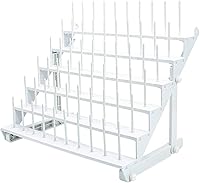
The Sew Tech rack can hold up to 60 standard spools or about 30 large cones, and it can be wall mounted or freestanding. Keep it close enough to reach without placing thread where it can fall into the machine.
The niffgaff stand has an adjustable thread guide and a nonslip base. It helps with thread feeding from a large cone, not with lubrication or maintenance.
What should you do after oiling?
Follow the manual’s instructions for wiping away excess oil and running the machine afterward. Don’t stitch on a project until the machine is ready according to the model’s guide.
If the manual directs you to test stitches, use a scrap of fabric and check for oil marks before returning to your project. Stop if oil appears where it shouldn’t, the machine makes a new sound, or it does not run as expected.
Avoid repeated oiling to solve a problem that may have another cause. A jam, damaged needle, incorrect threading, or lint buildup can affect stitching too.
When should you contact Brother support?
Contact Brother support or an authorized service center if the manual doesn’t give clear owner oiling steps or the machine still has a problem afterward. Don’t dismantle internal parts or apply oil to guessed locations.
Seek service if the machine remains noisy, binds, or shows oil where it should not. Share the model number and describe what you already checked so support can point you to the right instructions.
How to oil a Brother embroidery machine safely
For how to oil a Brother embroidery machine, let the exact model manual decide whether to oil, where to oil, and which oil to use. If it gives no user steps, keep the machine clean according to its care instructions and ask Brother for help before applying oil.
Keep thread organized with a net, rack, or external cone holder if that makes routine setup easier. For machine care, the manual remains your guide.
Frequently asked questions
Does every Brother embroidery machine need oil?
No. Lubrication needs vary by model, and some machines are designed for routine cleaning without user-applied oil.
Check the manual for your exact model before adding anything; if it does not give user lubrication instructions, contact Brother support or an authorized service center.
What oil should I use on a Brother embroidery machine?
Use only the machine oil and amount specified in your model’s manual. Do not substitute household, cooking, automotive, or general-purpose oil, and avoid applying oil to parts the manual does not identify as lubrication points.
How often should I oil a Brother embroidery machine?
Follow the schedule in your model’s manual, since the interval can differ by machine and use. If the manual does not tell you to oil it, do not create a schedule yourself; ask Brother support or an authorized service center.
What should I do if my Brother machine is noisy?
Turn the machine off and check the manual’s cleaning and troubleshooting steps before considering oil. Noise can have several causes, including lint buildup, a needle issue, or a threading problem; stop if the sound continues and contact Brother support or an authorized service center.