Brother CS7000X vs XR9550: Which Should You Choose? (November 2026)
Choose the Brother XR9550 for more built-in stitches and alphanumeric sewing, or choose the CS7000X for a simpler 70-stitch setup. Both are computerized Brother sewing and quilting machines with LCD stitch selection, automatic needle threading and drop-in top bobbins.
On this page (9 sections)
- Brother CS7000X vs XR9550: which has more stitches?
- Which machine is better for quilting?
- How do the included accessories compare?
- Which machine is easier to set up?
- How do the CS7000X and XR9550 compare for tight areas?
- Which product version should you choose?
- What should you check before buying?
- Which walking foot fits the Brother XR9550?
- Brother XR9550 vs CS7000X: which should you choose?
Choose the Brother XR9550 for more stitch variety and lettering, or choose the CS7000X for a simpler 70-stitch setup. In this brother cs7000x vs xr9550 comparison, the better choice depends on your stitch needs, quilting plans and preferred accessories.
Both machines are computerized Brother sewing and quilting machines with LCD stitch selection, automatic needle threaders and jam-resistant drop-in top bobbins. Those shared controls help with daily setup because you can see the selected stitch on the display and thread the needle without the same manual steps as a basic mechanical model.
For another model in this category, see the Brother HC1850 review.
The CS7000X focuses on 70 built-in stitches, while the XR9550 expands the selection to 165. That gap is the clearest practical divide in daily use, since a shorter list is quicker to scan for routine seams and quilting work, while the longer list gives more room for decorative, heirloom and lettering work.
If you are still deciding how much machine you need, our guide to how to choose a sewing machine explains how stitch range, workspace and accessories affect the choice. It can help you separate a feature you will use often from one that would only add sorting time in the sewing room.
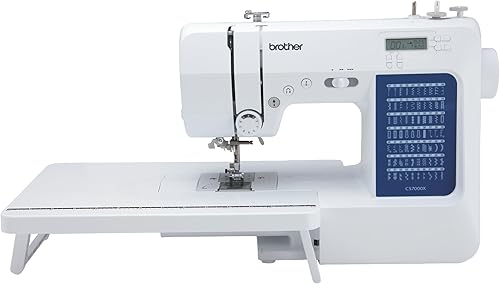 Best for focused quilting projects
Brother CS7000X Sewing and Quilting Machine LCD
 Best for a ready-to-start bundle
Brother CS7000X Computerized Sewing and Quilting Machine
Brother CS7000X vs XR9550: which has more stitches?
The XR9550 has more built-in stitches, with 165 compared with 70 on the CS7000X. That difference matters most if you want alphanumeric sewing, more decorative choices or a wider range of utility and heirloom stitches.
The CS7000X includes utility, decorative, heirloom and quilting stitch functions. It also has 7 one-step auto-size buttonhole styles, giving you a useful range for garments, household sewing and quilt projects.
The XR9550 includes 110 utility, decorative and heirloom stitches, 55 alphanumeric stitches and 8 styles of one-step auto-size buttonholes. The alphanumeric set gives it a clear advantage if monogram-style lettering is part of your plans.
More stitches are not automatically better for every sewer. If you mainly use straight, zigzag, buttonhole and a few quilting stitches, the CS7000X may keep selection simpler.
Is the XR9550 worth choosing for lettering?
Choose the XR9550 if 55 alphanumeric stitches are useful to you. Those stitches add a function the CS7000X does not list in its product information.
The XR9550 also includes a monogramming foot among its 8 quick-change presser feet. This makes it the more natural choice for users who want built-in lettering and monogram-related sewing options.
If you want a broader overview of computerized machines, our guide to best computerized sewing machines can help you compare this type of control system with your project needs.
Which machine is better for quilting?
The CS7000X is the more focused quilting choice, while the XR9550 offers more stitch options and drop feed for free-motion quilting. Both include a wide table and quilting-related accessories.
The CS7000X includes a detachable wide table, 10 sewing feet, a quilt guide and a larger needle-to-arm workspace. The metal frame and fixed needle bar are designed to support cleaner stitching and even lines.
The XR9550 includes a wide table, 8 sewing and quilting feet and drop feed for free-motion quilting and sewing. Drop feed lets you lower the feed dogs for techniques where you guide the fabric yourself.
Choose the CS7000X when a quilt guide, 10 included feet and a large needle-to-arm workspace match your project. Choose the XR9550 when free-motion quilting or a larger stitch library matters more.
For the CS7000X, follow the CS7000X threading guide before beginning a project. Correct threading and bobbin loading matter for consistent stitching on either machine.
How do the included accessories compare?
The CS7000X includes more listed sewing feet, while the XR9550 offers a wider set of built-in stitches and a drop-feed function. The better accessory package depends on what you already own.
The first CS7000X includes a wide table, 10 sewing feet, a quilt guide, a protective hard case and a trilingual English, Spanish and French user manual. Its product information also identifies a metal frame and fixed needle bar.
The second CS7000X has the same 70-stitch machine and includes a wide table, 10 sewing feet, a quilt guide, a protective cover, a hard plastic storage and carry case, a 6-color premium sewing thread pack and a 5-piece universal sewing machine needle set.
The XR9550 standard machine includes a protective hard cover, wide table and 8 presser feet. Its listed accessories include bobbins, a needle set, extra spool pin, eyelet punch, cleaning brush, seam ripper, twin needle, spool caps, screwdriver, pedal controller, power cord and an operation manual.
The XR9550 bundle adds a 36-piece bobbin and sewing thread set with a case and a soft measuring tape set. Pick it when those supplies are useful, or pick the standard XR9550 if you already have thread and measuring tools.
Which machine is easier to set up?
Both machines use LCD controls, automatic needle threading and drop-in top bobbins, so the basic setup is similar. The main learning difference comes from the number of stitches and the accessory package.
On the CS7000X, the improved automatic needle threader helps push thread through the needle. The drop-in top bobbin is designed to load easily and stay in place during sewing.
The XR9550 also has an automatic needle threader and drop-in top bobbin. Its LCD screen and push-button stitch selectors let you choose stitches and view stitch settings.
Read the manual before threading, changing feet or winding a bobbin. If you choose the XR9550, our guide on how to use a Brother XR9550 sewing machine covers the main operating tasks.
Keep thread paths clear and replace a needle when it becomes bent or damaged. Use the needle type suited to your fabric and thread, then test the stitch on a scrap before starting the final piece.
How do the CS7000X and XR9550 compare for tight areas?
Both machines offer free-arm sewing for smaller areas such as cuffs and sleeves. This feature is useful when a full flat workspace would make it harder to guide a narrow opening.
The CS7000X product information identifies a smaller free arm for sewing tight projects. The XR9550 includes free-arm capability for sewing cuffs and sleeves.
A free arm does not replace careful fabric control. Support the project without pulling it through the needle, and choose a stitch length and foot that suit the fabric.
The XR9550 also lists drop feed for free-motion quilting and sewing. That gives it more flexibility for users who want to move fabric manually during selected techniques.
For another Brother comparison, see Brother XR9550 vs SQ9285 if you are comparing the XR9550 with a different computerized model.
Which product version should you choose?
Choose the first CS7000X for its 10 feet, quilt guide, wide table and hard case. Choose the second CS7000X when the included thread, needles and plastic carry case are useful from the start.
The second CS7000X has the same model number and 70 built-in stitches, but its title identifies a hard plastic storage and carry case, premium sewing thread 6-pack and 5-piece sewing machine needle set. The thread colors are black, white, grey, blue, pink and taupe.
Choose the XR9550 bundle if you want the broad stitch system plus extra sewing supplies. Choose the standard XR9550 if you want the machine and core accessories without the separate 36-piece bundle.
The standard XR9550 has the same 165-stitch system, including 55 alphanumeric stitches, plus the listed wide table, 8 presser feet, protective hard cover and drop-feed function. Its product information specifies 120-volt use in the US.
What should you check before buying?
Check the stitch range, included feet, workspace and electrical requirements before choosing either Brother machine. The model that looks better on paper may still be a poor fit if its accessories do not match your projects.
First, list the stitches you use now and the ones you expect to use next. If lettering is useful, the XR9550's 55 alphanumeric stitches are a strong reason to choose it.
Next, consider quilting size and fabric handling. The CS7000X includes a larger needle-to-arm workspace, wide table and quilt guide, while the XR9550 includes a wide table and drop feed for free-motion work.
Then compare the bundle contents. Thread, needles, bobbins and a measuring tape can make the XR9550 bundle convenient, while the second CS7000X adds a 6-color thread pack and 5-piece needle set.
Finally, confirm the outlet requirement. The CS7000X and the standard XR9550 data specify 120-volt US use, and the CS7000X information warns that other use or sale may affect the warranty.
You can also compare nearby Brother options through Brother ST371HD sewing machine reviews and a CS5055 Brother sewing machine review before making a final choice.
Which walking foot fits the Brother XR9550?
Confirm the exact walking foot model and attachment method before ordering one for the XR9550. The XR9550 information here lists quilting feet, but it does not identify a specific walking foot.
A walking foot can help with more controlled feeding across layered fabric. Compatibility still depends on the machine and attachment design, so check the foot instructions and your machine manual before buying.
Our guide to which walking foot fits the Brother XR9550 covers the compatibility question in more detail. Use the same careful approach for specialty feet, needles and attachments.
That care matters because a presser foot is not only about shape. The shank type, attachment point and clearance around the needle decide whether a foot sits squarely and feeds fabric evenly.
On the XR9550, the listed presser feet include zigzag, buttonhole, zipper, button sewing, overcasting, blind stitch, monogramming and quilting feet. A walking foot is a separate specialty choice and is not named in that list, so treat it as an add on rather than an included part.
For quilt layers, controlled feeding can make alignment easier to manage while you guide the fabric by hand. It does not change the stitch count, and it will not replace practice with the included quilting foot.
Before you order, check the manual for the correct foot holder and snap on method. Then confirm the foot is made for this machine family and clears the needle and presser bar in the raised and lowered positions.
Once fitted, test on two scraps of the same fabric before starting a project. Look for even feeding without dragging and check that the needle still clears the foot.
Adjust thread tension only if the test stitch shows a clear need. Store the foot with its instructions so you can refit it the same way later.
Keep the included feet separate, since using the labelled foot for the task is usually the safer starting point for seams, zippers and buttonholes. Test the walking foot separately on scraps before using it on a finished piece.
Brother XR9550 vs CS7000X: which should you choose?
Pick the CS7000X if you want 70 useful stitches, 10 sewing feet, a quilt guide and a focused quilting setup. Pick the XR9550 if you want 165 stitches, 55 alphanumeric options or drop feed for free-motion quilting.
Choose the first CS7000X for its standard accessory package and the second CS7000X if its thread, needles and hard plastic carry case save you extra setup work. Choose the XR9550 bundle when its 36-piece bobbin and thread set is useful, or choose the standard XR9550 when you want the core machine package.
The decision is not only about stitch count. Match the machine to the work you will actually do, the feet you need and the supplies already in your sewing room.
For garment sewing, the CS7000X covers the core range with utility and decorative stitches plus 7 one-step auto-size buttonhole styles. The XR9550 adds 8 one-step auto-size buttonhole styles and a broader set of utility, decorative and heirloom stitches.
For quilting, the CS7000X is the more focused option because it includes a quilt guide, a detachable wide table and a larger needle-to-arm workspace. The XR9550 takes a different route with drop feed, which lets you lower the feed dogs and guide the fabric yourself.
Both machines use LCD selection, automatic needle threading and drop-in top bobbins, so the basic start is similar. The CS7000X includes 10 sewing feet plus a quilt guide, while the XR9550 includes 8 sewing and quilting feet.
If you travel to classes, the first CS7000X includes a protective hard case, and the second CS7000X bundle includes a hard plastic storage and carry case. The standard XR9550 includes a protective hard cover.
Thread the machine as directed, keep the bobbin area clean, replace a bent or dull needle, and test a stitch on scrap fabric before you sew the project itself. Confirm the 120 volt US requirement before you buy, then choose the model whose stitch list, feet and included supplies fit the projects you already plan to make.
Frequently asked questions
Is the Brother CS7000X better than the XR9550?
The Brother CS7000X is the better fit if 70 utility, decorative, heirloom and quilting stitches are enough and you prefer a focused setup. The XR9550 is better if you want 165 stitches, 55 alphanumeric stitches and drop feed for free-motion quilting.
What is the main difference between the CS7000X and XR9550?
The main difference is the stitch range. The CS7000X has 70 built-in stitches and 7 one-step auto-size buttonholes, while the XR9550 has 165 stitches, including 55 alphanumeric stitches, and 8 one-step auto-size buttonhole styles.
Which Brother machine is better for quilting?
Both machines include quilting functions, a wide table and quilting accessories. The CS7000X includes a quilt guide and 10 sewing feet, while the XR9550 includes 8 sewing and quilting feet plus drop feed for free-motion quilting, so choose by the techniques you plan to use.
Does the Brother CS7000X have more feet than the XR9550?
The CS7000X includes 10 sewing feet plus a quilt guide. The XR9550 includes 8 sewing and quilting feet, including zigzag, buttonhole, zipper, button sewing, overcasting, blind stitch, monogramming and quilting feet.
Which should beginners choose, the CS7000X or XR9550?
Beginners who want fewer stitch choices may find the CS7000X easier to sort through, while beginners planning lettering or more decorative work may prefer the XR9550's 165-stitch range. Both have LCD selection, automatic needle threading and drop-in top bobbins.


