9 Best Monogram Embroidery Machines (November 2026)
The best monogram embroidery machines include the Brother SE700 Sewing and Embroidery Machine for first monograms, the Smartstitch S-1001 Upgraded Embroidery Machine for caps and repeat orders, and the Brother SE700 Combo Embroidery & Sewing Machine (best bundle for beginners).
On this page (10 sections)
- How we compared these monogram machines
- The best monogram embroidery machines in detail
- Best monogram embroidery machine: quick comparison
- How these machines were compared
- What hoop size do you need for names and initials?
- How many lettering fonts do you need?
- Do you need sewing ability or embroidery only?
- What editing and file transfer features help with monograms?
- When should you step up to a multi-needle or large-hoop machine?
- Verdict: best monogram embroidery machine picks by need
The best monogram embroidery machine for most home crafters is the Brother SE700, because it pairs 10 lettering fonts with a 4 x 4 in hoop, wireless transfer and sewing ability in one 15.6 lb machine.
This guide compares monogram embroidery machine reviews by lettering tools, hoop options and editing features, so you can match a machine to initials, names and small text.
Monogramming looks simple, but the details change the result.
A tall script letter needs different spacing than a block initial.
A 3 x 3 in design fits a 4 x 4 in hoop, while a full name often needs more width.
Use our monogram machine embroidery designs guide to judge styles before you pick a machine.
Our picks at a glance
-
1
 Best for first monograms
Brother SE700 Sewing and Embroidery Machine
9.7/10 our score
See it on Amazon -
2
 Best for caps and repeat orders
Smartstitch S-1001 Upgraded Embroidery Machine
9.6/10 our score
See it on Amazon -
3
 Best bundle for beginners
Brother SE700 Combo Embroidery & Sewing Machine
9.5/10 our score
See it on Amazon
- 4
 Check it
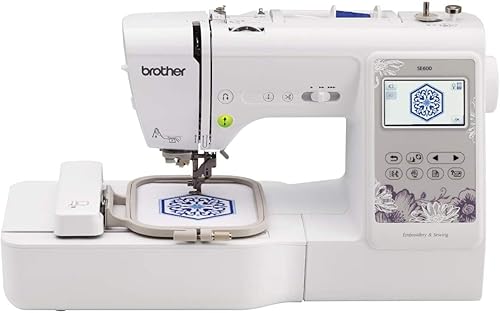
Brother SE600 Sewing and Embroidery Machine
Best budget combo entry - 5
 Check it
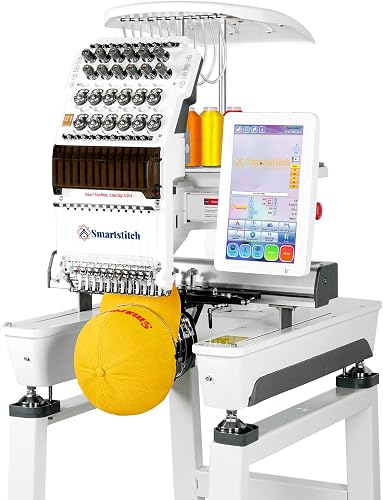
Smartstitch S-1201 Plus Embroidery Machine
Best for wide commercial lettering - 6
 Check it
SINGER® Smart HD 9120™ Sewing Machine
Best app-controlled sewing pick - 7
 Check it
Brother PE545 Wireless Embroidery Machine 4x4 Hoop
Best embroidery-only wireless pick - 8
 Check it
Poolin EOC06 Large Hoop Embroidery Machine
Best large hoop for home business - 9
 Check it
Brother PE800 Embroidery Machine
Best 5 x 7 hoop for names
How we compared these monogram machines
We compared specs, features and buyer patterns against what a monogram searcher needs.
Our score weighs specs, features and buyer feedback against what you're shopping for.
We checked font counts, hoop sizes, touchscreen editing, file transfer and whether each machine also sews.
We did not test machines.
Maker claims are labeled with the brand name, and buyer patterns are noted as such.
The best monogram embroidery machines in detail
The top picks below move from the best all-round home choice to specialized commercial and large-hoop options.
Each write-up explains who it suits, what the specs mean in daily use and where it trades off against the others.
Brother SE700 Sewing and Embroidery Machine: Best for first monograms
- 135 built-in designs
- 10 embroidery lettering fonts
- 4 x 4 in embroidery field
- 3.7 in touchscreen
- Wireless LAN
A combo sewing and embroidery machine with built-in lettering and wireless transfer for names and initials.
Pros
- 10 lettering fonts
- Wireless LAN transfer
- Also sews with 103 stitches
Cons
- 4 x 4 in hoop limits wide names
- Embroidery-only buyers may not need sewing features
The Brother SE700 suits beginners who want sewing and embroidery in one machine and plan to monogram gifts, kids items and home decor.
Its 10 embroidery lettering fonts let you personalize projects without buying extra designs first.
The 4 x 4 in embroidery field fits three-letter initials, small names and motifs up to that size after you allow for hoop grip.
The 3.7 in touchscreen helps you preview and edit lettering before you stitch, which cuts test runs.
Wireless LAN lets you send files from a PC with Design Database Transfer, and the Artspira app lets you draw or download patterns on a phone.
That helps when you want a custom initial layout.
The 135 built-in designs and 103 sewing stitches also cover borders, florals and everyday sewing in the same session.
The trade-off is hoop width.
Longer names or wide frames may push against the 4 x 4 in limit.
If that is your main project, a 5 x 7 in or larger hoop below will fit better.
Smartstitch S-1001 Upgraded Embroidery Machine: Best for caps and repeat orders
- 10 needles
- 1200 SPM max speed
- 7 in touchscreen
- 9.5 x 14.2 in area
- Auto thread trimming
A 10-needle commercial machine with a large area for flat items, hats and shirts.
Pros
- 10 needles for color changes
- Large 9.5 x 14.2 in area
- Auto thread trimming
Cons
- 93 lb and large footprint
- Commercial workflow is more complex
The Smartstitch S-1001 suits sellers and group leaders who monogram caps, shirts and flat items in batches.
Its 10 needles mean less manual color changing when a design uses several thread colors.
The 9.5 x 14.2 in area gives room for wide names, chest lettering and designs that would not fit a 4 x 4 in hoop.
Auto thread trimming and auto color changing support repeat runs.
A 7 in touch screen and USB or WiFi transfer help you load DST or DSB files from a computer.
Smartstitch says the starter pack includes threads, stabilizers and bobbin threads, plus frames for T-shirts, caps and flat items.
The 1200 SPM maximum speed and thread break detection matter when you run longer names across many items.
The trade-off is size and learning curve.
At 93 lb with dimensions of 25 x 34 x 33 in, it needs a dedicated table.
It is a commercial workflow, not a portable craft machine.
Brother SE700 Combo Embroidery & Sewing Machine: Best bundle for beginners
- 4 embroidery hoops in bundle
- 40 polyester thread spools
- 135 built-in designs
- 103 sewing stitches
- Wireless LAN
The SE700 combo with extra hoops and a thread set so you can start monogramming right away.
Pros
- Multiple hoop sizes in bundle
- Thread set included
- Wireless transfer
Cons
- Main hoop is still 4 x 4 in
- Bundle contents vary from the machine alone
This Brother SE700 bundle suits beginners who want hoops and thread included so they can start monogramming without a separate shopping trip.
It keeps the same 135 built-in designs and 10 lettering fonts as the machine alone.
The bundle adds a 4 x 6.75 in hoop, a 1 x 2.5 in hoop and a second 4 x 4 in hoop, plus 40 polyester thread spools at 500 m each.
More hoops help when you want to prep the next item while one is stitching.
Wireless LAN and the Artspira app support file transfer, and the 3.2 x 1.8 in LCD color display lets you edit designs on screen.
The 103 sewing stitches add hemming and construction options.
Pre-wound bobbins, a bobbin clip and tools in the bundle also reduce the extras you must order separately for first projects.
The trade-off is that the main embroidery field remains 4 x 4 in.
Extra hoops add convenience, but they do not make wide names fit.
Check bundle contents carefully, because they differ from the machine alone.
Brother SE600 Sewing and Embroidery Machine: Best budget combo entry
- 80 built-in designs
- 6 lettering fonts
- 4 x 4 in hoop
- 3.2 in touchscreen
- 103 sewing stitches
A simpler combo with 6 fonts and a 4 x 4 in hoop for basic initials and short names.
Pros
- Lower-cost way into monograms
- Includes monogramming foot
- 103 sewing stitches
Cons
- Only 6 fonts and 80 designs
- 400 SPM max embroidery speed
The Brother SE600 suits budget-minded beginners who want a combo machine for simple initials and short names.
It has 6 embroidery lettering fonts and 80 built-in designs, which cover basic personalized projects.
The 4 x 4 in embroidery field fits most monogram frames and three-letter initials.
The 3.2 in LCD color touchscreen lets you preview designs before stitching, and the automatic needle threader and drop-in top bobbin reduce setup friction.
It also has 103 built-in sewing stitches, including 10 styles of auto-size buttonholes, and includes a monogramming foot.
That makes it useful for finishing an item after you embroider it.
The included pre-wound bobbins, needles and accessory pouch suggest a ready to use kit for first towels and shirts.
The trade-off is fewer fonts and designs than the SE700, plus a 400 SPM maximum embroidery speed.
If you expect to use many script styles or longer names, step up to a 10-font model.
Smartstitch S-1201 Plus Embroidery Machine: Best for wide commercial lettering
- 12 needles
- 1200 SPM max speed
- 10 in touchscreen
- 12 x 16 in area
- WiFi
A 12-needle machine with the largest area here for jackets, bags and wide lettering.
Pros
- 12 x 16 in area
- 12 needles
- 10 in touchscreen
Cons
- Large commercial machine
- Needs space and a learning curve
The Smartstitch S-1201 Plus suits a small business that needs wide lettering on jackets, bags, caps and denim.
Its 12 x 16 in embroidery area is the largest in this group, so long names and titles have real room.
Twelve needles support color work with fewer stops, and Smartstitch lists auto thread trimming, auto color changing, thread break detection and laser embroidery positioning.
The 10 in touch screen helps you check placement and edit larger designs.
WiFi and USB transfer move DST or DSB files to the machine.
Smartstitch says the starter pack includes machine embroidery threads, stabilizers and bobbin threads for flat items, hats and shirts.
The 1200 SPM maximum speed and self-lubrication system are aimed at longer runs where stopping to change thread would slow output.
The trade-off is scale.
This is a commercial machine that needs table space, power and time to learn.
For occasional initials on towels, a home machine will be simpler and easier to store.
SINGER® Smart HD 9120™ Sewing Machine: Best app-controlled sewing pick
- App control via CREATIVATE
- 200+ stitches
- Optional 900E embroidery attachment
- 170 x 100 mm hoop with attachment
- 150+ free designs in app
A sewing-first machine that adds embroidery only with the separate 900E attachment.
Pros
- Strong sewing features
- App-guided setup
- Larger hoop if you add attachment
Cons
- Embroidery attachment sold separately
- Not a dedicated embroidery machine
The SINGER Smart HD 9120 suits sewists who want app-guided sewing first and embroidery as an optional add-on.
It has 200+ stitches in the app library, including lettering, plus speed control and a built-in needle threader.
Embroidery is not included by default.
You add the separate 900E embroidery attachment, which uses a spacious 170 mm x 100 mm hoop and gives access to more than 150 free embroidery designs in the CREATIVATE app.
That hoop size is larger than a 4 x 4 in field, so wider names become possible once the attachment is fitted.
The app also helps with guided setup, tutorials and project inspiration on iOS and Android.
Eco Mode, start and stop control and a drop and sew bobbin system support longer sewing sessions before you switch tasks.
The trade-off is the extra purchase and a sewing-first design.
If monogramming is your main goal, a dedicated embroidery machine will give you built-in fonts and hoops from the start.
Brother PE545 Wireless Embroidery Machine 4x4 Hoop: Best embroidery-only wireless pick
- 135 built-in designs
- 10 built-in fonts
- 4 x 4 in hoop
- 3.7 in touchscreen
- Wireless LAN
An embroidery-only machine with 10 fonts and wireless transfer for focused monogram work.
Pros
- 10 fonts for lettering
- Wireless LAN
- Light at 14.1 lb
Cons
- Does not sew
- 4 x 4 in hoop limit
The Brother PE545 suits embroidery-focused buyers who do not need sewing and want wireless transfer.
It has 135 built-in designs and 10 built-in fonts, with 7 English and 3 Japanese styles for lettering and monogramming.
The 4 x 4 in embroidery field fits initials, small names and motifs, and the included hoop keeps setup simple.
The 3.7 in LCD color touchscreen lets you drag and drop patterns and preview edits before stitching.
Wireless LAN sends files from a PC with Design Database Transfer, and the Artspira app lets you draw custom patterns on a mobile device and transfer them wirelessly.
Tutorial videos on the screen help beginners learn threading and care.
Pre-wound bobbins, needles and spool caps in the accessory pouch also cover the first runs without extra orders.
The trade-off is clear: this is embroidery-only and does not function as a traditional sewing machine.
At 14.1 lb it is light, but the 4 x 4 in hoop still limits wide lettering.
Poolin EOC06 Large Hoop Embroidery Machine: Best large hoop for home business
- 11 x 7.9 in area
- 200 built-in patterns
- 8 fonts
- 7 in touchscreen
- 4 hoops included
A large-hoop machine with 8 fonts and design tools for clothing, bags and bedding.
Pros
- 11 x 7.9 in area
- Includes 4 hoops
- 200 built-in patterns
Cons
- 35 lb and larger footprint
- Fewer fonts than Brother picks
The Poolin EOC06 suits home businesses and DIY makers who need a large hoop without going full commercial.
Its 11 x 7.9 in embroidery area fits clothing, T-shirts, bedding, towels, pillowcases, bags and hoodies.
It includes 200 built-in patterns, 8 fonts and 10 languages, plus 4 hoops: two 5.5 x 5.5 in, one 7.9 x 7.9 in and one 7.9 x 11 in.
That range helps you match hoop size to the item and reduce re-hooping.
The 7 in color touch screen lets you drag and edit designs, and files in DST or DSB format transfer by USB or wireless LAN.
InStitch software supports creating and editing designs, and the kit includes thread, bobbins and stabilizers.
Automatic needle threading, bobbin winding and thread trimming after a color also help when you stitch multi-color lettering on larger items.
The trade-off is footprint and font count.
At 35 lb it is heavier than home Brother models, and 8 fonts is fewer than the 10 or 11 fonts on some picks.
Brother PE800 Embroidery Machine: Best 5 x 7 hoop for names
- 138 built-in designs
- 11 fonts
- 5 x 7 in hoop
- 3.2 in touchscreen
- USB port
An embroidery-only machine with 11 fonts and a 5 x 7 in hoop for longer names.
Pros
- 11 fonts, most here
- 5 x 7 in hoop
- USB import
Cons
- Does not sew
- Smaller hoop than Poolin or Smartstitch
The Brother PE800 suits embroidery-only users who want more hoop width and more fonts than a 4 x 4 in machine.
It has 138 built-in designs and 11 fonts, with 7 English, 3 Japanese and 1 Cyrillic style for monogramming and lettering.
The 5 x 7 in embroidery field fits longer names, frames and designs that feel cramped in a 4 x 4 in hoop.
The 3.2 in LCD color touchscreen lets you preview designs before embroidering, and USB import adds designs to built-in memory.
An automatic needle threader, numbered threading diagram and on-screen tutorials help beginners get started.
The included 5 x 7 in hoop and embroidery foot cover the main monogram tasks.
Ten frame designs and border styles in the built-in set also help you surround initials without extra files.
The trade-off is that it does not sew, and its hoop is still smaller than the Poolin or Smartstitch areas.
If you mainly make initials, the PE545 gives similar fonts with a smaller hoop.
Best monogram embroidery machine: quick comparison
The table below puts hoop size, fonts and format side by side so you can spot the main trade-offs fast.
Use it to narrow the list before you read buying advice on lettering, needles and thread.
| Product | Best for | Hoop Size | Fonts | Weight | Our score |
|---|---|---|---|---|---|
| Brother SE700 Sewing and Embroidery Machine | first monograms | 4 x 4 in | 10 lettering fonts | 15.6 lb | 9.7 |
| Smartstitch S-1001 Upgraded Embroidery Machine | caps and repeat orders | 9.5 x 14.2 in | 93 lb | 9.6 | |
| Brother SE700 Combo Embroidery & Sewing Machine | bundle for beginners | 4 x 4 in plus extras | 10 lettering fonts | 15 lb | 9.5 |
| Brother SE600 Sewing and Embroidery Machine | budget combo entry | 4 x 4 in | 6 lettering fonts | 26.2 lb | 9.4 |
| Smartstitch S-1201 Plus Embroidery Machine | wide commercial lettering | 12 x 16 in | From specs: compact commercial class | 9.3 | |
| SINGER® Smart HD 9120™ Sewing Machine | app-controlled sewing pick | 170 x 100 mm with optional attachment | Lettering in app stitch library | 18.2 lb | 9.1 |
| Brother PE545 Wireless Embroidery Machine 4x4 Hoop | embroidery-only wireless pick | 4 x 4 in | 10 fonts | 14.1 lb | 8.7 |
| Poolin EOC06 Large Hoop Embroidery Machine | large hoop for home business | 7.9 x 11 in | 8 fonts | 35 lb | 8.5 |
| Brother PE800 Embroidery Machine | 5 x 7 hoop for names | 5 x 7 in | 11 fonts | 17.6 lb | 8.3 |
How these machines were compared
We compared specs, features and buyer patterns against what a monogram searcher needs.
Our score weighs specs, features and buyer feedback against what you're shopping for.
We checked font counts, hoop sizes, touchscreen editing, file transfer and whether each machine also sews.
We did not test machines.
Maker claims are labeled with the brand name, and buyer patterns are noted as such.
What hoop size do you need for names and initials?
A 4 x 4 in hoop fits most three-letter monograms and short names.
It is the common home size, and every Brother home pick here uses it.
Measure your longest word before you buy.
Add at least 1 in on each side so the stabilizer stays gripped and the design does not hit the hoop edge.
Script names often need more width than block initials at the same letter height.
Choose 5 x 7 in if you embroider full names, school names or framed designs often.
The best fonts for machine embroidery guide shows how font choice changes width at a given height.
Hoop choice also affects placement on the garment.
A larger hoop lets you center a name on a chest or towel without shifting the fabric as much.
A small hoop can force you to split a design or shrink letters until they lose detail.
4 x 4 in hoops
These hoops suit initials, small names and motifs up to about 3 in wide after margins.
They are compact, easy to store and common on combo machines.
Home picks with this size include the Brother SE700, SE600 and PE545.
They work well for towels, shirts and gifts.
Wide titles will need a larger hoop.
5 x 7 in and larger hoops
These hoops suit longer names, jacket backs, bags and designs with frames or borders.
They reduce re-hooping and give you room to center text.
The Brother PE800 uses 5 x 7 in, the Poolin EOC06 reaches 7.9 x 11 in, and Smartstitch models go larger.
Larger hoops need more table space and more stabilizer.
How many lettering fonts do you need?
Six fonts cover basic initials, but 10 or 11 fonts give more choice for script, block and decorative styles.
Font count matters less than legibility at your smallest size.
Check that a machine includes a clean block style for small text and a script style for names.
Decorative fonts can lose detail when you shrink them below 0.5 in tall.
Our best small fonts for machine embroidery guide explains which styles stay readable for tiny initials.
Built-in fonts are fastest, but downloaded lettering can add variety.
Font variety also affects how formal or playful a gift looks.
A machine with 10 or 11 fonts usually lets you switch from a wedding towel to a kids shirt without buying a design.
A six font machine can still work well if the styles include one clear block and one simple script.
Built-in fonts vs downloaded designs
Built-in fonts let you type a name and stitch it right away.
That is ideal for gifts and one-off orders.
Downloaded or digitized monogram designs can give you interlocked initials and fancy frames.
Confirm file format and size limits before you buy.
Tools for this are covered in our monogram software for embroidery machines guide.
Do you need sewing ability or embroidery only?
Choose a combo if you also sew garments, hems or projects that need stitches.
The Brother SE700 and SE600 include sewing stitches, feet and buttonhole styles.
Choose embroidery-only if you will focus on towels, blanks and lettering.
The Brother PE545 and PE800 are lighter and focused on embroidery tasks.
A combo saves space if you have one craft table.
An embroidery-only machine can still be the better monogram tool if it has the fonts and hoop you need.
Combo machines
Combos suit makers who finish items after embroidering them.
You can embroider a name, then sew a hem or attach a lining on the same machine.
Look for a monogramming foot, automatic needle threader and a clear touchscreen.
Those features reduce setup time between sewing and embroidery tasks.
Embroidery-only machines
Embroidery-only machines suit focused monogram work and gifts.
They skip sewing feet and stitches you may never use.
Check that the model includes tutorial videos, USB or wireless transfer and enough built-in designs.
That support matters more than sewing features for pure lettering.
What editing and file transfer features help with monograms?
A touchscreen that previews designs before stitching saves thread and test runs.
Look for drag, resize, rotate and mirror controls for lettering.
Wireless transfer helps you send files from a PC or phone without a USB stick.
USB remains useful as a backup and for offline work.
Brother models here use Design Database Transfer and the Artspira app.
Smartstitch models accept DST and DSB files by USB or WiFi.
Poolin supports DST and DSB by USB or wireless LAN.
Needles and thread also affect small lettering quality.
Our Needles for Machine Embroidery: A Complete Guide covers needle choice, and What Weight Thread for Machine Embroidery? covers thread weight for fine text.
Touchscreen editing for lettering
Editing controls matter most for spacing and centering.
Drag tools help you move a name to the right spot on the hoop.
Resize tools show you whether a long name will fit before you commit thread.
Mirror and rotate options also help with frames and symmetrical monograms.
When should you step up to a multi-needle or large-hoop machine?
Step up if you make repeat orders, caps or multi-color designs often.
Multi-needle machines reduce manual thread changes and speed up batches.
Large hoops help with wide names, jackets, bags and bedding.
They also need more table space, power and setup time.
Home machines remain better for occasional gifts and learning.
Commercial machines suit sellers who monogram to order.
Multi-needle speed also changes how you plan a run.
A design with several colors can run with fewer stops when needles are already loaded.
That matters for team names, logos and decorative initials with more than one thread color.
If you also press finished items, our rowenta access steam iron reviews can help with garment care, and our serger overlock machine guide covers finishing seams on sewn items.
Verdict: best monogram embroidery machine picks by need
Pick the Brother SE700 if you want the best all-round home monogram machine with 10 fonts, wireless transfer and sewing in one unit.
Pick the SE700 bundle if you want extra hoops and thread included.
Pick the Brother PE800 if you want 11 fonts and a 5 x 7 in hoop for longer names.
Pick the Poolin EOC06 if you need an 11 x 7.9 in area for home business projects.
Pick Smartstitch S-1001 or S-1201 Plus if you monogram caps, shirts and wide items in batches.
Pick the SINGER Smart HD 9120 only if sewing is your main use and you will add the separate embroidery attachment.
Our top 3 picks at a glance
-
1
Best for first monograms
Brother SE700 Sewing and Embroidery Machine
9.7/10 our score
See it on Amazon -
2
Best for caps and repeat orders
Smartstitch S-1001 Upgraded Embroidery Machine
9.6/10 our score
See it on Amazon -
3
Best bundle for beginners
Brother SE700 Combo Embroidery & Sewing Machine
9.5/10 our score
See it on Amazon
Frequently asked questions
What hoop size do I need for a monogram?
A 4 x 4 in hoop fits most three-letter initials and short names. Choose 5 x 7 in or larger if you embroider full names, titles or designs with a frame.
Measure the longest word first, then add at least 1 in on each side for stabilizer and hoop grip.
How many fonts should a monogram machine have?
Six fonts cover basic initials, but 10 or 11 fonts give more choice for script, block and decorative styles. Check that the fonts include a clean block style for small text and a script style for names.
Font count matters less than legibility at your smallest size.
Can I add my own monogram designs?
Many machines here accept files by USB or wireless transfer, so you can use downloaded or digitized initials. Confirm the file format your machine accepts before you buy design files.
Built-in fonts remain the fastest way to make a name without extra software.
Do I need a sewing combo or embroidery-only machine?
Choose a combo if you also sew garments, hems or projects that need stitches. Choose embroidery-only if you will focus on towels, blanks and lettering and want a lighter machine.
The embroidery features, hoop and fonts decide monogram quality in either case.


