8 Best Embroidery Machines for Patches (November 2026)
The best embroidery machines for patches include the Brother SE700 Sewing and Embroidery Machine for compact sewing and embroidery, the Smartstitch S-1001 Upgraded Embroidery Machine for repeated patch production, and the Brother SE600 Sewing and Embroidery Machine for first small patches.
On this page (4 sections)
The best embroidery machine for patches is the Smartstitch S-1001 for repeated production, while the Brother SE700 is the better compact sewing and embroidery choice.
Pick by patch size, dense border needs, and how many patches you plan to make. A small patch may fit a 4 x 4 in hoop, but a larger badge or repeated run needs more room and faster color changes.
Hoop size is the first filter because the finished patch, including its border and edge treatment, must sit inside the usable embroidery area. A design that looks fine on screen can become cramped once stabilizer, hoop tension, and placement are taken into account.
We compared embroidery areas, needle counts, transfer methods, built-in designs, and patch workflow across the machines in this guide. Patch making needs repeatable placement, clean edges, and steady output, not just one decorative stitch.
If you need the full process, start with this guide on how to make patches with an embroidery machine. Before stitching, match your fabric and design to the best stabilizer for embroidery patches.
Stabilizer choice affects puckering and border definition, especially on dense designs where many stitches pull in the same small area. Our score weighs specs, features, and buyer feedback against what you are shopping for.
Needle count is another dividing line. Multi-needle models keep several thread colors loaded and reduce hand changes, which helps when a patch uses a border color, fills, and lettering.
Single-needle machines are easier to learn and store, but they ask you to stop and change thread more often.
Transfer method also shapes daily use, as USB, Wi-Fi, and wireless LAN differ in how quickly you move a digitized design onto the machine. Built-in designs and fonts help you test ideas quickly, yet your own patch artwork still needs a file the machine can read.
Digitizing quality matters as much as machine size for dense borders, with stitch density, underlay, and edge settings suited to the fabric. Weight, footprint, and the need for a stable table decide whether a commercial-style model fits your room.
Care also changes with scale, as larger machines reward regular cleaning and lubrication checks where specified. A compact combo saves space and handles general sewing, but its field limits patch size.
Use your finished patch measurement as the starting point. Then match batch size, color count, and workspace to the machine type.
Our picks at a glance
-
1
 Best for compact sewing and embroidery
Brother SE700 Sewing and Embroidery Machine
9.7/10 our score
See it on Amazon -
2
 Best for repeated patch production
Smartstitch S-1001 Upgraded Embroidery Machine
9.6/10 our score
See it on Amazon -
3
 Best for first small patches
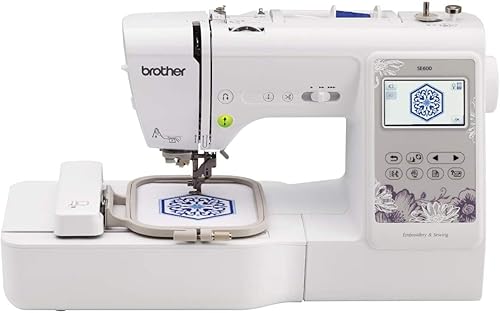
Brother SE600 Sewing and Embroidery Machine
9.4/10 our score
See it on Amazon
- 4
 Check it
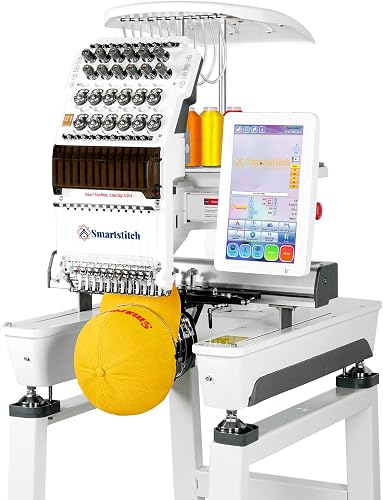
Smartstitch S-1201 Plus Embroidery Machine
Best for large multi-color patches - 5
 Check it
SINGER® Smart HD 9120™ Sewing Machine
Best for sewing-first makers - 6
 Check it
Poolin EOC06 Large Hoop Embroidery Machine
Best for large home-business patches - 7
 Check it
Brother PE900 Wireless Embroidery Machine with WLAN
Best for larger Brother patches - 8
 Check it
Brother PE535 Embroidery Machine
Best for simple USB patch designs
Which embroidery machine for patches is best for your work?
The best machine depends on your patch size and production pace.
Choose the Smartstitch S-1001 for repeated work, a Brother combo machine for sewing and small patches, or the Poolin EOC06 for a larger home-business hoop.
Start with the finished patch and add room for the border.
A compact home machine suits occasional small patches and general sewing, while a production model suits batches and multi-color designs.
Think about how often you will change thread colors during a run.
Multi-needle machines reduce those stops, but they also need more space and a more involved setup.
Consider your table and storage before you compare features.
A heavier commercial-style machine needs a stable surface, while a lighter home model is easier to move and put away.
Also weigh how you will move designs to the machine.
USB, Wi-Fi and app or wireless options each fit different habits, so pick the workflow you will actually use for every patch file.
That simple match of size, pace and workspace will narrow the choice faster than a long feature list.
| Product | Best for | Embroidery area | Built-in designs | Machine type | Our score |
|---|---|---|---|---|---|
| Brother SE700 Sewing and Embroidery Machine | compact sewing and embroidery | 4 x 4 in | 135 | Sewing and embroidery combo | 9.7 |
| Smartstitch S-1001 Upgraded Embroidery Machine | repeated patch production | 9.5 x 14.2 in | 9.6 | ||
| Brother SE600 Sewing and Embroidery Machine | first small patches | 4 x 4 in | 80 | 9.4 | |
| Smartstitch S-1201 Plus Embroidery Machine | large multi-color patches | 12 x 16 in | 9.3 | ||
| SINGER® Smart HD 9120™ Sewing Machine | sewing-first makers | Sewing machine with optional embroidery | 9.1 | ||
| Poolin EOC06 Large Hoop Embroidery Machine | large home-business patches | 7.9 x 11 in | 200 | 8.5 | |
| Brother PE900 Wireless Embroidery Machine with WLAN | larger Brother patches | 5 x 7 in | 193 | Embroidery only | 8.5 |
| Brother PE535 Embroidery Machine | simple USB patch designs | 4 x 4 in | 80 | Embroidery only | 8.4 |
Best embroidery machines for patches compared
The machines below are ordered by score.
Each one solves a different patch-making problem, from small home projects to larger multi-color production.
Read them in order if you want the overall ranking, or jump to the badge that matches your setup.
Compact combo machines suit makers who sew daily and add patches as a side task.
Embroidery-only models suit a focused patch workflow without general sewing functions.
Larger multi-needle and large-hoop models suit batches, wider badges and designs that need several thread colors on the machine at once.
No single machine wins on every point.
The best fit depends on hoop size, color-change workflow, file transfer and the space you have available.
Brother SE700 Sewing and Embroidery Machine: Best for compact sewing and embroidery
- 4 x 4 in embroidery field
- 135 built-in designs
- 103 built-in sewing stitches
- Wireless LAN and USB transfer
A compact combo machine for home makers who want to create small patches and sew other projects on one machine.
Pros
- 135 built-in embroidery designs
- 4 x 4 in hoop
- Wireless design transfer
- Includes 8 sewing feet
Cons
- Smaller patch area than commercial machines
- US 120-volt use
The Brother SE700 is the strongest compact choice when you want sewing and embroidery in one machine. Its 4 x 4 in embroidery field suits small patches, initials and simple badge designs.
The machine includes 135 built-in embroidery designs, 10 embroidery lettering fonts and 103 built-in sewing stitches. The 3.7 in color touchscreen lets you preview and edit designs before stitching.
Wireless LAN supports transfers from a computer through Design Database Transfer, and the Artspira app can create or download designs for wireless transfer. A USB port gives you another file-transfer route.
The included 4 x 4 in hoop, embroidery arm and 8 sewing feet make it useful for a home workspace with mixed projects. Its 15.6 lb weight and 16.5 x 7.76 x 12.09 in dimensions are easier to plan around than a commercial machine.
Choose it for small patches and general sewing. If your patches need more than 4 x 4 in, move to the Brother PE900 or a larger-hoop machine.
Smartstitch S-1001 Upgraded Embroidery Machine: Best for repeated patch production
- 10 needles
- 1200 SPM maximum speed
- 9.5 x 14.2 in embroidery area
- 7 in touchscreen
A commercial-style patch embroidery machine for larger layouts, multiple thread colors and repeated production.
Pros
- Large embroidery area
- 10 needles for color changes
- Automatic thread trimming
- USB and Wi-Fi transfer
Cons
- 93 lb machine weight
- Larger setup than home machines
The Smartstitch S-1001 is the best embroidery patch machine for repeated production. Its 9.5 x 14.2 in embroidery area gives you room to arrange larger patches, while 10 needles reduce manual color changes in multi-color designs.
The machine reaches a maximum speed of 1200 SPM and has a 7 in touchscreen. Automatic thread trimming, automatic color changing, thread break detection and laser positioning support a more production-focused workflow.
The S-1001 supports DST and DSB files through USB or Wi-Fi. It can stitch designs on denim, canvas, leather, vinyl, caps, shoes and bags, according to Smartstitch.
This is a 93 lb corded-electric machine with 25 x 34 x 33 in dimensions. Plan a stable workspace before choosing it, especially if you want to make batches of patches rather than occasional single pieces.
Choose it when patch quantity, thread colors and design area matter most. A compact Brother is easier for beginners with limited space.
Brother SE600 Sewing and Embroidery Machine: Best for first small patches
- 4 x 4 in embroidery field
- 80 built-in designs
- 103 built-in sewing stitches
- 3.2 in LCD touchscreen
A beginner-friendly combo machine for small patches, lettering and general sewing in a single compact setup.
Pros
- 4 x 4 in hoop
- Automatic needle threader
- 103 sewing stitches
- Includes 7 sewing feet
Cons
- Slower embroidery speed
- Small patch field
The Brother SE600 suits beginners who want a 4 x 4 in patch embroidery machine with sewing functions. Its 80 built-in embroidery designs and 6 embroidery lettering fonts cover small personal patches and simple labels.
The 3.2 in color touchscreen lets you preview designs, and the automatic needle threader reduces one setup task. The machine also has 103 built-in sewing stitches and a maximum sewing speed of 710 stitches per minute.
Its maximum embroidery speed is 400 SPM, which is slower than the Smartstitch machines. That makes it a better fit for occasional patch work than for a large repeated order.
The included embroidery arm, 4 x 4 in hoop and 7 sewing feet give you a combined sewing and embroidery setup. The machine measures 15.51 x 21.18 x 16.54 in and weighs 26.2 lb.
Choose it for small patches and general sewing. Choose the SE700 if you want more built-in embroidery designs and wireless transfer.
Smartstitch S-1201 Plus Embroidery Machine: Best for large multi-color patches
- 12 needles
- 1200 SPM maximum speed
- 12 x 16 in embroidery area
- 10 in touchscreen
The largest-area pick here for patch layouts that need more room, with 12 needles for designs using several thread colors.
Pros
- Largest embroidery area here
- 12 needles
- Automatic color changing
- USB transfer
Cons
- Commercial machine footprint
- Higher setup demands than combo machines
The Smartstitch S-1201 Plus is the best choice here for large multi-color patch layouts. Its 12 x 16 in embroidery area is the largest in this group, and its 12 needles suit designs with several thread colors.
The machine has a 1200 SPM maximum speed, a 10 in touchscreen, automatic thread trimming, automatic color changing, thread break detection and laser embroidery positioning.
Smartstitch says the S-1201 Plus supports DST and DSB files and can stitch on denim, canvas, leather, vinyl, caps, shoes and bags. The machine uses USB transfer for designs.
Its dimensions are 22 x 17 x 29 in, and its aluminum construction gives it a commercial-style setup. The larger field helps with patch layouts, but it also demands more workspace than a 4 x 4 in home machine.
Choose it for large designs and repeated production with many colors. The S-1001 is the more compact Smartstitch option.
SINGER® Smart HD 9120™ Sewing Machine: Best for sewing-first makers
- Optional 900E embroidery attachment
- 170 x 100 mm hoop with attachment
- 200+ stitches
- CREATIVATE app control
A sewing-first option for makers who want patch embroidery later through the separately sold 900E embroidery attachment.
Pros
- 200+ stitches
- App-based controls
- Built-in needle threader
- Speed control
Cons
- Embroidery attachment sold separately
- Not a ready-to-use embroidery machine
The SINGER Smart HD 9120 is best for sewing-first makers who may add embroidery later.
It is a sewing machine with optional embroidery, so the separately sold 900E attachment is required before it can make embroidered patches.
With that attachment, the stated embroidery hoop is 170 x 100 mm.
That hoop size gives you room for patches that are wider than a 4 x 4 in field, but only after the extra attachment is fitted.
The machine itself offers more than 200 stitches through the CREATIVATE app, plus app-based stitch controls, tutorials and project guidance.
The app helps organize the stitch library and lets you preview or adjust settings before you sew, which can make learning easier.
For a quick hem or plain sewing task, you can still use the machine without the app.
Built-in needle threading, a drop-and-sew bobbin system, speed control and a start/stop button support regular sewing work.
Speed control helps when you want to slow down for curves or detailed stitching, while start/stop reduces reliance on the foot control.
The machine measures 7.9 x 16.9 x 11.8 in and weighs 18.2 lb.
That compact footprint suits a home table more easily than a commercial production machine.
Included feet cover everyday sewing tasks, which reinforces the sewing-first positioning of this model.
This is not the best ready-to-use embroidery patch machine in this roundup because embroidery requires an extra attachment.
It makes sense if sewing is your main task and patch embroidery is a later expansion, but budget for the attachment and check compatibility before you buy.
Poolin EOC06 Large Hoop Embroidery Machine: Best for large home-business patches
- 7.9 x 11 in embroidery area
- 200 built-in designs
- 7 in color touchscreen
- Wi-Fi and USB transfer
A large-hoop home-business option with several hoops, built-in designs and included thread, bobbins and stabilizers.
Pros
- Large 7.9 x 11 in hoop
- 4 hoops included
- Wi-Fi and USB transfer
- Includes thread and stabilizers
Cons
- 35 lb machine
- 90/14 needle guidance is for common fabrics under 4 mm
The Poolin EOC06 is the best large-hoop embroidery machine for home-business patches. Its 7.9 x 11 in embroidery area gives more room than the 4 x 4 in Brother models without moving to the largest commercial-style machines.
It includes 5.5 x 5.5 in, 7.9 x 7.9 in and 7.9 x 11 in hoops. The 7 in color touchscreen supports design editing, while Wi-Fi and USB provide file-transfer options.
The machine includes 200 built-in patterns, 8 fonts and 10 languages. It also includes 6 rolls of polyester thread, pre-wound bobbins and stabilizers, which can reduce the number of supplies needed at setup.
Poolin says the EOC06 supports DST and DSB files. The machine weighs 35 lb and measures 23 x 27 x 12.5 in, so measure your table before choosing it.
The included 90/14 needle is intended for common fabrics smaller than 4 mm. For thicker fabric, follow the appropriate needle guidance and review this guide to Needles for Machine Embroidery: A Complete Guide.
Brother PE900 Wireless Embroidery Machine with WLAN: Best for larger Brother patches
- 5 x 7 in embroidery field
- 193 built-in designs
- 13 lettering fonts
- Wireless LAN and USB transfer
An embroidery-only Brother machine for patches larger than 4 x 4 in, with wireless transfer and on-screen design editing.
Pros
- 5 x 7 in hoop
- 193 built-in designs
- Color sort and jump-stitch trimming
- Wireless LAN
Cons
- Does not sew traditionally
- US 120-volt use
The Brother PE900 is the best larger Brother embroidery machine for patches. Its 5 x 7 in embroidery field gives you more room than a 4 x 4 in machine while keeping the workflow focused on embroidery.
The PE900 has 193 built-in designs, 13 lettering fonts and 50 free designs through the Artspira app. Its 3.7 in touchscreen supports resizing, rotating, repositioning and combining designs before stitching.
Wireless LAN and USB transfer give you two ways to move designs to the machine. Advanced Color Sort can adjust the order of multi-color stitching, and jump-stitch trimming handles excess thread jumps within a color.
The PE900 is embroidery-only and does not function as a traditional sewing machine. It measures 17 x 10 x 12 in and weighs 21 lb.
Choose it when you want a Brother workflow and a 5 x 7 in patch field. Choose the SE700 if you also need regular sewing.
Brother PE535 Embroidery Machine: Best for simple USB patch designs
- 4 x 4 in hoop area
- 80 built-in designs
- 9 font styles
- USB port
A straightforward embroidery patch machine for small designs, lettering and USB-based file transfer.
Pros
- Simple USB workflow
- 4 x 4 in hoop
- 3.2 in color touchscreen
- Embroidery-only layout
Cons
- No traditional sewing function
- Smallest design field
The Brother PE535 is the best simple USB embroidery patch machine for small designs.
Its 4 x 4 in hoop suits compact logos, names and basic badge shapes.
It has 80 built-in designs and 9 font styles, including 6 English and 3 Japanese lettering fonts.
Those built-in options help you start with lettering and simple motifs without needing a custom file for every test patch.
The USB port lets you upload your own designs, and the 3.2 in color touchscreen helps you preview them before stitching.
Previewing on screen makes it easier to check size and placement before you commit fabric and stabilizer.
Drag and drop positioning on the display also helps you center a small patch design within the hoop area.
The PE535 is embroidery-only, so it does not replace a traditional sewing machine.
That focus can simplify the embroidery workflow, since the controls and hoop are set up for stitching designs rather than switching between sewing and embroidery modes.
It includes a 4 x 4 in hoop, embroidery arm and embroidery foot.
Having the arm and foot included means you can set up for embroidery without sourcing those parts separately.
At 15 x 16.5 x 12 in and 15 lb, it is one of the easier machines here to place in a small workspace.
Its 4 x 4 in field remains the main limit for larger patches.
Measure the finished patch before choosing it, because a wider border or added lettering can quickly exceed the usable area.
Choose it for simple small patches and USB transfers.
Choose the PE900 for a larger Brother embroidery field.
What should you look for in an embroidery machine to make patches?
Look first at the embroidery field, needle setup and transfer method. Those three details affect the patch size you can stitch, how often you stop for color changes and how easily you move digitized designs to the machine.
What hoop size is best for patch embroidery?
A 4 x 4 in hoop works for many small patches, names and compact logos. The Brother SE700, Brother SE600 and Brother PE535 all use a 4 x 4 in field.
A 5 x 7 in hoop gives more room for larger badges. The Brother PE900 fits this middle ground, while the Poolin EOC06 and Smartstitch machines are better for larger layouts.
Measure the finished patch, including its border. The design must fit inside the usable embroidery area with enough room for the edge treatment.
Are more needles better for an embroidery patch machine?
More needles can help when a patch uses several thread colors because you can keep more colors loaded. The Smartstitch S-1001 has 10 needles, and the S-1201 Plus has 12.
A single-needle home machine can still make excellent patches, but you may need to change thread colors by hand. For occasional work, a simpler machine may be easier to learn and maintain.
Needle count matters most when patch volume and color changes are high. It does not replace careful design setup, correct tension and suitable stabilizer.
How do dense borders affect patch machine choice?
Dense borders need enough design space, firm stabilization and careful digitizing. A larger hoop gives you more room to place the border without crowding the patch edge.
The S-1001, S-1201 Plus and Poolin EOC06 offer larger fields than the 4 x 4 in machines. That makes them easier to consider for large badges or layouts with wide edging.
Start with a design made for patches rather than simply shrinking a larger design. Small stitches can crowd together when a design is reduced.
Which thread weight should you use for machine embroidery patches?
Thread weight affects stitch coverage and the look of the finished border. Use a thread choice that matches the digitized design, needle, and fabric, then check our guide to What Weight Thread for Machine Embroidery?.
The right combination helps keep small details readable. If the thread is too heavy for the design or needle, dense areas may become crowded and lettering harder to read.
A lighter thread can keep fine details clearer, but it may need more stitches to reach the same coverage. Fabric also changes the result, as stable fabrics hold dense stitches differently from stretch or soft fabrics.
Needle choice works with thread weight rather than against it. A needle that is too small for the thread can cause friction and skipped stitches, while a needle that is too large can leave visible holes.
Stabilizer plays a supporting role in the same balance. Firm support helps dense patch designs hold their shape, yet the wrong type for the fabric can still cause puckering or stiffness around the edge.
Always confirm the machine needle and threading instructions before starting a full batch. A small test patch on the actual material can reveal coverage, puckering, and border alignment before you use the final fabric.
Keep the test patch beside the finished plan so you can compare stitch density, thread color, and edge shape side by side. If the test shows crowded stitches, adjust the design or thread pairing for the next attempt.
Small changes at test stage are cheaper and faster than cutting out a full set of patch blanks. That careful check is especially worth doing when the border is dense and the patch will be repeated.
How do you choose the right patch embroidery machine?
Choose the Smartstitch S-1001 when you need repeated production, 10 needles, and a 9.5 x 14.2 in field. Choose the Brother SE700 when you need a compact machine that also sews.
The SE700 suits home makers who want small patches alongside everyday sewing in one setup. Its 4 x 4 in field keeps the footprint modest, but it will not fit larger badge designs.
Choose the Brother PE900 for a 5 x 7 in Brother embroidery-only workflow. That middle field gives more room for patch borders without moving to a full production machine.
Choose the Poolin EOC06 for a larger home-business field with several included hoops. Multiple hoop sizes help you match the layout to the job, from smaller pieces to wider designs.
For large multi-color work, the Smartstitch S-1201 Plus provides the largest embroidery area here. Its 12 needles and 12 x 16 in field suit designs that need several colors and more layout space.
For small USB designs, the Brother PE535 keeps the setup simple. Its embroidery-only design and 4 x 4 in hoop suit compact patches in a small workspace.
Before you decide, measure the finished patch and note how many patches you will make in a typical run. A single small patch and a weekly batch of multi-color patches ask for very different machines.
Also check the space you can give the machine daily. A large production model needs a stable surface and room around the hoop path, while a compact model can share a home table.
Think about color changes in practical terms. If your patch uses several thread colors, a multi-needle model reduces hand changes and keeps the run moving.
If your patches are mostly one or two colors, a single-needle machine may be simpler to learn, thread, and maintain.
File transfer should match your habits as well, as USB suits offline handling while Wi-Fi, wireless LAN, or an app may suit makers who move designs more often. The best embroidery machine for patches is the one whose hoop fits your finished design and whose workflow matches your output.
Measure the patch first, then decide whether you need a combo machine, a single-needle embroidery machine or a multi-needle production model. That order keeps the choice grounded in the work itself.
Our top 3 picks at a glance
-
1
Best for compact sewing and embroidery
Brother SE700 Sewing and Embroidery Machine
9.7/10 our score
See it on Amazon -
2
Best for repeated patch production
Smartstitch S-1001 Upgraded Embroidery Machine
9.6/10 our score
See it on Amazon -
3
Best for first small patches
Brother SE600 Sewing and Embroidery Machine
9.4/10 our score
See it on Amazon
Frequently asked questions
What is the best embroidery machine for patches?
The Smartstitch S-1001 is the strongest choice for repeated patch production because it has 10 needles, a 9.5 x 14.2 in embroidery area and a 1200 SPM maximum speed.
For occasional small patches, the Brother SE700 or Brother PE535 takes less space and uses a 4 x 4 in hoop.
What size embroidery machine do I need for patches?
A 4 x 4 in embroidery field is enough for many small name, logo and badge designs. Choose a 5 x 7 in, 7.9 x 11 in or larger field when your patch shape or border needs more room.
The hoop size limits the design area, so measure the finished patch before choosing a machine.
Can an embroidery machine make dense patch borders?
Yes, an embroidery machine can stitch dense borders when the design, needle, thread and stabilizer are matched correctly. Large commercial-style machines give more room for border layouts and repeated work.
A dense border also needs careful digitizing and test stitching, so machine size alone does not guarantee a clean edge.
Is a sewing machine also an embroidery patch machine?
Only if it has embroidery capability or a compatible embroidery attachment. The Brother SE700 and SE600 combine sewing and embroidery, while the SINGER Smart HD 9120 needs the separately sold 900E attachment.
The Brother PE900 and PE535 are embroidery-only machines.
What file formats work with an embroidery patch machine?
The Smartstitch S-1001 and S-1201 Plus support DST and DSB files, while the Poolin EOC06 also supports DST and DSB. Other machines in this guide use their own supported transfer workflow through USB, wireless LAN or an app.
Check the machine instructions before exporting a design.


