9 Best Brother Embroidery Machines for Beginners (November 2026)
The best Brother embroidery machines for beginners include the Brother SE2000 Sewing and Embroidery Machine Computerized for growing into larger projects, the Brother SE700 Sewing and Embroidery Machine for learning sewing and embroidery together, and the Smartstitch S-1001 Upgraded Embroidery Machine for a commercial-style learning path.
On this page (6 sections)
- Which Brother embroidery machine is best for beginners?
- Best Brother embroidery machines for beginners
- How should beginners choose an embroidery field?
- What else should you buy for a Brother embroidery machine?
- How do beginners avoid common embroidery problems?
- Which Brother embroidery machine should you choose?
The best Brother embroidery machine for beginners is the Brother SE2000 if you want sewing and embroidery together. The PE900 is the better focused choice for embroidery only, while the SE700 offers a smaller combo format with wireless transfer and beginner-friendly controls.
We compared Brother combo machines, embroidery-only models and one larger multi-needle alternative. That mix matters because many beginners are not sure at the start whether they will mainly sew, mainly embroider, or try both on the same machine.
The main buying decisions are the embroidery field, whether you need sewing functions, how you will transfer designs and what supplies are included. Hoop size affects the projects you can finish in one hooping, while sewing functions affect everyday use for hems, seams and buttonholes.
Design transfer also shapes daily use more than it first appears. Wireless LAN can suit people who work from a computer often, while USB transfer can suit people who prefer a simple cable connection and local files.
Included accessories deserve a close look before you decide. Extra hoops, sewing feet, bobbins, needles and thread can change what you can start on day one and what you need to buy separately later.
For a wider look at the brand, see our guide to the best Brother embroidery machines. That guide can help if you want to compare models beyond the beginner range.
If you already have the PE545, our Brother PE545 embroidery machine reviews can help with the next comparison. It may also help you judge whether a combo machine or an embroidery-only model fits your next step.
A beginner price can feel high, but the better question is which machine matches the projects you will actually make. Small names and gifts point one way, while larger lettering and regular sewing point another.
We weighted touchscreen editing, built-in designs, fonts and stitch options against ease of setup and care. A machine with clear controls and a practical field size is often easier to learn than a model with more features but fewer clear paths.
Use this roundup as a shortlist, then check dimensions, weight and included parts for your exact choice. Keep your receipt information safe and plan space for hoops, thread and stabilizer near the machine.
That approach keeps the first purchase focused on learning, not on chasing every possible feature. You can add files, thread and accessories later as your taste and skills grow.
Our picks at a glance
-
1
 Best for growing into larger projects
Brother SE2000 Sewing and Embroidery Machine Computerized
9.7/10 our score
See it on Amazon -
2
 Best for learning sewing and embroidery together
Brother SE700 Sewing and Embroidery Machine
9.7/10 our score
See it on Amazon -
3
 Best for a commercial-style learning path
Smartstitch S-1001 Upgraded Embroidery Machine
9.6/10 our score
See it on Amazon
- 4
 Check it
Brother SE700 Combo Embroidery & Sewing Machine
Best for a ready-to-start bundle - 5
 Check it
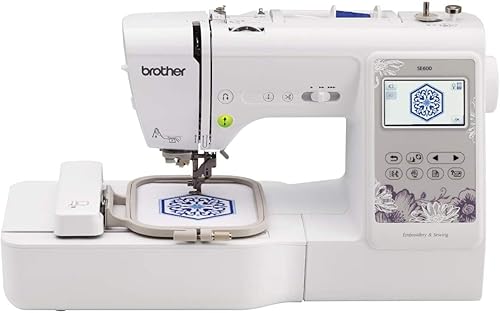
Brother SE600 Sewing and Embroidery Machine
Best for simple combo-machine practice - 6
 Check it
Brother PE900 Wireless Embroidery Machine with WLAN
Best for embroidery-only learners - 7
 Check it
Brother PE535 Embroidery Machine
Best for straightforward USB learning - 8
 Check it
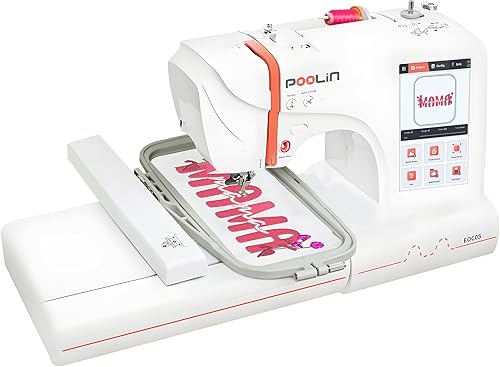
Poolin EOC05 Embroidery Machine for Beginners
Best non-Brother alternative for home projects - 9
 Check it
Brother PE800 Embroidery Machine
Best for larger USB designs on a budget
Which Brother embroidery machine is best for beginners?
The best overall choice is the Brother SE2000 because it combines a 5 x 7 in embroidery field with 241 sewing stitches, wireless transfer and touchscreen editing. It gives a beginner room to learn embroidery without giving up a full sewing machine.
The Brother SE700 is a better fit when you want a lighter combo machine and expect to make mostly small designs. Its 4 x 4 in field, 135 built-in embroidery designs and 103 sewing stitches cover many beginner projects.
Choose the Brother PE900 when embroidery is your only goal. It has the same 5 x 7 in field size as the SE2000, plus 193 built-in designs and 13 fonts, but it does not function as a traditional sewing machine.
Our score weighs specs, features and buyer feedback against what you're shopping for. The scores also reflect how well each machine fits a beginner's likely need for clear controls, useful design space and a practical path to more projects.
| Product | Best for | Embroidery field | Built-in designs | Display | Our score |
|---|---|---|---|---|---|
| Brother SE2000 Sewing and Embroidery Machine Computerized | growing into larger projects | 5 x 7 in | 193 embroidery designs and 241 sewing stitches | 3.7 in LCD touchscreen | 9.7 |
| Brother SE700 Sewing and Embroidery Machine | learning sewing and embroidery together | 4 x 4 in | 135 embroidery designs and 103 sewing stitches | 3.7 in LCD touchscreen | 9.7 |
| Smartstitch S-1001 Upgraded Embroidery Machine | a commercial-style learning path | 9.6 | |||
| Brother SE700 Combo Embroidery & Sewing Machine | a ready-to-start bundle | 4 x 4 in | 3.2 x 1.8 in LCD color touchscreen | 9.5 | |
| Brother SE600 Sewing and Embroidery Machine | simple combo-machine practice | 4 x 4 in | 80 embroidery designs and 103 sewing stitches | 3.2 in LCD touchscreen | 9.4 |
| Brother PE900 Wireless Embroidery Machine with WLAN | embroidery-only learners | 5 x 7 in | 193 embroidery designs and 13 fonts | 3.7 in LCD touchscreen | 8.5 |
| Brother PE535 Embroidery Machine | straightforward USB learning | 4 x 4 in | 80 designs and 9 fonts | 3.2 in LCD touchscreen | 8.4 |
| Poolin EOC05 Embroidery Machine for Beginners | non-Brother alternative for home projects | 7 in color touchscreen | 8.4 | ||
| Brother PE800 Embroidery Machine | larger USB designs on a budget | 5 x 7 in | 138 designs and 11 fonts | 3.2 in LCD touchscreen | 8.3 |
Best Brother embroidery machines for beginners
The strongest beginner picks separate into three groups: combo machines for sewing and embroidery, embroidery-only machines for a focused setup, and larger models for people who already know they want more capacity.
Brother SE2000 Sewing and Embroidery Machine Computerized: Best for growing into larger projects
- 5 x 7 in embroidery field
- 241 built-in sewing stitches
- 193 built-in embroidery designs
- Wireless LAN and USB transfer
The SE2000 combines sewing and embroidery with a 5 x 7 in field, 193 built-in embroidery designs, 50 downloadable designs and 241 sewing stitches. Wireless LAN, USB transfer and touchscreen editing give beginners room to expand.
Pros
- Largest Brother combo field here
- Wireless and USB design transfer
- Includes 8 sewing feet
Cons
- Heavier than the other Brother home models
- 120-volt US use only
The Brother SE2000 is the most flexible choice in this group. Its 5 x 7 in embroidery field gives you more room than a 4 x 4 in machine for larger designs and lettering.
It includes 193 built-in embroidery designs, 50 downloadable designs through Artspira, 13 embroidery fonts and 241 sewing stitches. That combination supports both machine embroidery practice and regular sewing projects.
The 3.7 in touchscreen lets you edit lettering, resize, rotate, reposition and combine designs before stitching. Wireless LAN can transfer embroidery files from a computer through Design Database Transfer, and the built-in USB port offers another route.
Color sorting can reduce thread changes in multi-color designs. Jump stitch trimming handles excess thread jumps within the color, which can simplify cleanup after stitching.
This model is 17.56 in deep, 9.49 in wide and 11.81 in high, with a listed weight of 38 lb. It includes a 5 x 7 in hoop, 8 sewing feet, bobbins, a needle set, cleaning tools and other accessories.
Choose it if your beginner plan includes both embroidery and sewing. If you only want embroidery, the PE900 provides a similar field size in a more focused machine.
Brother SE700 Sewing and Embroidery Machine: Best for learning sewing and embroidery together
- 4 x 4 in embroidery field
- 135 built-in embroidery designs
- 103 built-in sewing stitches
- Wireless LAN and Artspira support
The SE700 is a compact combo machine with a 4 x 4 in field, 135 embroidery designs, 10 lettering fonts and 103 sewing stitches. Its automatic needle threader and wireless design transfer suit a beginner building both skills.
Pros
- Sewing and embroidery in one machine
- Automatic needle threader
- 8 sewing feet included
Cons
- Smaller field than the SE2000
- 120-volt US use only
The Brother SE700 is a practical starting point for learning two skills in one machine. Its 4 x 4 in embroidery field suits names, small motifs and many gifts, while 103 sewing stitches add regular sewing options.
You get 135 built-in embroidery designs, 10 embroidery lettering fonts and 103 built-in sewing stitches. The 3.7 in color touchscreen lets you preview and edit embroidery designs before stitching.
Wireless LAN supports transfer from a computer through Design Database Transfer. Artspira can also send downloaded or custom patterns wirelessly, while the USB port gives you another transfer method.
The automatic needle threader pushes thread through the needle, and the drop-in top bobbin is designed for easy loading. The machine includes 8 sewing feet, a 4 x 4 in hoop, bobbins, needles and a twin needle.
At 16.5 in deep, 7.76 in wide and 12.09 in high, the SE700 has a smaller listed footprint than the SE2000. It weighs 15.6 lb, which may make it easier to move between storage and a work surface.
Pick it when you want a lighter combo machine and mostly plan to stitch within a 4 x 4 in area. For step-by-step setup, read how to use the Brother PE900 embroidery machine, then apply the same basic habits to your model's manual.
Smartstitch S-1001 Upgraded Embroidery Machine: Best for a commercial-style learning path
- 10 needles
- 9.5 x 14.2 in embroidery area
- 7 in LCD touchscreen
- USB and WiFi pattern transmission
The Smartstitch S-1001 is a much larger step than the home Brother models, with 10 needles, a 9.5 x 14.2 in area and 1200 SPM maximum speed. It includes training resources and a starter pack for broader embroidery work.
Pros
- Largest embroidery area here
- 10 needles for multi-color work
- USB and WiFi transmission
Cons
- 93 lb machine weight
- Much larger footprint than home models
The Smartstitch S-1001 is the largest and most specialized option here. It is a commercial-style machine with 10 needles, a 9.5 x 14.2 in embroidery area and a 1200 SPM maximum speed.
A 7 in LCD touchscreen provides the control surface. The machine supports USB and WiFi pattern transmission, and its listed functions include automatic thread trimming, automatic color changing, thread break detection and laser embroidery positioning.
The S-1001 supports DST and DSB embroidery files. The included starter pack contains machine embroidery threads, stabilizers and bobbin threads, while the package also includes flat, cap and T-shirt embroidery equipment, a bobbin winder, toolbox, stand and user manual.
The brand also describes manuals, video training and live support options for new users. Keep the wooden pallet, accessory boxes, metal buckles and fixed bolts for a period after unpacking in case a return is needed.
This is a 93 lb aluminum machine measuring 25 in deep, 34 in wide and 33 in high. It needs a dedicated work area and a willingness to learn a more involved setup.
Choose it only if your beginner goal includes a large embroidery area and multi-needle workflow. For ordinary home monograms, the smaller Brother models are easier to place and simpler to compare.
Brother SE700 Combo Embroidery & Sewing Machine: Best for a ready-to-start bundle
- 4 x 4 in embroidery field
- 4 embroidery hoops
- 40 polyester thread spools
- 135 embroidery designs and 103 sewing stitches
This SE700 bundle adds 4 embroidery hoops, 40 polyester thread spools and accessories to the same basic 4 x 4 in combo-machine format. It suits beginners who want supplies arranged around the machine from the start.
Pros
- Thread set and multiple hoops included
- Sewing and embroidery in one machine
- 135 built-in embroidery designs
Cons
- 4 x 4 in field limits larger designs
- Bundle and machine details should be checked together
This Brother SE700 bundle is best for beginners who want thread and extra hoops arranged with the machine. The core machine has a 4 x 4 in embroidery field, 135 built-in embroidery designs and 103 built-in sewing stitches.
The bundle includes two 4 x 4 in hoops, one 4 x 6.75 in hoop and one 1 x 2.5 in hoop. It also includes 40 polyester embroidery thread spools with 500 m on each spool.
The accessory set includes 8 sewing feet, needles, bobbins, pre-wound bobbins, scissors, a seam ripper, cleaning brush, screwdrivers, spool caps and an accessory bag. It also includes the machine's operation manual, quick reference guide and embroidery design guide.
The bundle lists the Brother Artspira app, a 3.2 x 1.8 in LCD color touchscreen and wireless LAN. The included design cards contain SVG and JPG files for embroidery designs and commercial use.
Choose this version if the added supplies match your first projects. The 4 x 4 in field still sets the same design-size limit as the standard SE700.
Brother SE600 Sewing and Embroidery Machine: Best for simple combo-machine practice
- 4 x 4 in embroidery field
- 80 built-in embroidery designs
- 103 built-in sewing stitches
- 3.2 in LCD touchscreen
The SE600 gives beginners a sewing and embroidery combination with an automatic needle threader, 80 built-in designs, 103 sewing stitches and a 4 x 4 in hoop area. Its smaller display keeps the basic controls focused.
Pros
- Sewing and embroidery together
- Automatic needle threader
- Includes 7 sewing feet
Cons
- Fewer built-in embroidery designs than the SE700
- Older 3.2 in display
The Brother SE600 is a focused combo machine for beginners who want to practice sewing and embroidery without a large feature list. It has 80 built-in embroidery designs, 6 embroidery lettering fonts and 103 built-in sewing stitches.
Its 4 x 4 in field includes the hoop, embroidery arm and embroidery foot. The 3.2 in LCD color touchscreen lets you preview designs before stitching, while the automatic needle threader and drop-in top bobbin support basic setup.
The SE600 includes 7 sewing feet, bobbins, an embroidery hoop, a needle set, cleaning brush, seam ripper and other accessories. Its maximum embroidery speed is 400 SPM, and its maximum sewing speed is 710 stitches per minute.
The listed dimensions are 15.51 in deep, 21.18 in wide and 16.54 in high. It weighs 26.2 lb and uses corded electric power.
Choose it when sewing matters as much as embroidery and you prefer a basic 4 x 4 in starting point. The SE700 gives you more built-in embroidery designs and a larger touchscreen.
Brother PE900 Wireless Embroidery Machine with WLAN: Best for embroidery-only learners
- 5 x 7 in embroidery field
- 193 built-in embroidery designs
- 13 lettering fonts
- Wireless LAN, USB and Artspira support
The PE900 focuses entirely on embroidery, with a 5 x 7 in field, 193 built-in designs, 13 fonts and wireless or USB transfer. It is a strong fit when you do not need a traditional sewing machine.
Pros
- Larger field for lettering and designs
- Wireless and USB transfer
- Color sorting and jump stitch trimming
Cons
- Does not sew traditional seams
- 120-volt US use only
The Brother PE900 is the best focused choice for a beginner who wants embroidery only. Its 5 x 7 in field provides more design room than the PE535, while the 3.7 in touchscreen gives you space to edit lettering and layouts.
It includes 193 built-in embroidery designs and 13 lettering fonts across English, Japanese and Cyrillic options. Wireless LAN supports Design Database Transfer and Artspira, and a USB port provides another way to move files.
Color sorting can reduce color changes in multi-color patterns. Jump stitch trimming automatically trims excess thread jumps within the color, which can reduce finishing work.
The PE900 includes a 5 x 7 in embroidery frame set, embroidery foot, bobbins, embroidery bobbin thread, a needle set, scissors, cleaning brush and a dust cover. It measures 17 in deep, 10 in wide and 12 in high, and weighs 21 lb.
It does not function as a traditional sewing machine. Choose it if your projects are names, designs, garments, bags or gifts and you do not need to sew seams on the same machine.
For bobbin planning, see our guide to the best bobbins for the Brother PE900.
Brother PE535 Embroidery Machine: Best for straightforward USB learning
- 4 x 4 in embroidery field
- 80 built-in designs
- 9 font styles
- USB design transfer
The PE535 is an embroidery-only Brother machine with a 4 x 4 in hoop, 80 built-in designs, 9 fonts and USB transfer. Its focused controls make sense for beginners who want lettering and small projects without sewing functions.
Pros
- Simple embroidery-only setup
- USB port for imported designs
- Includes hoop, arm and foot
Cons
- Cannot sew traditional seams
- 4 x 4 in field limits design size
The Brother PE535 keeps the learning path simple by focusing on embroidery. It has a 4 x 4 in field, 80 built-in designs and 9 lettering fonts, including English and Japanese options.
The USB port lets you upload and store embroidery designs in the machine's built-in memory. A 3.2 in LCD color touchscreen lets you preview designs, and the drag-and-drop feature helps reposition a design on the display.
The PE535 includes a 4 x 4 in hoop, embroidery arm and embroidery foot. Its listed dimensions are 7.8 in deep, 16.5 in wide and 12 in high, with a weight of 15 lb.
This machine does not function as a traditional sewing machine. Choose it for small embroidered names, monograms, holiday designs and beginner gifts when USB transfer is enough.
If you need a setup walkthrough, read how to use the Brother embroidery machine PE535. The 4 x 4 in field is easier to plan around, but it will not handle the same large layouts as the PE900 or PE800.
Poolin EOC05 Embroidery Machine for Beginners: Best non-Brother alternative for home projects
- 4 x 9.25 in embroidery area
- 7 in color touchscreen
- WiFi and USB transfer
- Starter bundle included
The Poolin EOC05 is an embroidery-only alternative with a 4 x 9.25 in area, 7 in touchscreen, WiFi and USB transfer. Its starter bundle includes thread, stabilizer, bobbins, needles and two hoops.
Pros
- Longer field than standard 4 x 4 in models
- 7 in touchscreen
- Starter supplies included
Cons
- Not a Brother machine
- Not intended for commercial mass production
The Poolin EOC05 is the main non-Brother alternative in this roundup. It is designed for beginners and home DIY projects, with a 4 x 9.25 in embroidery area that is longer than the standard 4 x 4 in field.
A 7 in color touchscreen and Institch OS2 support simple control. WiFi and USB transfer give you design options, and the included free software can create and edit designs for personal projects.
The starter bundle includes 4 x 9.25 in and 4 x 4 in hoops, 6 rolls of thread, 30 pieces of stabilizer, 25 rolls of bobbins, 9 needles, a USB device, thread stand, tool kit and instruction materials.
The EOC05 is embroidery only and does not function as a sewing machine. It is intended for personal projects such as clothing, accessories, home decor and gifts, not commercial mass production.
Choose it if the longer 4 x 9.25 in field and 7 in touchscreen matter more than staying with Brother. If you want Brother's machine family and support materials, compare the PE900 and PE535 first.
Brother PE800 Embroidery Machine: Best for larger USB designs on a budget
- 5 x 7 in embroidery field
- 138 built-in designs
- 11 font styles
- USB design transfer
The PE800 gives beginners a 5 x 7 in embroidery field, 138 built-in designs, 11 fonts and USB transfer. It is suited to larger designs when wireless features are less important.
Pros
- 5 x 7 in field
- USB import
- 138 built-in designs
Cons
- Embroidery only
- No wireless transfer listed
The Brother PE800 is a good fit for beginners who want a 5 x 7 in field and USB transfer without a combo sewing machine. It includes 138 built-in designs and 11 lettering fonts.
The built-in designs include scrollwork, florals and quilt patterns. The fonts cover English, Japanese and Cyrillic lettering, while the 3.2 in color touchscreen lets you preview designs before stitching.
USB transfer imports designs into the machine's built-in memory. The PE800 includes a 5 x 7 in hoop, embroidery foot, bobbin, needle set, embroidery bobbin thread, scissors, cleaning brush, dust cover and accessory bag.
It measures 10.48 in deep, 18.48 in wide and 12.81 in high, with a listed weight of 17.6 lb. It uses electric power and is intended for 120-volt US use.
Choose it when a larger field is more important than wireless transfer. The PE900 adds wireless LAN, more built-in designs and a larger touchscreen.
How should beginners choose an embroidery field?
Beginners should choose a 4 x 4 in field for small names and motifs, or a 5 x 7 in field if larger lettering and fewer design limits matter. The field size determines the maximum area you can stitch in one hooping.
A 4 x 4 in machine can suit clothing labels, small towels, pockets and gifts. The SE700, SE600 and PE535 use this size, while the Poolin EOC05 adds a longer 4 x 9.25 in area.
That smaller field is easier to plan around at first. It keeps designs compact, reduces the chance of planning a layout that will not fit, and suits short names, simple monograms and small decorative motifs.
The long shape of the Poolin EOC05 area suits a different kind of project. It gives more length for words or narrow layouts, but it does not give the same width as a 5 x 7 in field.
A 5 x 7 in field gives more room for designs and lettering. The SE2000, PE900 and PE800 use this larger format, which may reduce the need to split a design into separate sections.
With more room, you can place wider lettering, combine motifs and leave more breathing space around a design. That can suit jackets, bags, larger towels and gifts where central placement matters.
The trade-off is planning and weight. Larger fields often come with larger hoops and heavier machines, so check how the machine fits your table and how you will store it between sessions.
Measure your work surface before choosing. The SE2000 weighs 38 lb, while the PE535 weighs 15 lb, and the Smartstitch S-1001 weighs 93 lb.
Also measure the items you hope to embroider. A design that fits the hoop may still be hard to place on a narrow seam, a cuff or a curved area without careful positioning.
If you are unsure, sketch your first few projects on paper at true size. That simple check often shows whether 4 x 4 in will feel roomy enough or whether 5 x 7 in is the safer long-term choice.
What else should you buy for a Brother embroidery machine?
Start with embroidery thread, bobbins, stabilizer and suitable needles. A beginner should also keep scissors, a seam ripper and cleaning tools nearby for setup and finishing.
Thread weight affects how a design fills and how the finished stitches look. Read what weight thread for machine embroidery before building a color set.
The SE2000, PE900 and PE535 include some thread and setup tools, but your ongoing projects may need more colors and replacement supplies. The SE700 bundle includes 40 polyester thread spools, while the Poolin package includes 6 rolls of thread.
Stabilizer choice depends on the fabric and design. Hoop the fabric and stabilizer evenly, keep the surface smooth and check the design placement before starting.
For gift projects, compare best embroidery blanket kits after you understand your field size. A larger blanket may need a larger design plan or several hoop positions.
How do beginners avoid common embroidery problems?
Most beginner problems come from incorrect threading, loose hooping, unsuitable needles, poor stabilizer choice or a design that is too large for the field. Start with a small design and a fabric sample before stitching a finished item.
A sample shows how thread, fabric and stabilizer work together. It can reveal puckering, shifting or poor coverage early, when you can still change the design size, needle or support.
Check that the bobbin is inserted correctly and that the upper thread follows the machine's numbered path. Clean the needle area as instructed, replace a damaged needle and keep the fabric flat in the hoop.
Loose hooping is a common cause of designs that wander or sit unevenly. The fabric should feel taut and smooth, with stabilizer held evenly and no folds pulled into the hoop.
Needles matter more than beginners often expect. A bent, dull or wrong size needle can skip stitches, fray thread or mark fabric, so replace it when results start to change.
Stabilizer choice also affects the finish. The wrong type can leave a design too stiff, too soft or distorted, so match support to the fabric weight and stitch density.
Use the touchscreen preview to check lettering size, rotation and placement. Wireless transfer can save time on supported models, but USB transfer remains useful on the PE535 and PE800.
Preview tools help, but they do not replace a test stitch. Scale, density and thread color can look different on screen than they do on woven, knit or textured fabric.
Don't judge a design only by the screen preview. Thread color, fabric texture and stabilizer can change how the finished stitches look, so make a sample when the project matters.
Keep a simple routine for care as well. Brush away lint, store hoops flat, keep thread clean and dry, and follow the manual for cleaning intervals and oiling where required.
Take breaks during long runs and watch the first rows closely. Early checks for tension, alignment and fabric movement are easier to fix than a design that has already stitched off center.
If a problem appears, stop and change only one thing at a time. That habit makes it easier to learn what caused the issue and avoids turning a small mistake into a repeat problem.
Which Brother embroidery machine should you choose?
Choose the SE2000 if you want the broadest beginner path, including a 5 x 7 in field and full sewing functions. Choose the SE700 if you want a lighter 4 x 4 in combo machine with wireless transfer.
Pick the PE900 for embroidery only with a 5 x 7 in field. Choose the PE535 for a simpler 4 x 4 in USB workflow, or the PE800 when you want a larger field with USB transfer.
The SE600 is a practical combo option for basic practice, while the SE700 bundle helps if you want extra thread and hoops included. Consider the Smartstitch S-1001 only when its multi-needle format and large work area match your long-term plan.
For a first Brother purchase, the decision rule is simple: choose combo if you need sewing, choose embroidery only if you do not, then select 4 x 4 in for small projects or 5 x 7 in for more room.
Our top 3 picks at a glance
-
1
Best for growing into larger projects
Brother SE2000 Sewing and Embroidery Machine Computerized
9.7/10 our score
See it on Amazon -
2
Best for learning sewing and embroidery together
Brother SE700 Sewing and Embroidery Machine
9.7/10 our score
See it on Amazon -
3
Best for a commercial-style learning path
Smartstitch S-1001 Upgraded Embroidery Machine
9.6/10 our score
See it on Amazon
Frequently asked questions
What is the best Brother embroidery machine for beginners?
The Brother SE2000 is the best Brother embroidery machine for beginners who want both sewing and embroidery, because it has a 5 x 7 in field, touchscreen editing, wireless transfer and 241 sewing stitches.
Choose the PE900 instead if you only want embroidery and prefer a 5 x 7 in field without traditional sewing functions.
Should a beginner choose a Brother combo or embroidery-only machine?
Choose a Brother combo machine if you want to sew seams, hems or buttonholes as well as embroider. The SE2000, SE700 and SE600 combine both functions.
Choose the PE900, PE535 or PE800 if your projects are focused on embroidery and you do not need a traditional sewing machine.
Is a 4 x 4 in embroidery machine large enough for beginners?
A 4 x 4 in embroidery field is large enough for many names, monograms, small motifs and beginner practice projects. It is easier to plan around than a larger field.
Choose a 5 x 7 in model if you expect to stitch larger designs, wider lettering or fewer rehoops as your skills grow.
What should beginners learn before using a Brother embroidery machine?
Start by learning threading, bobbin placement, hooping, stabilizer choice and design placement. Stitch a small sample before moving to a finished garment or gift.
Use the machine's touchscreen tutorials when available, and read our guide to needles for machine embroidery before choosing needle sizes.
Can Brother embroidery machines use designs from a computer?
Several Brother machines here support design transfer from a computer or USB device. The SE2000, SE700 and PE900 also support wireless transfer, while the PE535 and PE800 use USB transfer.
Check the file workflow for your exact model before moving designs to the machine.


