Cricut Maker vs Explore: Which Type Do You Need? (November 2026)
Choose Cricut Maker for fabric, thicker materials and specialty tools; choose Cricut Explore for everyday paper, vinyl and apparel projects. Your material list matters more than the machine's appearance.
On this page (9 sections)
- Cricut Maker vs Explore: what is the main difference?
- Which machine is better for fabric?
- Is Maker worth choosing for simple vinyl projects?
- Which Cricut Maker product fits a broader craft plan?
- Is the Maker 5 bundle better for starting many projects?
- Is Explore 5 enough for everyday craft projects?
- Which tools and accessories work with both families?
- How should you choose between Cricut Maker and Explore?
- Cricut Maker vs Explore: which type do you need?
Choose Cricut Maker for fabric, thicker materials and specialty tools; choose Cricut Explore for everyday paper, vinyl and apparel projects. The Cricut Maker vs Explore choice depends on what you plan to cut, draw, score, foil or engrave.
Start with the projects you already have in mind rather than the machine name on the box. A card maker who mostly uses cardstock, vinyl and iron-on may not need the wider Maker material range.
Cricut Maker supports 300+ materials, while Cricut Explore 5 supports 100+ materials. Both machine families connect with Design Space and can handle common projects such as cards, apparel, vinyl designs and full-color stickers.
That shared ground is why the decision should focus on what sits outside the everyday list. Fabric, leather, wood, thicker boards and engraving move the balance toward Maker.
Tool range tells a similar story in daily use. Maker supports more tools and operations, so one machine can stay useful as interests change over time.
Explore keeps a simpler setup for the tasks it covers. Fewer tool choices can mean a shorter learning curve when vinyl, paper and printable materials make up most of your craft table.
Consider how often you will change materials between sessions. A broad craft list may favor Maker, while a steady routine of decals and cards may favor Explore.
This comparison focuses on material preparation, tool range, fabric work and project needs. We checked the stated features for the Cricut Maker and Explore families, then matched them to common craft plans.
Also think about space before you choose. A machine that needs a clear working area should fit the table and storage you actually have at home.
Your first few projects will give the clearest answer. List the materials, tools and finishes you expect to use, then pick the family built for that list.


Cricut Maker vs Explore: what is the main difference?
Maker gives you a wider material and tool range; Explore covers common craft materials with a simpler tool set. Maker works with 300+ materials and 13 tools, while Explore 5 works with 100+ materials and 6 tools.
That difference matters most when your projects include fabric, leather, wood, foam core board, metal engraving or other specialty work. If you mainly cut vinyl, iron-on, cardstock and printable materials, Explore may cover your needs.
Both families can write, draw, foil and score. Maker adds operations such as engraving and debossing through its broader tool system.
The Explore 5 is a 12 in (30.5 cm) cutting machine. For a larger-format comparison, see Cricut Maker vs Cricut Venture.
The Cricut Maker 4 has a 270.25 sq in active surface area, and the Maker 5 has 12 in (30.5 cm) cutting performance.
Does Cricut Maker cut more materials?
Yes, Cricut Maker is the better choice when your material list goes beyond everyday vinyl, paper and iron-on. Its stated range includes fabric, leather, wood, vinyl, iron-on HTV, cardstock, stickers and materials up to 3 mm for the Maker 5.
That does not mean every Maker project needs a specialty tool. It means the machine family leaves more room for different materials as your projects change.
The Maker 4 also supports cutting, drawing, foiling, scoring, engraving, debossing and perforating. Those operations can matter if you plan to make fabric appliques, engraved pieces or textured paper projects.
Which machine is better for fabric?
Cricut Maker is the safer choice for regular fabric work because its material range and tool system are broader. Explore can still suit projects that stay within its supported materials and available tools.
Fabric preparation matters as much as the machine. Cut clean pieces, keep the material flat, and choose the tool and mat recommended for the fabric type you plan to use.
A Maker is useful when your sewing projects include fabric appliques along with paper templates, labels or iron-on designs. It can also keep the same machine relevant if you later move into leather or thicker craft materials.
Explore 5 makes more sense if fabric is occasional and your main work is decals, cards, full-color stickers or personalized apparel. Review the exact material and tool pairing before starting a fabric project.
For a broader look at fabric cutting tools, compare machine cutting with rotary cutters and sewing scissors. A machine helps with repeated shapes, while scissors can be faster for a single simple cut.
What should you prepare before cutting fabric?
Prepare the fabric so it stays flat and stable during the cut. Press out wrinkles, follow the recommended mat and blade guidance for the material, and test a small shape before committing the full piece.
Keep the design simple until you know how the fabric behaves. Small details, loose fibers and weak adhesion can affect the final shape even when the machine is working correctly.
If you are new to the Maker system, this Cricut Maker beginner tutorial can help you understand the basic design and cutting flow before you start a larger fabric project.
Is Maker worth choosing for simple vinyl projects?
Choose Explore for simple vinyl projects unless you expect your material list to grow. Explore 5 works with 100+ materials and includes support for vinyl, iron-on, cardstock and printable materials.
Explore 5 also supports full-color Print-Then-Cut projects with a home inkjet printer. That fits sticker sheets, decals and apparel designs that begin as printed images.
The Explore 5 Essential Bundle includes Smart Vinyl, Smart Iron-On, Value Cardstock, Insert Card Sets and Printable Vinyl. It also includes supplies for up to 65 projects, plus 25 premium-quality images and 1 font.
Cricut Maker can handle those common jobs too. Its advantage is the extra headroom for materials and specialty tools, not a requirement for basic vinyl cutting.
The best choice is the machine you will use often. Paying attention to your real project list can prevent you from choosing a broader tool system that stays unused.
Which Cricut Maker product fits a broader craft plan?
The Cricut Maker suits crafters who want one machine for common projects and more demanding materials. The Cricut Maker includes a Fine-Point Blade, Fine Point Pen, Light Grip Mat, Weeder, a materials sampler and 30 bonus images in Design Space.
This mix suits someone moving beyond one material at a time. You can learn basic cutting and drawing first, then add scoring, foiling or engraving as a later project asks for it.
The sampler includes Smart Vinyl, Matless Vinyl, Smart Iron-On, Matless Heat Transfer Vinyl, Cardstock and Transfer Tape. That mix gives you several common materials to learn the workflow.
Each sampler material helps you practice a different part of setup. Vinyl teaches weeding and transfer, iron-on adds heat pressing, and cardstock shows how mat choice and blade settings affect detail.
The Fine-Point Blade and Fine Point Pen cover the most common starting tasks. The Light Grip Mat suits lighter materials, while the Weeder helps remove small cut pieces after a design finishes.
The Cricut Maker works with 300+ materials and supports cutting, drawing, foiling, scoring, engraving, debossing and perforating. It also works with most inkjet printers for Print-Then-Cut projects.
That wider range suits crafters who like variety without owning separate machines for each task. A single setup can move from a sticker sheet to a fabric piece or a textured card detail.
The trade-off is added setup thought. Specialty tools and some materials are sold separately, so check the exact pairing before you plan a project around them.
Size also matters in a small craft room. The machine footprint needs room for loading material and for finished pieces to clear the rollers.
For a focused start, begin with the sampler materials and keep designs simple. You will learn mat handling, blade care and Design Space prompts before adding thicker or specialty work.
The Cricut Maker vs Cricut Maker 3 comparison is the next useful read if you already know you want the Maker family but are comparing generations.
Is the Maker 5 bundle better for starting many projects?
The Cricut Maker® 5 Essential Bundle + Digital is aimed at a stocked start across many craft types. It works with 300+ materials, 13 tools and includes supplies for up to 65 projects.
The bundle includes the Premium Fine Point Cutting Tool, Scoring Tool, Engraving Tool, Printable Vinyl, Insert Card Sets and other Cricut accessories. It also includes 25 additional premium-quality images and 1 font.
The Maker 5 has a new snap-in pen holder and a 12 in (30.5 cm) cutting performance. Its design is described as 30% more compact than previous models, while the item weight is 25 lb.
This bundle is a strong fit when you want to try cutting, writing, scoring, engraving and fabric projects. The trade-off is that more tools create more choices during setup, and compatible materials, tools and accessories can still be sold separately.
Is Explore 5 enough for everyday craft projects?
Explore 5 is enough for many everyday projects involving vinyl, iron-on, cardstock, printable materials and cards. It supports 100+ materials and works with 6 tools.
The Explore 5 Essential Bundle includes Smart Vinyl, Smart Iron-On, Value Cardstock, Insert Card Sets and Printable Vinyl. It also includes supplies for up to 65 projects, along with 25 premium-quality images and 1 font.
Explore 5 uses Design Space through a computer or mobile device and connects through Bluetooth. Its free content library includes 3,000+ images, 100+ fonts and 1,000+ projects.
The machine supports full-color Print-Then-Cut with a home inkjet printer. It can recognize and cut around inkjet-printed images for stickers, decals and apparel.
The Cricut Maker vs Explore 5 comparison focuses more closely on the current Explore 5 and fabric-related choices.
Which tools and accessories work with both families?
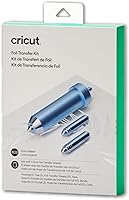
Some accessories work across both machine families, but specialty tool compatibility still needs checking. The Cricut Foil Transfer Kit is designed for Cricut Maker and Cricut Explore machines.
It includes 3 interchangeable fine, medium and bold foil transfer tips, 1 foil transfer tool housing, adhesive tape and 12 foil transfer sheets. The sheets include 6 gold and 6 silver pieces, each measuring 4 x 6 in.
The system uses pressure-activated transfer rather than heat. Follow the Design Space prompts, secure the foil sheet and card with the tape, then peel the sheet after the machine finishes.
For an older Explore comparison, read Cricut Maker vs Cricut Explore Air 2. If your projects are small and portable, Cricut Maker vs Cricut Joy can help you compare a different machine size and use case.
How should you choose between Cricut Maker and Explore?
Choose Maker if fabric, thicker materials or specialty tools are part of your likely projects. Choose Explore if you mainly want vinyl, cardstock, apparel, cards and printable-material work.
Use these questions before you decide:
- Will you cut fabric often, or only once in a while?
- Do you expect to work with leather, wood, foam core board or metal?
- Do you need engraving, debossing or perforating?
- Are vinyl, iron-on, cardstock and stickers enough?
- Would included supplies help you start several projects?
- Do you have room for the machine and its working area?
Choose the Cricut Maker when the answer points to material variety. Its 300+ material range and broader tool support can reduce the need to change machines as your craft plans expand.
Choose Explore 5 when the answer points to common cutting tasks. Its 100+ material range, 6-tool support and 12 in (30.5 cm) cutting performance cover many home projects.
Check the exact tool and material pairing before buying. A machine family can support a broad category without every material using the same blade, mat or setting.
Cricut Maker vs Explore: which type do you need?
Pick Cricut Maker for fabric, thicker materials, engraving and a wider tool system. Pick Cricut Explore for everyday vinyl, paper, iron-on, cards, stickers and apparel projects.
The Cricut Maker is the better long-term fit when you expect your material list to expand. The Maker 5 bundle adds supplies for up to 65 projects, while the Cricut Maker includes starter materials and 30 Design Space images.
Explore 5 is the practical fit when your projects stay close to common craft materials. Its Essential Bundle also includes supplies for up to 65 projects, so the main difference is the machine family's material and tool range.
If you are still comparing machine families, start with your next 5 projects. For the Cricut Maker vs Explore question, choose the family that supports those materials without adding tools you do not expect to use.
Frequently asked questions
Is Cricut Maker better than Cricut Explore?
Cricut Maker is better for fabric, thicker materials and specialty work because it supports 300+ materials and a broader tool range. Cricut Explore suits common vinyl, cardstock, iron-on, printable-material and card projects.
Choose Maker for material variety, not simply because it is the higher family.
Can Cricut Explore cut fabric?
Cricut Explore can work with some materials, but the Explore 5 is described around 100+ materials and 6 tools, while the Maker family is described around 300+ materials and 13 tools. If fabric is a regular part of your plans, compare the exact tool and material requirements before choosing.
What is the main difference between Cricut Maker and Explore?
The main difference is the range of materials and tools. Cricut Maker supports 300+ materials and works with 13 tools, while Cricut Explore 5 supports 100+ materials and works with 6 tools.
Both support common projects such as vinyl, cardstock, apparel and full-color stickers.
Can both Cricut Maker and Explore use foil?
Yes. The Cricut Foil Transfer Kit is compatible with Cricut Maker and Cricut Explore machines.
It includes 3 interchangeable fine, medium and bold tips, 12 gold and silver foil sheets, a tool housing and adhesive tape for pressure-activated foil transfer.