7 Best Cricut Maker Accessories (November 2026)
The best best Cricut Maker accessories include the CRAFT WORLD 0.4 Tip Fine Point Pens for fine writing and drawing, the Gwybkq Cutting Mat 12 Pack 12x12 for repeat cutting mat use, and the IMAGINING Carrying Case Bag for Circut Maker for taking your machine on the go.
On this page (9 sections)
- The best Cricut Maker accessories for different project types
- How the best Cricut Maker accessories compare
- How we compared these Cricut Maker accessories
- Which Cricut Maker accessories should you buy first?
- What is a Cricut Maker deep cut blade used for, and when do you need it?
- How do you choose between starter bundles and separate tools?
- What should you check before buying replacement parts and cords?
- How do pen adapters and carrying bags fit into a Maker setup?
- Verdict: which of the best Cricut Maker accessories should you buy?
The best Cricut Maker accessories for most buyers are the CRAFT WORLD 0.4 Tip Fine Point Pens, because a 30-pen set adds writing and drawing to a machine you already own. The Gwybkq mats are the best buy if you cut every week, and the Sophia's rotary blade is the best buy if fabric is your main material.
Our score weighs specs, features and buyer feedback against what you are shopping for. A high score here means the pick fits the common Maker toolkit well, not that it suits every project.
Our picks at a glance
-
1
 Best for fine writing and drawing
CRAFT WORLD 0.4 Tip Fine Point Pens
9.7/10 our score
See it on Amazon -
2

-
3
 Best for taking your machine on the go
IMAGINING Carrying Case Bag for Circut Maker
9.4/10 our score
See it on Amazon
- 4
 Check it
Sophia's DESING Rotary Blade+Drive Housing Works for Maker
Best for fabric and quilting projects - 5
 Check it
VINYL FROG 60PCS Accessories Bundle for Cricut
Best for vinyl starter projects - 6
 Check it
Cutaswish Craft Accessories for Maker & Explore
Best for all-in-one starter bundles - 7
 Check it
Convend The Ultimate Accessories Bundle for Maker
Best for gift-ready craft kits
The best Cricut Maker accessories for different project types
The top pick adds fine writing and drawing. The next picks solve repeat cutting, travel, fabric cutting and starter vinyl work.
Choose by the job you do most before you compare extras.
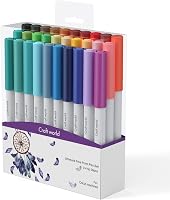
CRAFT WORLD 0.4 Tip Fine Point Pens: Best for fine writing and drawing
- 30 pens
- 0.4 tip
- Water-based ink
- Multicolor set
A 30-pen set for writing, drawing and sketching with a Maker 3, Maker, Explore 3 or Air 2.
Pros
- 30 colors in one set
- Fine 0.4 tip for detail work
- Water-based, acid-free ink
Cons
- Pens are not a cutting blade
- Cap pens promptly after use
These pens suit card makers, journalers, sketch artists and anyone who wants words or line art on a cut project. The set has 30 pens with a 0.4 tip, so you get many colors without buying singles one by one.
CRAFT WORLD says the water-based ink is acid-free and non-toxic. The ink is described as permanent after it dries, which matters for cards and gifts you plan to keep.
The pens work with Maker 3, Maker, Explore 3 and Air 2 machines. That range helps if you share tools across machines or upgrade later.
The round plastic body and standard grip match the clamp in those machines, and the snap cap helps you keep the tip from drying out between uses.
The listed uses include writing, drawing, sketching, anime, manga, comic work, artist illustration, technical drawing and bullet journaling. That breadth suits art students and hobbyists as well as paper crafters.
Age range is listed as adult and kid, which helps families plan shared craft time.
Trade-off: pens add detail, but they do not cut thicker material. If your main work is vinyl decals or fabric, mats or blades will help you more.
CRAFT WORLD also notes that you should close the cap in time after use, so dry tips are the main care point to plan for.
Gwybkq Cutting Mat 12 Pack 12x12: Best for repeat cutting mat use
- 12 mats
- 12 x 12 in
- Four grip levels
- PVC material
Twelve 12 x 12 in mats in light, standard, strong and fabric grips for heavy repeat use.
Pros
- 12 mats for rotation
- Four grip levels included
- Fits common 12 x 12 in workflow
Cons
- Grip fades faster if left exposed to air
- Hand wash only
These mats suit anyone who cuts often enough to wear out a single mat. The pack has 12 mats at 12 x 12 in, so you can rotate them and keep one clean while another rests.
You get four grip levels in the pack. Light grip suits paper and vellum, standard grip suits cardstock and vinyl, and stronger grips suit heavier material and fabric.
The color coding helps you tell levels apart at a glance. Blue is listed for standard paper, light cardstock, vellum and printer paper.
Green is listed for heavy cardstock, patterned paper, permanent vinyl, iron-on and heat transfer vinyl. Purple is listed for specialty cardstock, poster board, chipboard and backed fabric.
Gwybkq says the PVC mats can be reused about 50 times with good storage. Grip drops to about 10 to 30 uses if the surface stays exposed to air, so flat storage matters.
The mats are described as sturdy, odorless and self-healing, with an adhesive meant to avoid residue during peeling. Trade-off: a 12-pack costs more up front than one mat and pays off only if you cut often.
Our best Cricut Maker mats guide helps you match grip to material. Care is hand wash only, so plan for gentle cleaning and full drying before storage.
IMAGINING Carrying Case Bag for Circut Maker: Best for taking your machine on the go
- Full-opening design
- Padded compartments
- Shoulder strap and handle
- Fits Maker 4, Maker 3, Explore 4, Explore 3 and Explore Air 2
A padded, full-opening case with pockets for mats, rolls, tools, cords and adapters.
Pros
- Padding guards against dust and scratches
- Pockets for mats and accessories
- Carry by strap, handle or luggage
Cons
- Large footprint when open
- Check fit for your exact machine model
This case suits crafters who take a machine to classes, crops, parties or a second home. It fits the Circut Maker 4, Maker 3, Explore 4, Explore 3 and Explore Air 2.
The case measures 23.5 x 9 x 7.5 in and uses nylon with thick padding. IMAGINING says the padding guards against dust and scratches during travel and storage.
The weight is listed at 0.86 kg, so the empty case adds less than a kilogram to a trip.
Inside, you get a 15 x 13 in mesh pocket for vinyl rolls and papers, a small mesh pocket for tools and a padded pocket for cutting mats. A cord cutout lets you charge without removing the machine.
Hidden slots store cords and adapters when not in use. The main compartment opens fully and uses a hook and loop fastener, plus a smooth double-headed zipper for the outer closure.
You can carry it three ways. The shoulder strap, web handle and luggage stackable design cover short walks, car trips and stacked luggage.
That matters for crafters who move a machine between a home desk and a class table.
Trade-off: it adds bulk at home. If your machine never leaves the desk, a simple cover or shelf space may serve you better than a carry case.
Check fit for your exact model before you order, especially if you use a larger mat or extra tools.
Sophia's DESING Rotary Blade+Drive Housing Works for Maker: Best for fabric and quilting projects
- Rotary blade plus drive housing
- Stainless steel
- Works for Maker, Maker 3 and Maker 4
- For fabric, quilting squares and sewing projects
A rotary blade and housing for unbacked fabric, felt, lace, quilt batting and sewing projects.
Pros
- Made for fabric without backing
- Stainless steel blade
- Includes drive housing
Cons
- Fabric tool, not a vinyl blade
- Use with a FabricGrip mat
This rotary blade suits sewing, quilting and fabric projects. It comes with a drive housing and a stainless steel rotary blade for Maker, Maker 3 and Maker 4 machines.
Sophia's DESING lists fabric, quilting squares and sewing projects, plus cardstock, foil poster and kraft board. For fabric, it lists lace, felt, quilt batting, silk, denim, crepe, tissue paper and mulberry paper.
It is meant to roll through soft material without backing, rather than slice vinyl or paper with a pointed tip.
The blade is said to handle images larger than 0.75 inches and keep sharpness across soft fabrics. Use it with a FabricGrip mat, since the stronger grip helps hold fabric steady during the cut.
The housing seats in the Maker clamp, and installation is described as straightforward for beginners.
Trade-off: compare this with other blades before you buy. Our guide to what is Cricut Maker deep cut blade used for explains when a deep cut blade fits thicker material better.
This rotary option is not a replacement for a blade made for thick board.
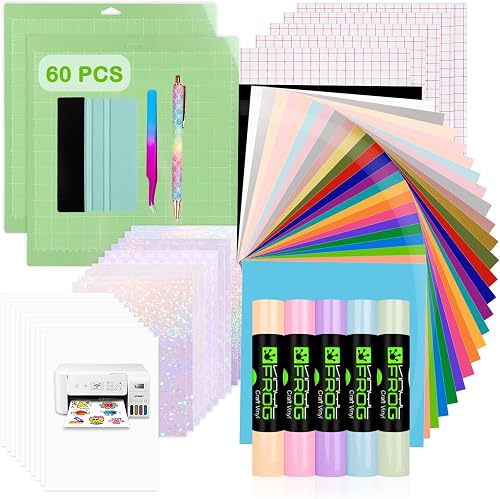
VINYL FROG 60PCS Accessories Bundle for Cricut: Best for vinyl starter projects
- 60 pieces
- 30 sheets of permanent adhesive vinyl
- 10 sheets of printable vinyl sticker paper
- 10 sheets of clear holographic lamination film
- 2 cutting mats, transfer tape, squeegee, weeding pen and tweezers
A 60-piece vinyl bundle with permanent vinyl, printable sticker paper, lamination film and hand tools.
Pros
- Covers decals, mugs and home decor
- Printable and holographic media included
- Hand tools included for weeding and transfer
Cons
- Focused on vinyl, not fabric
- Sheet count limits long production runs
This bundle suits buyers who want to start with vinyl decals, mugs, tumblers and home decor. It has 60 pieces, led by 30 sheets of permanent adhesive vinyl in assorted colors.
The vinyl sheets measure 30.5 x 30.5 cm and use PVC material. The listing describes the vinyl as waterproof and scratch-resistant, with indoor and outdoor use.
That makes it a fit for car decals and gifts that see daily handling, as well as for signs and wall decor that stay indoors.
You also get 10 sheets of A4 printable vinyl sticker paper and 10 sheets of clear holographic lamination film. That mix lets you print custom stickers and add a protective finish.
The holographic film changes the look of a printed design without needing a separate printer effect.
Hand tools are included: two reusable cutting mats, transfer tape, a squeegee, a weeding pen and precision tweezers. Those tools cover the cut, weed and transfer steps that vinyl work needs.
The mats are medium tack, which suits vinyl and cardstock without the extra hold of a fabric mat.
Trade-off: the bundle is vinyl-first. It does not give you fabric blades, HTV depth or pen sets, so fabric-first buyers should look at the rotary blade or a mixed starter kit.
Sheet count also limits long production runs, so check your project list before you buy for a large batch.
Cutaswish Craft Accessories for Maker & Explore: Best for all-in-one starter bundles
- 88 pieces
- HTV, adhesive vinyl, stencil sheets and sticker paper
- Printable fabric transfer paper for light and dark fabrics
- Mats, pens, pen adapters and hand tools
An all-in-one starter bundle with vinyl, transfer paper, stencil sheets, mats, pens and hand tools.
Pros
- Many project types in one box
- Printable fabric transfer paper included
- Pens and adapters included
Cons
- Large kit needs sorting and storage
- Less vinyl depth than a vinyl-only bundle
This starter bundle suits beginners who want to test several materials at once. It has 88 pieces, including HTV, permanent adhesive vinyl, transfer tape, mats, stencil sheets and sticker paper.
Cutaswish includes printable transfer paper for light and dark fabrics. The paper works with inkjet and laser printers, so you can print a design, cut it and transfer it to a shirt or tote.
The kit also includes 24 pens at 0.4 mm, two pen adapters, a scraper and a tool kit. The breakdown lists 5 glitter heat transfer vinyls, 20 permanent adhesive colored vinyl sheets, 3 transfer tapes, 10 mylar stencil sheets, 2 sticky cutting mats and 10 matte vinyl sticker papers.
The mats are 12 x 12 in in standard and light viscosities, so you can match grip to paper or vinyl. The HTV and adhesive vinyl sheets are listed at 12 x 10 in.
Trade-off: breadth means less depth in any one material. If you already know you love vinyl, a vinyl bundle may give you more usable sheets.
You will also need time to sort, label and store the many parts in the box.
Convend The Ultimate Accessories Bundle for Maker: Best for gift-ready craft kits
- 88 count
- 5 glitter heat transfer vinyls
- 20 permanent adhesive colored vinyl sheets
- 10 mylar stencil sheets
- 24 colored 0.4mm pens
A gift-ready bundle with glitter HTV, adhesive vinyl, stencil sheets, sticker paper, mats and pens.
Pros
- Glitter HTV included
- Stencil sheets and sticker paper included
- Packaging suits gifting
Cons
- Kit contents overlap heavily with other bundles
- Check sheet sizes before large projects
This bundle suits gift buyers and new crafters who want a ready-made kit. It includes 5 glitter heat transfer vinyls, 20 permanent adhesive colored vinyl sheets, 10 mylar stencil sheets and 10 matte vinyl sticker papers.
You get three transfer tapes, two sticky cutting mats, a vinyl scraper, two pen adapters, a tool kit and 24 colored 0.4 mm pens. Printable light and dark fabric transfer paper is also included.
The package is 14 x 14.5 x 1.5 inches and 1.72 kg, so it is substantial but still easy to store.
Convend says the kit works for bags, pillows, clothes, invitations and other designs. The packaging is made for gifting, which can save time if this is a present for a new Maker owner.
The specs show an age range of teen, which helps you judge whether it fits a younger crafter with adult help.
The bundle is listed for all Maker machines, Explore Air 2 and more. The tool kit and adapters cover the basic cut, weed and transfer workflow from the start.
Trade-off: the contents overlap with the Cutaswish bundle. Choose between them by sheet counts, colors and tools you will actually use.
Check sheet sizes before large projects.
How the best Cricut Maker accessories compare
The pens lead because they add a new skill to your machine at low complexity. The mats follow because grip affects every cut you make, no matter what material you use.
| Pick | Best for | Key spec | Watch out for |
|---|---|---|---|
| CRAFT WORLD pens | Writing and drawing | 30 pens, 0.4 tip | Not a cutting tool |
| Gwybkq mats | Repeat cutting | 12 mats, 12 x 12 in | Needs flat storage |
| IMAGINING case | Travel and storage | 23.5 x 9 x 7.5 in | Bulky at home |
| Sophia's rotary blade | Fabric and quilting | Blade plus housing | Fabric use only |
| VINYL FROG bundle | Vinyl starters | 60 pieces | Vinyl-focused |
| Cutaswish bundle | Mixed starter projects | 88 pieces | Less depth per material |
| Convend bundle | Gift-ready kits | 88 count | Contents overlap |
| Product | Best for | Count | Tip size | Ink base | Our score |
|---|---|---|---|---|---|
| CRAFT WORLD 0.4 Tip Fine Point Pens | fine writing and drawing | 30 pens | 0.4 | Water | 9.7 |
| Gwybkq Cutting Mat 12 Pack 12x12 | repeat cutting mat use | 12 mats | 9.6 | ||
| IMAGINING Carrying Case Bag for Circut Maker | taking your machine on the go | 9.4 | |||
| Sophia's DESING Rotary Blade+Drive Housing Works for Maker | fabric and quilting projects | 9.2 | |||
| VINYL FROG 60PCS Accessories Bundle for Cricut | vinyl starter projects | 60 pieces | 8.9 | ||
| Cutaswish Craft Accessories for Maker & Explore | all-in-one starter bundles | 88 pieces | 8.6 | ||
| Convend The Ultimate Accessories Bundle for Maker | gift-ready craft kits | 88 count | 8.3 |
How to read the comparison by project type
Start with material, not price. A pen set cannot replace a mat, and a vinyl bundle cannot cut fabric on its own.
Mats and blades affect cut quality on every project, while pens, cases and bundles add skills or variety around that core cut.
Bundles sit in the middle. They help you try several jobs at once, but they rarely match the depth of a single-purpose pack.
Use the table to decide whether you need depth, variety or travel protection first.
How we compared these Cricut Maker accessories
We compared specs, included items, machine fit and project type for each pick. We also checked which accessories solve a repeat problem, such as worn mats or missing hand tools.
We did not test these items by hand. Scores come from product data and buyer patterns, weighed against Maker use.
We grouped picks by job: writing, cutting surface, travel, fabric cutting and starter materials. Counts and sizes matter here too.
Thirty pens, twelve mats, two bundle mats and twenty vinyl sheets all point to different run lengths.
We checked compatibility lists and care notes. Maker, Maker 3, Maker 4, Explore 3, Explore 4 and Explore Air 2 appear across these picks in different ways.
Mat storage, pen caps and case size all affect how long a tool lasts and how much space it needs.
Which Cricut Maker accessories should you buy first?
Buy the accessory that fixes your most common bottleneck first. If cuts lift or slip, start with mats.
If fabric tears, start with a fabric blade.
Should you buy mats before bundles?
Yes, if your current mat is worn. A mat with weak grip can ruin vinyl, cardstock and fabric cuts in one pass.
Our sewing scissors buying guide also helps when you need hand cutting tools between machine cuts.
A fresh mat also makes bundle contents more useful. Vinyl, HTV and stencil sheets all need steady hold during the cut.
Check grip level before you buy a replacement. Light grip suits delicate paper, while standard and stronger grips suit vinyl, cardstock and fabric.
Should you buy a blade before pens?
Buy a blade first if you cut the same material every week. Pens are great for cards and journals, but they do not change what your machine can cut.
A rotary blade matters most for unbacked fabric, while a fine point blade matters most for paper and vinyl.
Pens sit after the blade that matches your main material. Match the first purchase to the thickest or most frequent material you cut.
What is a Cricut Maker deep cut blade used for, and when do you need it?
A deep cut blade is for thicker material that a fine point blade cannot manage well. Check thickness and material limits before you buy, since blade choice depends on the stock you cut.
The Sophia's rotary blade in this guide is a fabric option, not a deep cut blade. Use the rotary blade for unbacked fabric and quilting material, and use a deep cut option for thicker stock.
If rollers or blades are worn, our Cricut Maker rubber roller replacement guide covers a common repair before you blame the material.
Think about the thickest material you cut each month. If that stock is fabric, a rotary blade fits the job.
If that stock is thick board or dense material, a deep cut blade may fit better. Also check mat grip for thick stock so heavy material stays flat.
How do you choose between starter bundles and separate tools?
Choose a bundle when you want to try vinyl, HTV, stickers and stencils without buying each item alone. Choose separate tools when you already own mats, hand tools or pens.
When does a vinyl bundle make sense?
A vinyl bundle makes sense for decals, mugs, signs and labels. The VINYL FROG bundle fits this use because it centers on permanent vinyl, printable sticker paper and lamination film.
The 30 permanent vinyl sheets give you color variety, and the printable sheets let you add custom text or images.
When does a mixed bundle make sense?
A mixed bundle makes sense when you are still finding your favorite project type. Cutaswish and Convend both mix HTV, adhesive vinyl, sticker paper, stencil sheets, mats and pens.
Mixed kits help you compare shirts, mugs, cards, stencils and stickers in one season. After that test, separate packs let you restock only the winner.
Our best Cricut Maker tools guide helps you compare hand tools before you duplicate tools you already own.
What should you check before buying replacement parts and cords?
Check the exact machine model before you buy parts. Maker, Maker 3 and Maker 4 fit many of the same accessories, but cords and adapters can differ.
Our best Cricut Maker parts guide helps you match replacement parts to your machine. For power issues, our replacement power cord guide covers cord checks before a full replacement.
For computer connection, our Cricut Maker USB guide explains wired setup, and our USB cable guide helps you choose a cable that fits the port.
Check port type, cable length and adapter needs before you order. A worn roller, a loose cord or a dull blade can stop a project at once.
By contrast, extra storage or a larger pen set can wait until the next order.
How do pen adapters and carrying bags fit into a Maker setup?
Pen adapters let you use pens that do not fit the clamp the same way as standard tools. Check adapter fit before you buy a large pen set for machine use.
Our best Cricut Maker pen adapter guide helps you match adapters to pen size and machine model. The CRAFT WORLD pens in this guide are made for Maker 3, Maker, Explore 3 and Air 2 use.
A carrying bag helps when your machine moves between rooms or homes. Our best Cricut Maker bag guide covers size, padding and pocket checks for travel.
For bags, measure your machine and check pocket layout, and confirm cord access if you plan to use the machine while it stays in the case.
Verdict: which of the best Cricut Maker accessories should you buy?
Pick the CRAFT WORLD pens if you want writing and drawing first. Pick the Gwybkq mats if you cut often and need reliable grip.
Pick the Sophia's rotary blade if fabric and quilting are your main projects.
Pick the IMAGINING case if your machine travels. Pick VINYL FROG for vinyl-first projects.
Pick Cutaswish or Convend if you want a mixed starter kit or a gift-ready box.
Start with one gap in your setup, not with every accessory at once. If you cut daily, mats and the right blade should come before bundles.
If you cut monthly, pens or a starter bundle may give you more variety for the same spend.
Our top 3 picks at a glance
-
1
Best for fine writing and drawing
CRAFT WORLD 0.4 Tip Fine Point Pens
9.7/10 our score
See it on Amazon -
2
-
3
Best for taking your machine on the go
IMAGINING Carrying Case Bag for Circut Maker
9.4/10 our score
See it on Amazon
Frequently asked questions
What are the most useful Cricut Maker accessories?
Mats, blades for your main material, pens and a carry case cover most daily needs. Start with the tool that matches the projects you cut most often.
Add bundles only when you know the materials you will use.
Do I need a rotary blade for fabric?
A rotary blade helps with unbacked fabric such as felt, lace and quilt batting. It cuts fabric without the backing that some other blades need.
Pair it with a FabricGrip mat for best hold.
How often should I replace cutting mats?
Replace a mat when it no longer holds material during cutting or when residue builds up. Store mats flat and covered to keep grip longer.
A multi-pack lets you rotate mats while one rests.
Are bundles worth buying for beginners?
Bundles help when you want to try vinyl, HTV, stickers and stencils in one purchase. Check the exact sheet counts and tool list first.
Skip a bundle if you already own mats and hand tools.