9 Best Cricut Heat Presses (November 2026)
The best best Cricut heat presses include the HTVRONT Heat Press Mini Heat Press Machine for small HTV and sublimation details, the Calogy Mini Heat Press for mini press with a display, and the Cricut EasyPress® SE for most T-shirt projects.
On this page (8 sections)
- Which Cricut heat press format fits your projects
- The best Cricut heat presses and top alternatives
- How we compared these heat presses
- Which size is best for Cricut heat press projects
- How do Cricut EasyPress models differ
- Mini press or full press: which should you choose
- How much heat and pressure do you need
- Verdict: which best Cricut heat press should you buy
The best Cricut heat press for most crafters is the Cricut EasyPress SE 12 in x 10 in, because it covers a full adult T-shirt design in one position and reaches 400°F. This best Cricut heat press roundup compares Cricut formats against strong mini and auto alternatives, so you can match plate size to your projects.
Our score weighs specs, features and buyer feedback against what you're shopping for. We compared plate sizes, top heat, pressure type and portability across these nine models.
Cricut press formats matter most for small details and larger fabric transfers. A mini press reaches seams and hats, while a 12x10 or 15x15 plate handles full fronts without repositioning.
Our picks at a glance
-
1
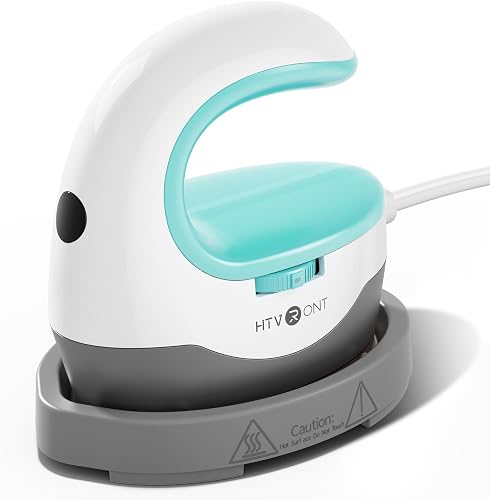 Best for small HTV and sublimation details
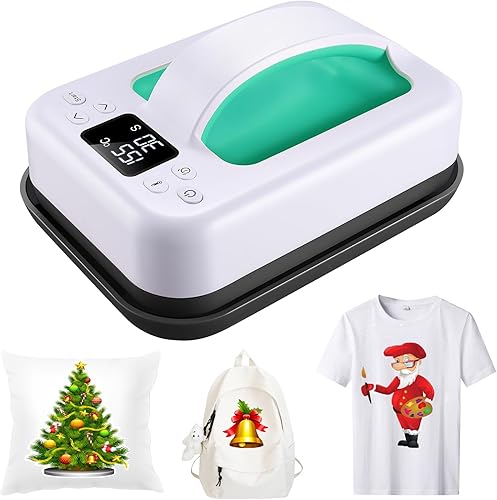
HTVRONT Heat Press Mini Heat Press Machine
9.7/10 our score
See it on Amazon -
2

-
3

- 4
 Best for smaller Cricut pressesCheck it
- 5
 Check it
HTVRONT Auto Heat Press Machine for T
Best for hands-free 15x15 pressing - 6
 Best for precision tip detail workCheck it
- 7
 Best for high pressure and hoodiesCheck it
- 8
 Check it
Legooin Heat Press Machine for T-Shirts
Best for a timed mini press - 9
 Check it
Cricut AutoPress™ 2 15x15 Heat Press Machine
Best for Cricut auto pressing
Which Cricut heat press format fits your projects
The right format depends on the size of your design, not just the brand. Mini presses suit details, handheld presses suit occasional shirts, and auto presses suit volume and consistent pressure.
For a first press, our pick is the EasyPress SE 12 in x 10 in. It is large enough for most T-shirts and still portable enough to store in a craft room.
If you press baby clothes, tote bags and small logos, the 9 in x 9 in EasyPress 2 is easier to store. You will reposition it on adult front designs.
If you press hats, shoes and seams, add a mini press. The EasyPress Mini LT and the two higher scoring mini models all top out near 355°F or 356°F.
If you press many shirts in a row, consider a 15x15 auto press. Hands-free release helps you load the next blank while one presses.
The best Cricut heat presses and top alternatives
We ranked these nine presses by score, from the HTVRONT Mini at 9.7 down to the Cricut AutoPress 2 at 8.1. Each write-up explains who the press suits and what trade-off you accept.
HTVRONT Heat Press Mini Heat Press Machine: Best for small HTV and sublimation details
- 3 heat settings: 284, 320 and 356°F
- Mint color, 439.98 g
- Insulated base included
- Aluminum alloy soleplate
A very small press with three heat settings for hats, small logos and quick touch-ups, where a full-size press would be awkward.
Pros
- Three heat settings
- Light and portable
- Insulated base included
Cons
- Small plate for large designs
- Top heat is 356°F
The HTVRONT Heat Press Mini Heat Press Machine suits crafters who press small HTV and sublimation projects and want a press they can carry. At 3.86 x 2.36 x 3.98 in and 439.98 g, it travels to a craft day or craft fair more easily than a handheld 9x9 press.
Its 3 heat settings run from 284°F to 356°F. That range covers many small transfers, but it is lower than the 400°F top heat on the Cricut handheld presses.
Higher heat materials may need a larger press.
The mint unit includes 1 x Insulated Base and 1 x User Manual. The base gives you a safe place to set the press down between moves, which matters when you work on a crowded table.
Aluminum alloy soleplate construction helps spread heat across the small plate. It is still a small plate, so large designs need careful repositioning.
Choose it for hats, small logos and travel projects. Skip it if most of your work is full front shirt designs.
For a Cricut mini alternative, see how to use Cricut EasyPress Mini.
Calogy Mini Heat Press: Best for mini press with a display
- 3 temperature levels to 356°F
- LED display with real time temp
- Auto power off in 15 mins
- Plate 2.87 x 4.43 in
A phone-sized mini press with one-button controls and a live temperature display for small items like hats, masks and pillows.
Pros
- Live temperature display
- Auto-off after 15 mins
- One-button control
Cons
- Small plate repositions for large prints
- Top heat is 356°F
The Calogy Mini Heat Press suits crafters who want live temperature feedback on a small press. Its heat plate is 2.87 x 4.43 in, within a 4.5 x 2.9 x 5.1 in body that Calogy compares to a mobile phone in height and width.
Its LED display shows real time temperature. You can see the current heat while you press, rather than relying on a preset setting alone.
That helps when you move between materials in one session.
Controls use one button. Press once to raise temperature, twice to lower it, and three times to switch between Celsius and Fahrenheit.
Power on and off also use that same button.
Three temperature levels run from 284°F to 356°F. Calogy says it reaches 284°F in around 3 mins from 84°F, then climbs in about 40 to 50 seconds per step.
Those times help you plan a session.
Auto power off after 15 mins of inactivity adds safety. An insulated safety base is included for storage and portable use.
Choose it for T-shirts, hats, caps and pillows with small designs. Skip it for large transfers, where the plate is too small.
Our best mini heat press guide covers more mini options.
Cricut EasyPress® SE: Best for most T-shirt projects
- 12 in x 10 in plate
- Heats to 400°F (205°C)
- Ceramic-coated heat plate
- Compatible with HTV, Infusible Ink and sublimation
Cricut's 12x10 handheld press covers most adult shirt designs in one move and reaches a higher top temperature than the mini presses.
Pros
- Large 12x10 plate
- Up to 400°F
- Cricut Heat Guide support
Cons
- Handheld pressure depends on you
- Not hands-free
The Cricut EasyPress SE 12 in x 10 in suits most T-shirt, sweatshirt and blanket projects. Its plate is large enough to cover many adult designs in one position, which reduces visible reposition lines.
Cricut says the ceramic-coated heat plate reaches 400°F (205°C). That top heat is higher than the 355°F to 356°F range on the mini presses here.
It gives you more material options.
Compatibility covers major brands of iron-on HTV, Infusible Ink and sublimation products. The Cricut Heat Guide gives time and temperature settings for each material.
The handle is designed for comfortable use and even pressure. Even so, pressure is still in your hands, so hold it steady and press straight down.
It remains portable and lightweight for a handheld press, but it takes more storage space than a 9x9 model. For step by step use, see how to use Cricut EasyPress SE.
Choose it as your first full-size Cricut press. Consider an auto 15x15 model if you press in volume.
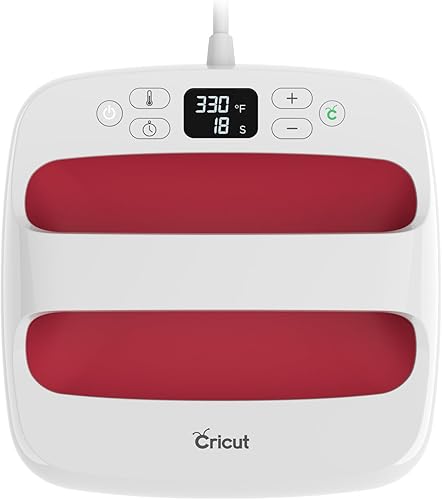
Cricut EasyPress 2-9 in x: Best for smaller Cricut presses
- 9 in x 9 in plate
- Heats to 400°F (205°C)
- Ceramic-coated heat plate
- Insulated safety base
A mid-size Cricut handheld press that fits tote bags, baby clothes and smaller shirt designs, with the same 400°F top heat as the larger SE.
Pros
- 400°F top heat
- Easier to store than 12x10
- Safety base included
Cons
- 9x9 plate for larger prints
- Handheld pressure only
The Cricut EasyPress 2 9 in x 9 in suits smaller blanks, tote bags, baby clothes and decor projects. At 9 x 9 in, it fits more easily in a cabinet or craft cart than the 12 x 10 in SE.
It shares the 400°F (205°C) top heat and ceramic-coated plate design with larger Cricut handheld presses. That means less compromise on heat, even though the plate is smaller.
Cricut says it combines the speed of a heat press with the convenience of an iron. A beep signals when the set time ends, which helps you avoid guessing.
The package includes a safety base and materials for a practice project. An insulated safety base and auto-shutoff feature are part of the design.
At 1150 watts and 110 volts, check that your outlet and circuit suit a high wattage press. Store it where the hot plate cannot be knocked.
Choose it for smaller projects and easier storage. Skip it if you press large adult fronts often.
For Cricut Maker work, see best Cricut Maker heat press.
HTVRONT Auto Heat Press Machine for T: Best for hands-free 15x15 pressing
- 15x15 plate
- Auto press and auto release
- Reaches 320°F within 4 mins
- Auto-adjusts to thickness up to 1 in
A 15x15 auto press that lowers, times and releases for you, suited to repeated shirt runs and thicker blanks.
Pros
- Hands-free auto release
- Large 15x15 plate
- Adjusts to 1 in thickness
Cons
- Heavy at 40.3 lb
- Takes counter space
The HTVRONT Auto Heat Press Machine for T Shirts suits sellers and hobbyists who want hands-free pressing on a 15x15 plate. After you slide the board in and press the R button, it presses down automatically and releases when the timer ends.
It auto-adjusts to thickness up to 1 in. That helps with thicker blanks and layered transfers without manual pressure changes.
The drawer slide design keeps your hands away from the hot plate.
HTVRONT says it reaches 320°F within 4 mins, which is fast for a large plate. It also saves nearly 130 seconds when heating to 410°F compared with other auto presses, according to HTVRONT.
Modes include 4 fast modes, 2 custom modes and an auto mode. Those modes help you repeat settings for recurring products.
At 40.3 lb and 20 x 12 x 16 in, this is a fixed workspace press. It is not a travel press.
Auto-off after 15 mins of no use adds safety.
Choose it for production runs of shirts, totes and apparel. Skip it if you need a portable handheld press.
Cricut EasyPress Mini™ LT: Best for precision tip detail work
- Mini size with precision tip
- Heats to 355°F (180°C)
- Ceramic-coated heat plate
- Single setting
Cricut's mini press with a pointed tip for seams, buttons and small shapes, with one simple heat setting.
Pros
- Precision tip
- Light at 0.48 kg
- Ceramic-coated plate
Cons
- Single setting only
- Top heat is 355°F
The Cricut EasyPress Mini LT suits detail work around buttons, seams and uniquely shaped projects. Its precision tip helps you reach spaces that a flat 9x9 plate cannot enter.
At 0.48 kg and 2.52 x 3.94 x 4.61 in, it is light enough to hold in one hand for small jobs. The blue LT model uses a single setting, which keeps operation simple.
Cricut says the ceramic-coated heat plate reaches 355°F (180°C). That is lower than the 400°F top heat on the EasyPress SE and EasyPress 2.
Check your material settings before you choose it.
An insulated safety base is included. Cricut also notes conformance with applicable product standards, including UL, CSA, FCC and IEC standards.
Recommended uses include bags, bottles, caps, hats, pillows, socks and T-shirts. Small logos and baby clothes fit its scale well.
Choose it for precision work and as a second press beside a larger model. Our guide to how to use mini heat press explains mini press technique.
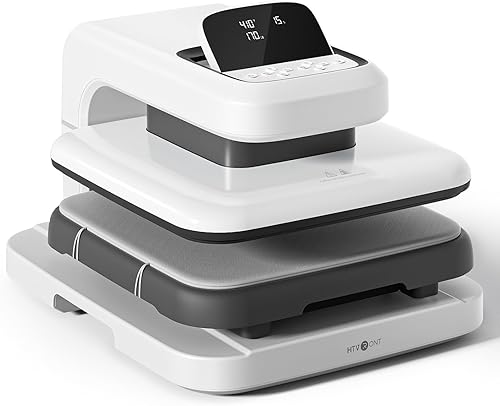
HTVRONT Auto Heat Press 2: Best for high pressure and hoodies
- 15x15 plate
- Pressure adjustable to 80 kg
- Heats to 410°F within 5 mins 30 secs
- Height up to 1.77 in
An auto 15x15 press with adjustable pressure and extra height for hoodies and DTF work that needs firm pressure.
Pros
- Adjustable pressure to 80 kg
- Extra height for hoodies
- Hands-free release
Cons
- Heavy at 21.54 kg
- Large footprint
The HTVRONT Auto Heat Press 2 suits DTF projects and thick items that need firm, adjustable pressure. Its pressure can be adjusted up to 80 kg (170 lb), which addresses insufficient pressure on demanding transfers.
The 15x15 plate handles larger designs, while the increased height supports projects up to 4.5 cm (1.77 in). That extra height helps with hoodies and other heavier items.
HTVRONT says NTC thermistor technology and a dual-tube heating engine heat the plate quickly and evenly. It reaches 410°F within 5 mins and 30 secs, according to HTVRONT.
After you set parameters, press the R button and the press lowers automatically. It buzzes when the timer ends and releases the material.
You can prepare the next item during that time.
The screen adjusts across 7 levels from 0 to 75 degrees. Auto-off after 15 mins with no operation adds safety.
At 21.54 kg, you need a stable stand.
Choose it for hoodies, DTF and volume work. Skip it for travel or small storage.
Legooin Heat Press Machine for T-Shirts: Best for a timed mini press
- 7 x 4.8 in plate
- Heats to 400°F (205°C)
- Timing function
- Auto shut-off after 10 mins
A 7x4.8 in press with a timer and 400°F top heat, a middle option between a true mini and a 9x9 press.
Pros
- Built-in timing function
- 400°F top heat
- Insulated base included
Cons
- 7x4.8 in plate for full shirts
- Repositions needed for large designs
The Legooin Heat Press Machine for T-Shirts suits crafters who want a timer on a mid-size mini press. Its plate is 7 x 4.8 in, larger than a true mini plate but smaller than a 9x9 press.
It reaches a maximum temperature of 400°F (205°C). That top heat matches the Cricut handheld presses, which gives you broader material options than the 355°F mini models.
The timing function lets you set press time for different materials. You do not need a separate timer to judge the transfer.
That helps avoid under pressing and over pressing.
At 3.3 lb, it is portable enough for home use and craft days. An insulated base, storage cloth bag, transfer papers and user manual are included.
Auto shut-off after 10 mins of inactivity adds safety. Legooin recommends it for T-shirts, hats, handbags, socks, mouse pads and shoes.
Choose it as a step up from a mini press for larger small designs. For compact alternatives, see best small heat press.
Cricut AutoPress™ 2 15x15 Heat Press Machine: Best for Cricut auto pressing
- 15 x 15 in plate
- Heat to 410°F (210°C)
- Pressure to 220 lb (100 kg)
- Auto-adjusts to 1.8 in thickness
Cricut's largest auto press for bigger shirts, blankets and DTF, with presets and Bluetooth sending from a phone.
Pros
- 220 lb pressure
- 15x15 plate
- Hands-free Auto Mode
Cons
- Large and heavy format
- App features need compatible phone
The Cricut AutoPress 2 15x15 suits small business owners and hobbyists pressing larger items in multiples. Its 15 in x 15 in heat plate covers extra-large T-shirts, sweatshirts and blankets.
Cricut says it delivers heat to 410°F (210°C) with pressure adjustable to 220 lbs (100 kg). That combination suits DTF, iron-on HTV including Puff Iron-On, Infusible Ink and sublimation.
Hands-free Auto Mode does the pressing for you. It auto-adjusts to materials up to 1.8 in (4.5 cm) thick.
You can load the next blank while it works.
Four built-in customizable presets can be controlled with the Control Pod. Bluetooth can send settings from a compatible mobile device using the Cricut Design Space app.
The interactive Heat Guide gives step by step instructions.
An insulated safety base, full slide out tray and auto-off feature add protection. The press is not intended for children 12 years and younger.
Choose it for volume, large blanks and Cricut ecosystem features. For the newer Cricut format, see how to use Cricut EasyPress 3.
How we compared these heat presses
We compared specs, features and buyer feedback against what shoppers want from a best Cricut heat press. We looked at plate size first, because size controls repositioning on each blank.
We checked top heat next. Mini presses here reach 355°F or 356°F, handheld Cricut presses reach 400°F, and auto presses reach 410°F.
Higher heat expands material choice, but each material still has its own time and temperature.
We compared handheld pressure with auto pressure. Handheld presses are portable and cost less, but your hand controls pressure.
Auto presses apply pressure for you and release on a timer, which helps with repeat runs.
We checked size and weight for storage. Mini presses weigh under 1 kg, handheld presses fit a craft cart, and 15x15 auto presses need a fixed stand and counter space.
We also checked safety features. Insulated bases, auto-off after 10 to 15 mins, and slide out trays reduce burn risk.
Those features matter more in a busy craft room.
Which size is best for Cricut heat press projects
The best size is the smallest plate that covers your most common design in one position. That rule saves time and avoids overlap lines.
A mini press covers chest logos, hats, sleeves and small shapes. It suits bags, socks, pillows and baby clothes.
It is a poor first press for a large front design.
A 9x9 press covers smaller shirts, tote bags and decor. It is easier to store than a 12x10 press.
You will reposition it on adult front prints.
A 12x10 press covers most adult T-shirts and sweatshirts. It is the format most first time buyers should consider.
The EasyPress SE in 12x10 fits this role.
A 15x15 auto press covers extra-large shirts, blankets and multiples. It suits volume work and DTF.
It needs a fixed stand and more storage space.
How to match plate size to your blanks
List your three most common blanks before you choose. Measure the design area, not the whole blank.
If the design fits the plate, you can press in one move.
For a chest logo, a mini press is enough. For a full front, choose 12x10 or 15x15.
For a tote bag, 9x9 often fits well.
When repositioning is a problem
Repositioning a mini press on a large design creates seams where heat overlaps. Those seams can show as uneven color or weak adhesion.
A larger plate avoids that risk.
If you already own a mini press, use it for details and add a larger press for fronts. That two press setup covers more project types.
How do Cricut EasyPress models differ
Cricut models differ mainly in plate size, top heat and pressure type. The mini, handheld and auto formats serve different jobs.
The EasyPress Mini LT has a precision tip and a single setting to 355°F. It is shaped for seams, buttons and small shapes.
It is not a full shirt press.
The EasyPress 2 9x9 and EasyPress SE 12x10 are handheld presses to 400°F. They share a ceramic-coated plate design.
The SE plate is larger for full shirt designs.
The AutoPress 2 15x15 is automatic and hands-free. It reaches 410°F with pressure to 220 lb.
It suits volume work and thicker materials.
Which Cricut model should a beginner buy
Buy the EasyPress SE 12x10 as a first Cricut press. Its plate covers most adult designs and its heat range covers common materials.
Add a mini press later for details.
If storage is tight, choose the 9x9 EasyPress 2. You will trade a smaller plate for easier storage.
For step by step help, see how to use Cricut EasyPress 3 for the newer format.
Do Cricut presses work with non-Cricut materials
Cricut says its EasyPress models work with major brands of iron-on HTV, Infusible Ink and sublimation products. The AutoPress 2 also lists DTF and Puff Iron-On.
Always check the time and temperature for your exact material. Brand names alone do not set the right heat.
The Cricut Heat Guide gives settings by material type.
Mini press or full press: which should you choose
Choose a mini press for detail and a full press for coverage. Many crafters end up owning both formats.
A mini press reaches hats, seams, shoes and small logos. It travels well and costs less.
Its small plate makes large designs slow and uneven.
A full handheld press covers T-shirts in one or two moves. It gives more consistent heat across a design.
It takes more storage and its pressure depends on you.
An auto press covers large designs with consistent pressure. It frees your hands for loading the next blank.
It is heavy and needs a fixed workspace.
What projects suit a mini press best
Mini presses suit hats, caps, socks, pillows, small chest logos and sleeve prints. The Calogy and HTVRONT mini models reach 356°F, while the Cricut Mini LT reaches 355°F.
Use a mini press for hard to reach areas on a larger blank. Press the main design with a full press, then touch up seams with a mini press.
When a full press is worth the space
A full press is worth the space if you press shirts weekly. The 12x10 SE and 9x9 EasyPress 2 both reach 400°F and cover designs faster.
Choose 15x15 auto formats if you press in volume or need adjustable pressure. The HTVRONT Auto Heat Press 2 reaches 80 kg pressure, while the Cricut AutoPress 2 reaches 220 lb.
How much heat and pressure do you need
You need enough heat for your material and enough pressure to bond it evenly. Top heat alone does not guarantee a good transfer.
HTV, Infusible Ink, sublimation and DTF each have their own time and temperature. Check the settings for your material before you press.
Use the Cricut Heat Guide for Cricut materials.
Higher top heat gives you more options. The auto presses here reach 410°F, handheld Cricut presses reach 400°F, and mini presses reach 355°F to 356°F.
Pressure matters most on thick blanks and DTF. Auto presses apply set pressure for you.
Handheld presses rely on your hand, so press straight down and hold steady.
How to judge pressure on a handheld press
Hold the handle with both hands when the plate is large. Press straight down without sliding.
Lift straight up when the timer ends.
Move in a steady grid if you must reposition. Overlap press areas slightly.
Check the transfer before you remove it from the blank.
When adjustable pressure helps
Adjustable pressure helps with hoodies, layered HTV and DTF. The HTVRONT Auto Heat Press 2 adjusts to 80 kg.
The Cricut AutoPress 2 adjusts to 220 lb.
Higher pressure is not always better. Match pressure to the material instructions.
Too much pressure can move a design on a thin blank.
Verdict: which best Cricut heat press should you buy
Pick the Cricut EasyPress SE 12 in x 10 in if you want one press for most T-shirt projects. Its 12x10 plate and 400°F top heat cover the widest range of first projects.
Pick the Cricut EasyPress 2 9x9 if storage is tight or your blanks are smaller. Pick the Cricut EasyPress Mini LT for precision detail work around seams and buttons.
Pick the HTVRONT Mini or Calogy Mini if you want a small press with three heat settings and portable size. Pick the Legooin 7x4.8 in if you want a timer and 400°F heat in a compact body.
Pick the HTVRONT Auto Heat Press or HTVRONT Auto Heat Press 2 for hands-free 15x15 volume work. Pick the Cricut AutoPress 2 if you want Cricut presets, Bluetooth sending and 220 lb pressure.
Start with the format that covers your most common design in one move. That choice saves time on every project after it.
Our top 3 picks at a glance
-
1
Best for small HTV and sublimation details
HTVRONT Heat Press Mini Heat Press Machine
9.7/10 our score
See it on Amazon -
2
-
3
Frequently asked questions
What size Cricut heat press should I buy first?
Buy the 12 in x 10 in EasyPress SE if you press adult T-shirts often. Its plate covers most full designs in one position.
Choose the 9 in x 9 in model for smaller blanks or tighter storage.
Add a mini press later for hats, seams and small details.
Is a mini heat press enough for T-shirts?
A mini press can handle small chest logos and sleeve prints. It is not ideal for a large front design because you must reposition it several times.
Uneven overlaps can show on big transfers.
Use a 9x9, 12x10 or 15x15 press for full shirt designs.
Do I need an auto heat press?
You need an auto press if you make repeated items or want consistent pressure without holding the press down. Auto models lower, time and release the design for you.
Handheld presses cost less and travel better.
Handheld pressure can vary from shirt to shirt.
What temperature do HTV and sublimation need?
Check the time and temperature for your specific material before you press. The Cricut Heat Guide gives settings by material.
Higher top heat, such as 400°F or 410°F, gives you more options.
Some materials need lower heat, so the top number alone does not decide the best press.
Can a handheld EasyPress replace a sewing iron?
A handheld press works like a more focused iron for heat transfers. If you also want a sewing iron for fabric care and pressing seams, a regular iron still has a place.
A heat press gives more even pressure on a flat design.
Use the tool that fits each job.
How do I press around buttons and seams?
Use a mini press with a precision tip for buttons, seams and curved areas. The Cricut EasyPress Mini LT is shaped for hard to reach spaces.
Keep the plate moving and check the transfer before you lift it.
Smaller presses make this detail work easier than a 15x15 plate.